
376 lines
15 KiB
Markdown
Executable File
376 lines
15 KiB
Markdown
Executable File
---
|
|
comments: true
|
|
description: Learn how to manage, analyze, and export trained models in Ultralytics Platform with support for 17+ deployment formats.
|
|
keywords: Ultralytics Platform, models, model management, export, ONNX, TensorRT, CoreML, YOLO
|
|
---
|
|
|
|
# Models
|
|
|
|
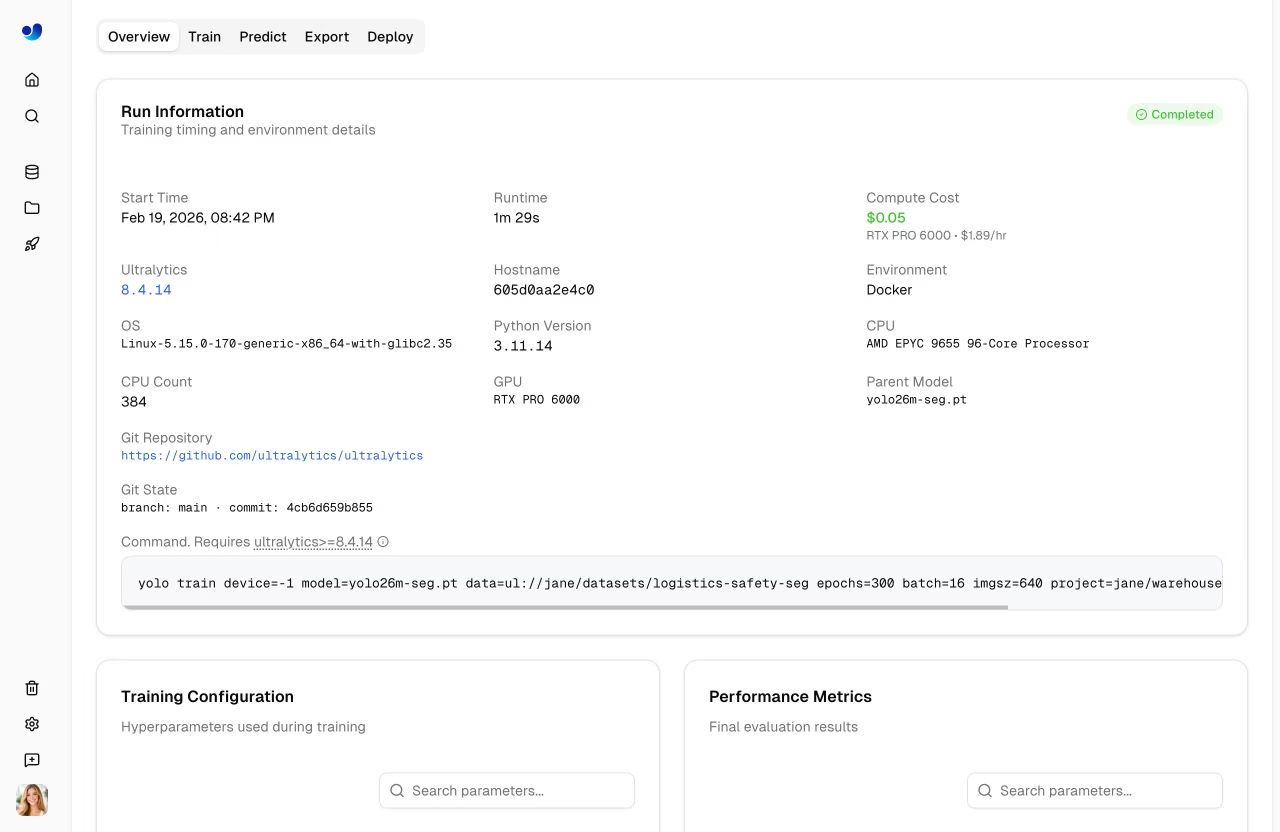
[Ultralytics Platform](https://platform.ultralytics.com) provides comprehensive model management for training, analyzing, and deploying YOLO models. Upload pretrained models or train new ones directly on the platform.
|
|
|
|
|
|
|
|
## Upload Model
|
|
|
|
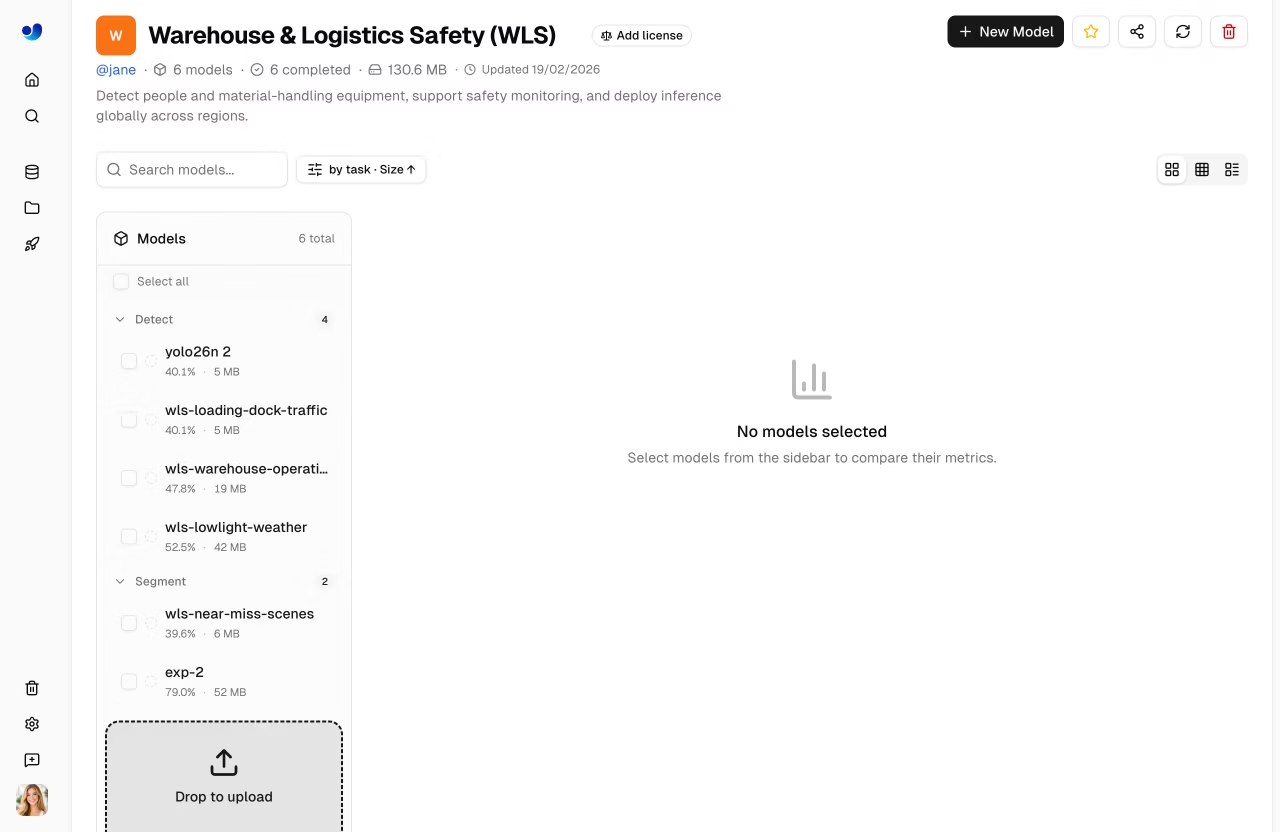
Upload existing model weights to the platform:
|
|
|
|
1. Navigate to your project
|
|
2. **Drag and drop** `.pt` files onto the project page or models sidebar
|
|
3. Model metadata is parsed automatically from the file
|
|
|
|
Multiple files can be uploaded simultaneously (up to 3 concurrent).
|
|
|
|
|
|
|
|
Supported model formats:
|
|
|
|
| Format | Extension | Description |
|
|
| ------- | --------- | ------------------------- |
|
|
| PyTorch | `.pt` | Native Ultralytics format |
|
|
|
|
After upload, the platform parses model metadata:
|
|
|
|
- Task type ([detect](../../tasks/detect.md), [segment](../../tasks/segment.md), [pose](../../tasks/pose.md), [OBB](../../tasks/obb.md), [classify](../../tasks/classify.md))
|
|
- Architecture (YOLO26n, YOLO26s, etc.)
|
|
- Class names and count
|
|
- Input size and parameters
|
|
- Training results and metrics (if present in checkpoint)
|
|
|
|
## Train Model
|
|
|
|
Train a new model directly on the platform:
|
|
|
|
1. Navigate to your project
|
|
2. Click **New Model**
|
|
3. Select base model and dataset
|
|
4. Configure training parameters
|
|
5. Choose cloud or local training
|
|
6. Start training
|
|
|
|
See [Cloud Training](cloud-training.md) for detailed instructions.
|
|
|
|
## Model Lifecycle
|
|
|
|
```mermaid
|
|
graph LR
|
|
A[Upload .pt] --> B[Overview]
|
|
C[Train] --> B
|
|
B --> D[Predict]
|
|
B --> E[Export]
|
|
B --> F[Deploy]
|
|
E --> G[17+ Formats]
|
|
F --> H[Endpoint]
|
|
|
|
style A fill:#4CAF50,color:#fff
|
|
style C fill:#FF9800,color:#fff
|
|
style E fill:#2196F3,color:#fff
|
|
style F fill:#9C27B0,color:#fff
|
|
```
|
|
|
|
## Model Page Tabs
|
|
|
|
Each model page has the following tabs:
|
|
|
|
| Tab | Content |
|
|
| ------------ | --------------------------------------------- |
|
|
| **Overview** | Model metadata, key metrics, dataset link |
|
|
| **Train** | Training charts, console output, system stats |
|
|
| **Predict** | Interactive browser inference |
|
|
| **Export** | Format conversion with GPU selection |
|
|
| **Deploy** | Endpoint creation and management |
|
|
|
|
### Overview Tab
|
|
|
|
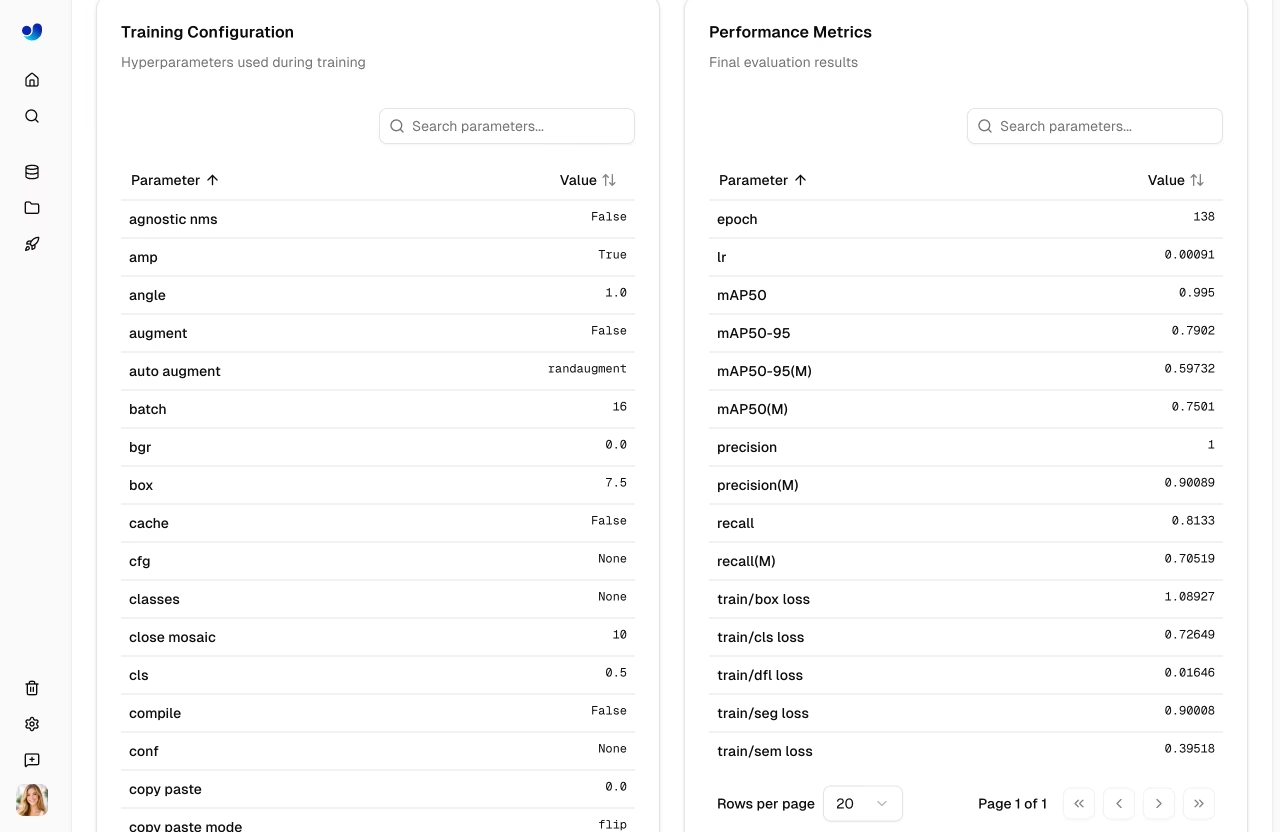
Displays model metadata and key metrics:
|
|
|
|
- Model name (editable), status badge, task type
|
|
- Final metrics (mAP50, mAP50-95, precision, recall)
|
|
- Metric sparkline charts showing training progression
|
|
- Training arguments (epochs, batch size, image size, etc.)
|
|
- Dataset link (when trained with a Platform dataset)
|
|
- Download button for model weights
|
|
|
|
|
|
|
|
### Train Tab
|
|
|
|
The Train tab has three subtabs:
|
|
|
|
#### Charts Subtab
|
|
|
|
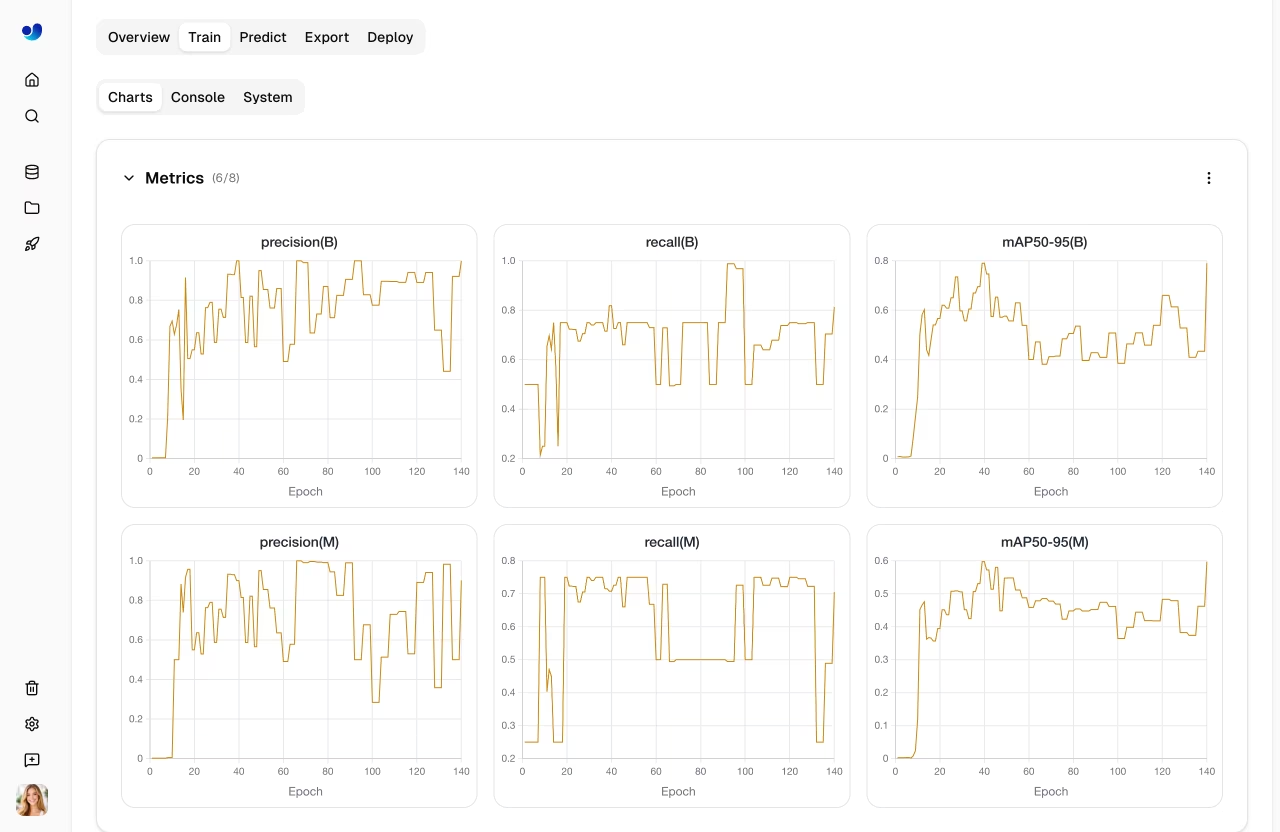
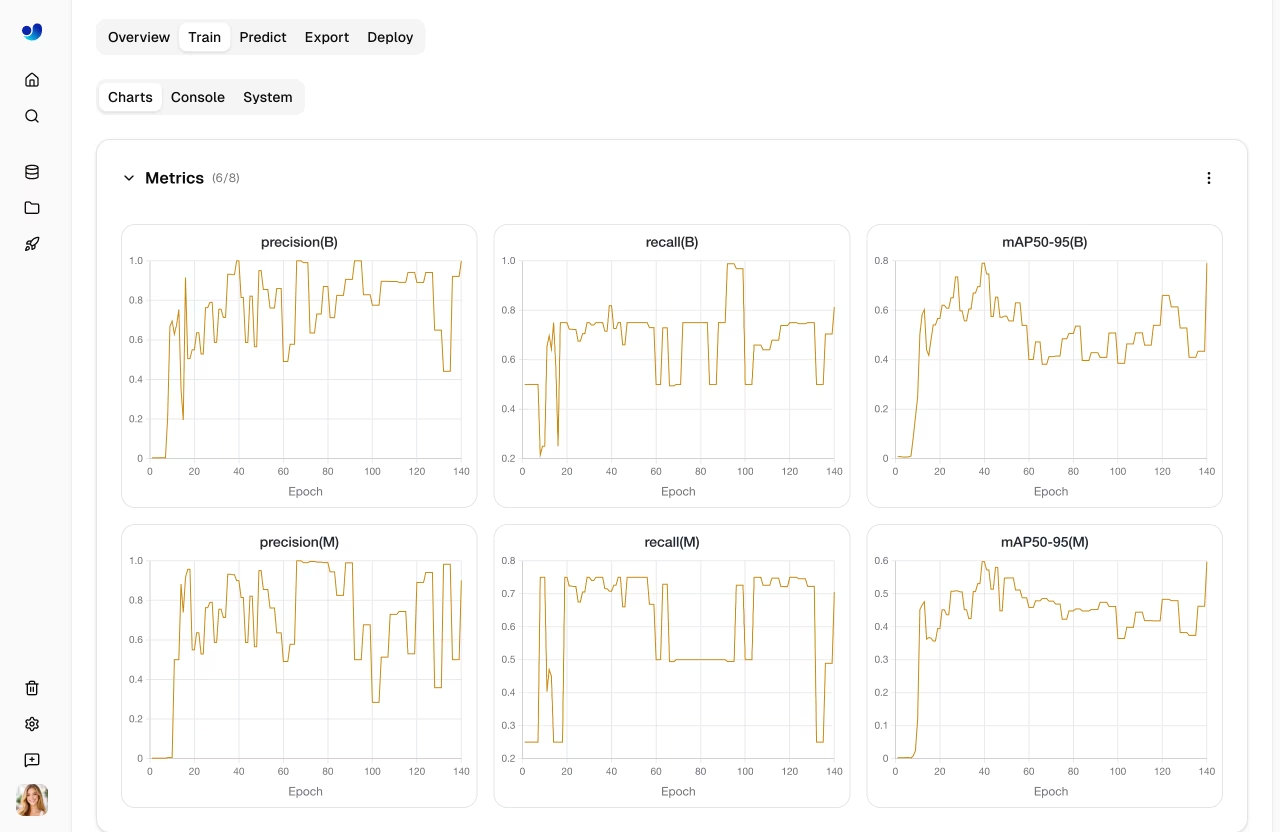
Interactive training metric charts showing loss curves and performance metrics over epochs:
|
|
|
|
| Chart Group | Metrics |
|
|
| ----------------- | ---------------------------------------------- |
|
|
| **Metrics** | mAP50, mAP50-95, precision, recall |
|
|
| **Train Loss** | train/box_loss, train/cls_loss, train/dfl_loss |
|
|
| **Val Loss** | val/box_loss, val/cls_loss, val/dfl_loss |
|
|
| **Learning Rate** | lr/pg0, lr/pg1, lr/pg2 |
|
|
|
|
|
|
|
|
#### Console Subtab
|
|
|
|
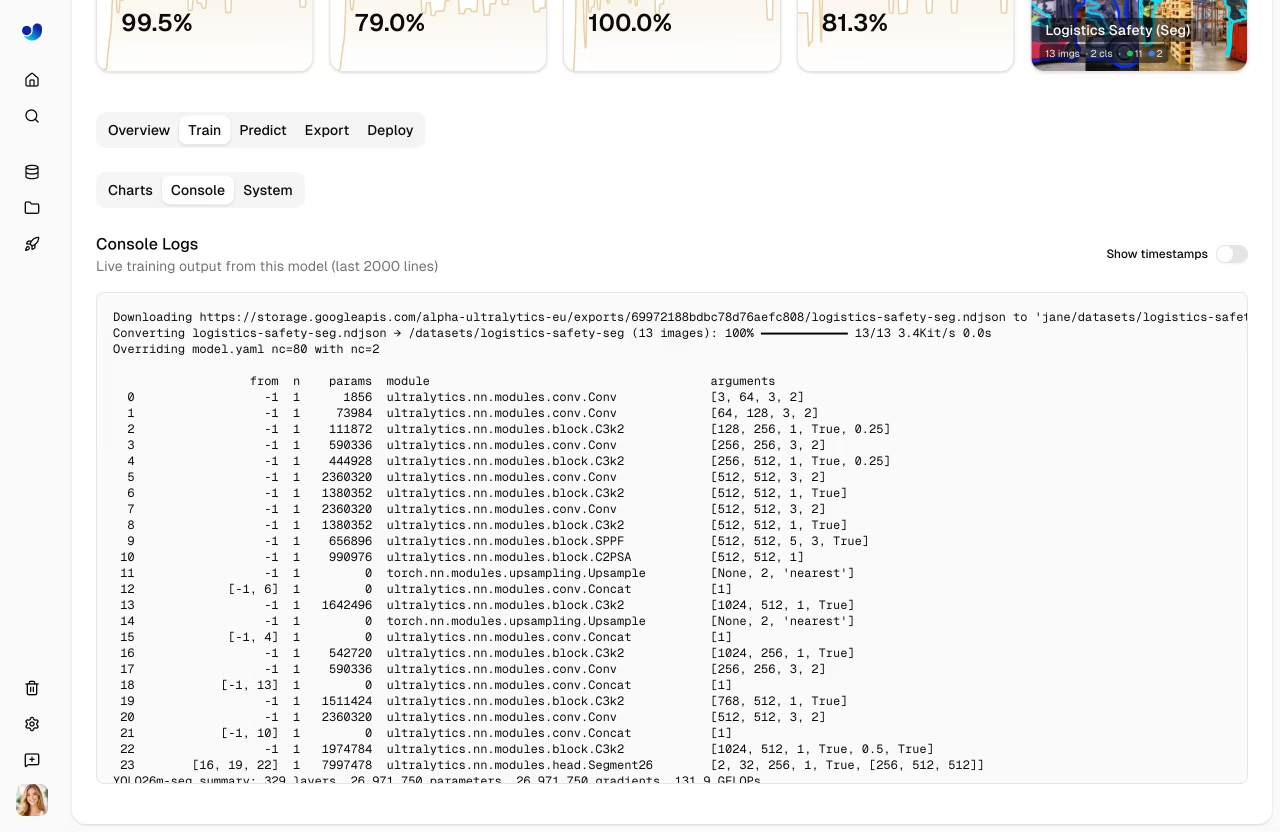
Live console output from the training process:
|
|
|
|
- Real-time log streaming during training
|
|
- Epoch progress bars and validation results
|
|
- Error detection with highlighted error banners
|
|
- ANSI color support for formatted output
|
|
|
|
|
|
|
|
#### System Subtab
|
|
|
|
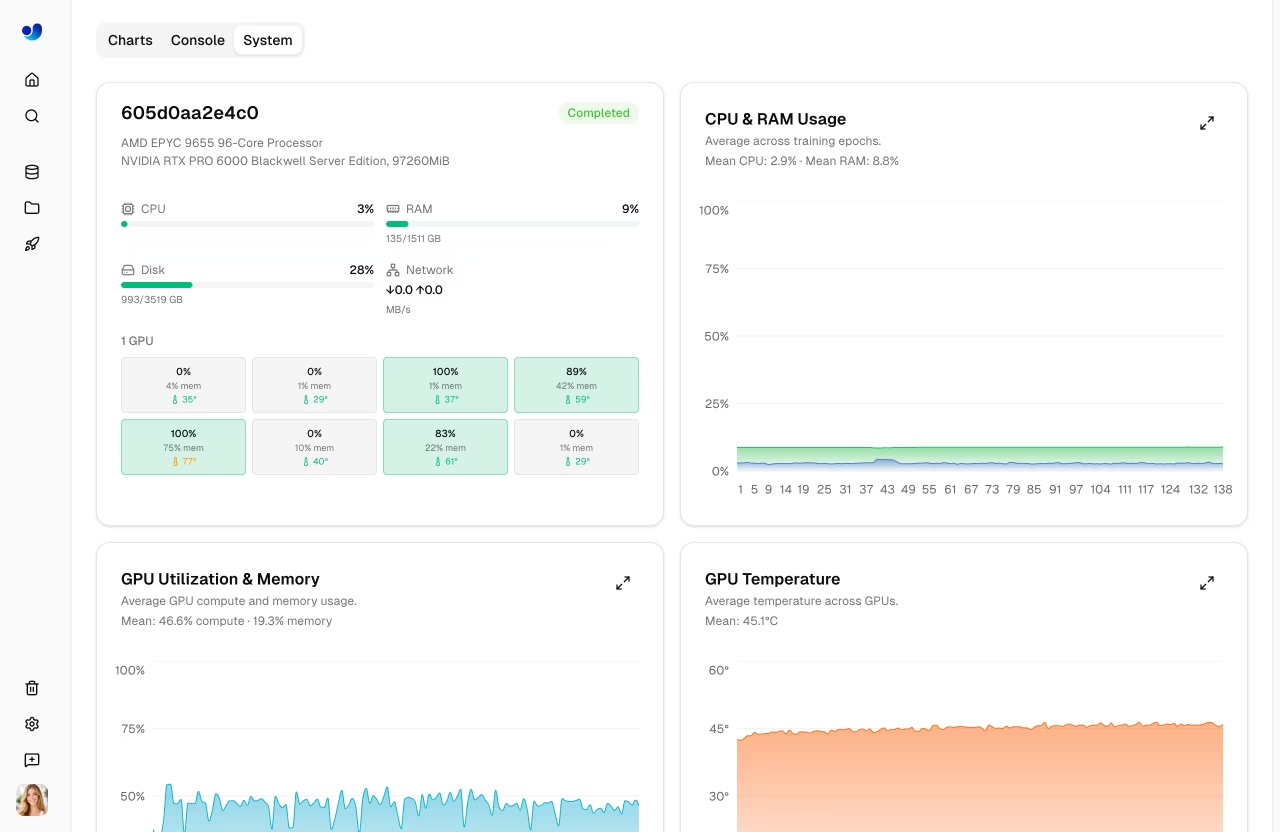
GPU and system metrics during training:
|
|
|
|
| Metric | Description |
|
|
| -------------- | -------------------------- |
|
|
| **GPU Util** | GPU utilization percentage |
|
|
| **GPU Memory** | GPU memory usage |
|
|
| **GPU Temp** | GPU temperature |
|
|
| **CPU Usage** | CPU utilization |
|
|
| **RAM** | System memory usage |
|
|
| **Disk** | Disk usage |
|
|
|
|
|
|
|
|
### Predict Tab
|
|
|
|
Run interactive inference directly in the browser:
|
|
|
|
- Upload an image, paste a URL, or use webcam
|
|
- Results display with bounding boxes, masks, or keypoints
|
|
- Auto-inference when an image is provided
|
|
- Supports all task types ([detect](../../tasks/detect.md), [segment](../../tasks/segment.md), [pose](../../tasks/pose.md), [OBB](../../tasks/obb.md), [classify](../../tasks/classify.md))
|
|
|
|
!!! tip "Quick Testing"
|
|
|
|
The Predict tab runs inference on Ultralytics Cloud, so you don't need a local GPU. Results are displayed with interactive overlays matching the model's task type.
|
|
|
|
### Export Tab
|
|
|
|
Export your model to 17+ deployment formats. See [Export Model](#export-model) below and the core [Export mode guide](../../modes/export.md) for full details.
|
|
|
|
### Deploy Tab
|
|
|
|
Create and manage dedicated inference endpoints. See [Deployments](../deploy/index.md) for details.
|
|
|
|
## Validation Plots
|
|
|
|
After training completes, view detailed validation analysis:
|
|
|
|
### Confusion Matrix
|
|
|
|
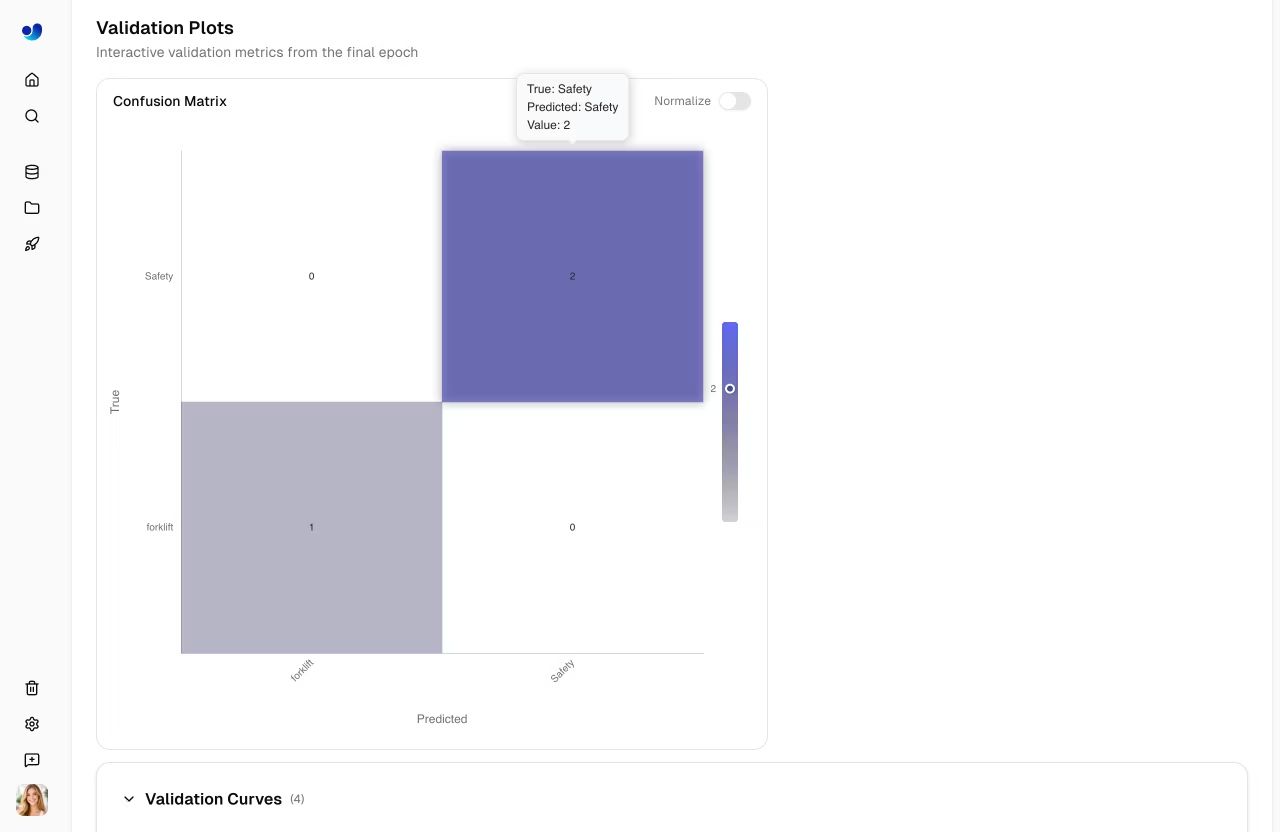
Interactive heatmap showing prediction accuracy per class:
|
|
|
|
|
|
|
|
### PR/F1 Curves
|
|
|
|
Performance curves at different confidence thresholds:
|
|
|
|
|
|
|
|
| Curve | Description |
|
|
| ------------------------ | ---------------------------------------- |
|
|
| **Precision-Recall** | Trade-off between precision and recall |
|
|
| **F1-Confidence** | F1 score at different confidence levels |
|
|
| **Precision-Confidence** | Precision at different confidence levels |
|
|
| **Recall-Confidence** | Recall at different confidence levels |
|
|
|
|
## Export Model
|
|
|
|
```mermaid
|
|
graph LR
|
|
A[Select Format] --> B[Configure Args]
|
|
B --> C[Export]
|
|
C --> D{GPU Required?}
|
|
D -->|Yes| E[Cloud GPU Export]
|
|
D -->|No| F[CPU Export]
|
|
E --> G[Download]
|
|
F --> G
|
|
|
|
style A fill:#2196F3,color:#fff
|
|
style C fill:#FF9800,color:#fff
|
|
style G fill:#4CAF50,color:#fff
|
|
```
|
|
|
|
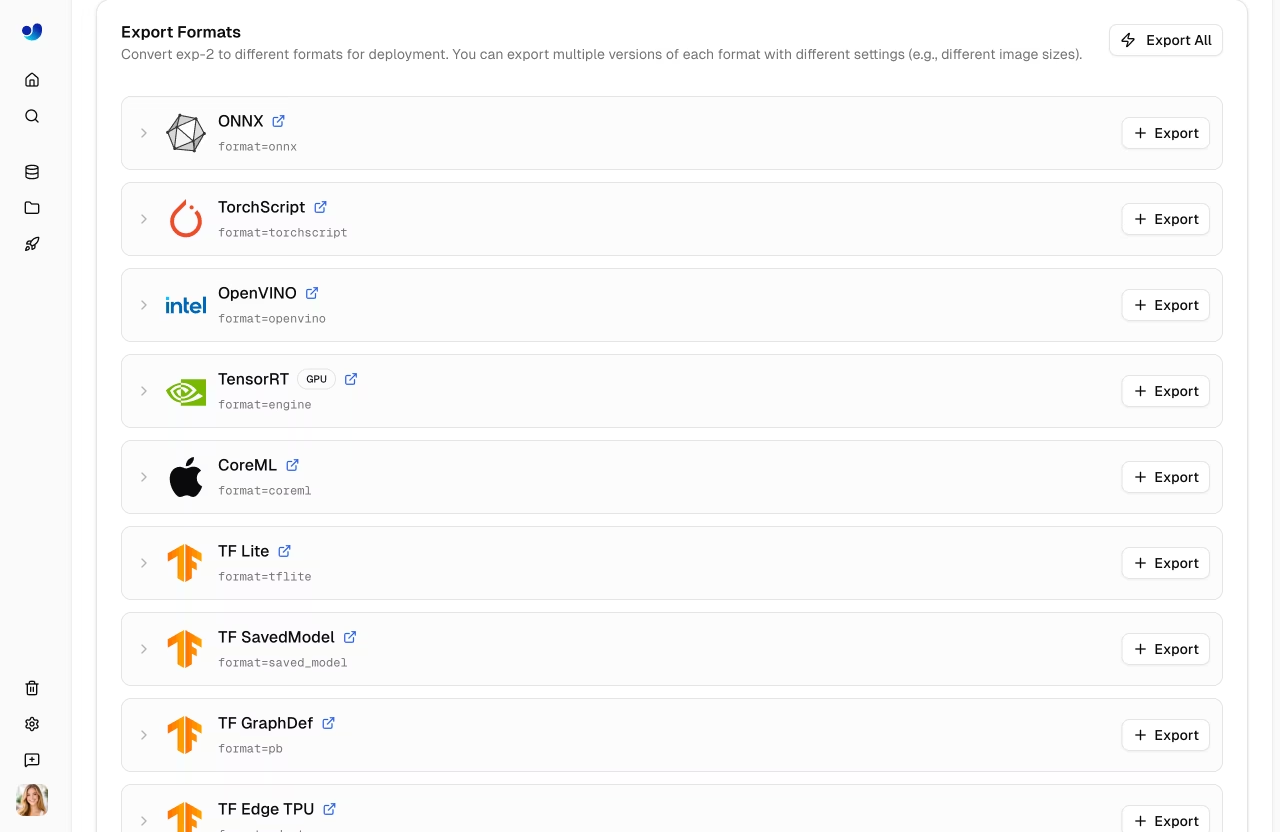
Export your model to 17+ deployment formats:
|
|
|
|
1. Navigate to the **Export** tab
|
|
2. Select target format
|
|
3. Configure export arguments (image size, half precision, dynamic, etc.)
|
|
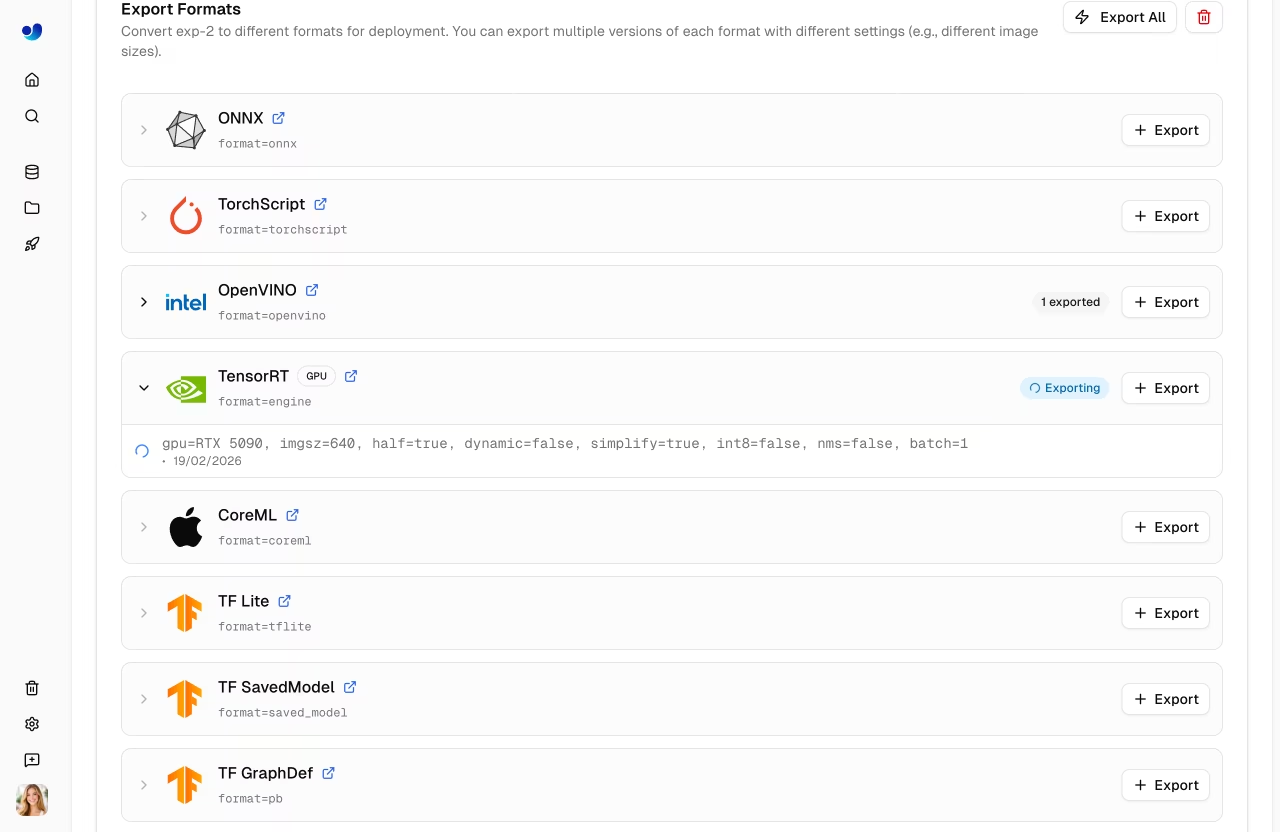
4. For GPU-required formats (TensorRT), select a GPU type
|
|
5. Click **Export**
|
|
6. Download when complete
|
|
|
|
|
|
|
|
### Supported Formats
|
|
|
|
The Platform supports export to [17+ deployment formats](../../modes/export.md#export-formats): ONNX, TorchScript, OpenVINO, TensorRT, CoreML, TF SavedModel, TF GraphDef, TF Lite, TF Edge TPU, TF.js, PaddlePaddle, NCNN, MNN, RKNN, IMX500, Axelera, and ExecuTorch.
|
|
|
|
### Format Selection Guide
|
|
|
|
| Target | Recommended Format | Notes |
|
|
| ------------------ | ------------------- | -------------------------------------------------------------- |
|
|
| **NVIDIA GPUs** | TensorRT | Maximum inference speed |
|
|
| **Intel Hardware** | OpenVINO | CPUs, GPUs, and VPUs |
|
|
| **Apple Devices** | CoreML | iOS, macOS, Apple Silicon |
|
|
| **Android** | TF Lite or NCNN | Best mobile performance |
|
|
| **Web Browsers** | TF.js or ONNX | ONNX via ONNX Runtime Web |
|
|
| **Edge Devices** | TF Edge TPU or RKNN | Coral and Rockchip (see [supported chips](#rknn-chip-support)) |
|
|
| **General** | ONNX | Works with most runtimes |
|
|
|
|
|
|
|
|
### RKNN Chip Support
|
|
|
|
When exporting to RKNN format, select your target Rockchip device:
|
|
|
|
| Chip | Description |
|
|
| ------- | -------------------- |
|
|
| RK3588 | High-end edge SoC |
|
|
| RK3576 | Mid-range edge SoC |
|
|
| RK3568 | Mid-range edge SoC |
|
|
| RK3566 | Mid-range edge SoC |
|
|
| RK3562 | Entry-level edge SoC |
|
|
| RV1103 | Vision processor |
|
|
| RV1106 | Vision processor |
|
|
| RV1103B | Vision processor |
|
|
| RV1106B | Vision processor |
|
|
| RK2118 | AI processor |
|
|
| RV1126B | Vision processor |
|
|
|
|
### Export Job Lifecycle
|
|
|
|
Export jobs progress through the following statuses:
|
|
|
|
| Status | Description |
|
|
| ------------- | ------------------------------------ |
|
|
| **Queued** | Export job is waiting to start |
|
|
| **Starting** | Export job is initializing |
|
|
| **Running** | Export is in progress |
|
|
| **Completed** | Export finished — download available |
|
|
| **Failed** | Export failed (see error message) |
|
|
| **Cancelled** | Export was cancelled by the user |
|
|
|
|
!!! tip "Export Time"
|
|
|
|
Export time varies by format. TensorRT exports may take several minutes due to engine optimization. GPU-required formats (TensorRT) run on Ultralytics Cloud GPUs — the default export GPU is RTX 5090.
|
|
|
|
### Bulk Export Actions
|
|
|
|
- **Export All**: Click `Export All` to start export jobs for all CPU-based formats with default settings.
|
|
- **Delete All Exports**: Click `Delete All` to remove all exports for the model.
|
|
|
|
### Format Restrictions
|
|
|
|
Some export formats have architecture or task restrictions:
|
|
|
|
| Format | Restriction |
|
|
| ---------------- | --------------------------------------------------------------- |
|
|
| **IMX500** | Only available for YOLOv8 and YOLO11 models |
|
|
| **Axelera** | Only available for detection models |
|
|
| **PaddlePaddle** | Not available for YOLO26 detection/segmentation/pose/OBB models |
|
|
|
|
## Clone Model
|
|
|
|
Clone a model to a different project:
|
|
|
|
1. Open the model page
|
|
2. Click the **Clone** button
|
|
3. Select the destination project
|
|
4. Click **Clone**
|
|
|
|
The model and its weights are copied to the target project.
|
|
|
|
## Download Model
|
|
|
|
Download your model weights:
|
|
|
|
1. Navigate to the model's **Overview** tab
|
|
2. Click the **Download** button
|
|
3. The original `.pt` file downloads automatically
|
|
|
|
Exported formats can be downloaded from the **Export** tab after export completes.
|
|
|
|
## Dataset Linking
|
|
|
|
Models can be linked to their source dataset:
|
|
|
|
- View which dataset was used for training
|
|
- Click the dataset card on the Overview tab to navigate to it
|
|
- Track data lineage
|
|
|
|
When training with Platform datasets using the [`ul://` URI format](../data/datasets.md#dataset-uri), linking is automatic.
|
|
|
|
!!! example "Dataset URI Format"
|
|
|
|
```bash
|
|
# Train with a Platform dataset — linking is automatic
|
|
yolo train model=yolo26n.pt data=ul://username/datasets/my-dataset epochs=100
|
|
```
|
|
|
|
The `ul://` scheme resolves to your Platform dataset. The trained model's Overview tab will show a link back to this dataset (see [Using Platform Datasets](../api/index.md#using-platform-datasets)).
|
|
|
|
## Visibility Settings
|
|
|
|
Control who can see your model:
|
|
|
|
| Setting | Description |
|
|
| ----------- | ------------------------------- |
|
|
| **Private** | Only you can access |
|
|
| **Public** | Anyone can view on Explore page |
|
|
|
|
To change visibility, click the visibility badge (e.g., `private` or `public`) on the model page. Switching to private takes effect immediately. Switching to public shows a confirmation dialog before applying.
|
|
|
|
## Delete Model
|
|
|
|
Remove a model you no longer need:
|
|
|
|
1. Open model actions menu
|
|
2. Click **Delete**
|
|
3. Confirm deletion
|
|
|
|
!!! note "Trash and Restore"
|
|
|
|
Deleted models go to Trash for 30 days. Restore from [Settings > Trash](../account/trash.md).
|
|
|
|
## FAQ
|
|
|
|
### What model architectures are supported?
|
|
|
|
Ultralytics Platform fully supports all YOLO architectures with dedicated projects:
|
|
|
|
- [**YOLO26**](../../models/yolo26.md): n, s, m, l, x variants (latest, recommended) — [platform.ultralytics.com/ultralytics/yolo26](https://platform.ultralytics.com/ultralytics/yolo26)
|
|
- [**YOLO11**](../../models/yolo11.md): n, s, m, l, x variants — [platform.ultralytics.com/ultralytics/yolo11](https://platform.ultralytics.com/ultralytics/yolo11)
|
|
- [**YOLOv8**](../../models/yolov8.md): n, s, m, l, x variants — [platform.ultralytics.com/ultralytics/yolov8](https://platform.ultralytics.com/ultralytics/yolov8)
|
|
- [**YOLOv5**](../../models/yolov5.md): n, s, m, l, x variants — [platform.ultralytics.com/ultralytics/yolov5](https://platform.ultralytics.com/ultralytics/yolov5)
|
|
|
|
All architectures support 5 task types: [detect](../../tasks/detect.md), [segment](../../tasks/segment.md), [pose](../../tasks/pose.md), [OBB](../../tasks/obb.md), and [classify](../../tasks/classify.md).
|
|
|
|
### Can I download my trained model?
|
|
|
|
Yes, download your model weights from the model page:
|
|
|
|
1. Click the download icon on the Overview tab
|
|
2. The original `.pt` file downloads automatically
|
|
3. Exported formats can be downloaded from the Export tab
|
|
|
|
### How do I compare models across projects?
|
|
|
|
Currently, model comparison is within projects. To compare across projects:
|
|
|
|
1. Clone models to a single project, or
|
|
2. Export metrics and compare externally
|
|
|
|
### What's the maximum model size?
|
|
|
|
There's no strict limit, but very large models (>2GB) may have longer upload and processing times.
|
|
|
|
### Can I fine-tune pretrained models?
|
|
|
|
Yes! You can use any of the official YOLO26 models as a base, or select one of your own completed models from the model selector in the training dialog. The Platform supports fine-tuning from any uploaded checkpoint.
|