
189 lines
7.4 KiB
Markdown
Executable File
189 lines
7.4 KiB
Markdown
Executable File
---
|
|
comments: true
|
|
description: Learn about model training in Ultralytics Platform including project organization, cloud training, and real-time metrics streaming.
|
|
keywords: Ultralytics Platform, model training, cloud training, YOLO, GPU training, machine learning, deep learning
|
|
---
|
|
|
|
# Model Training
|
|
|
|
[Ultralytics Platform](https://platform.ultralytics.com) provides comprehensive tools for training YOLO models, from organizing experiments to running cloud training jobs with real-time metrics streaming.
|
|
|
|
## Overview
|
|
|
|
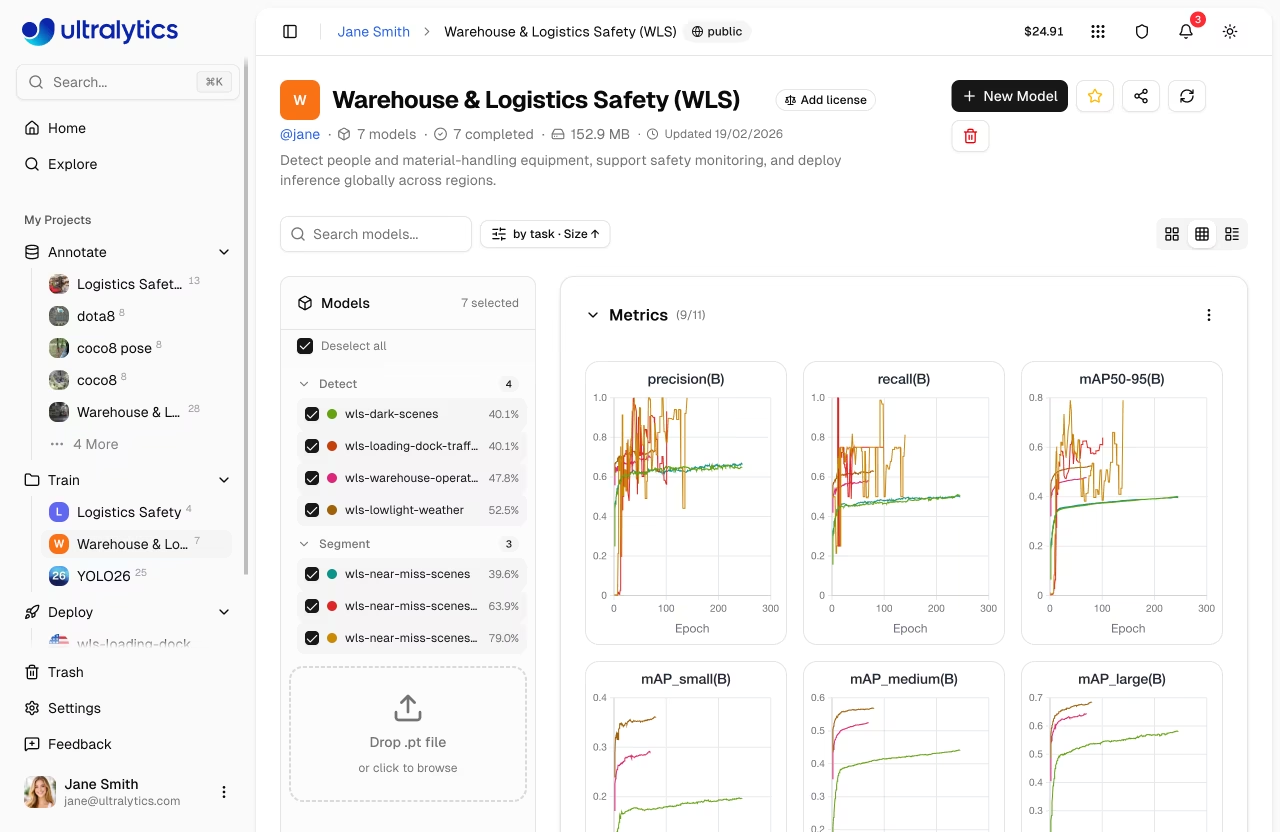
The Training section helps you:
|
|
|
|
- **Organize** models into [projects](projects.md) for easier management
|
|
- **Train** on cloud GPUs with a single click
|
|
- **Monitor** real-time metrics during training
|
|
- **Compare** model performance across experiments
|
|
- **Export** to 17+ deployment formats (see [supported formats](models.md#supported-formats))
|
|
|
|
|
|
|
|
## Workflow
|
|
|
|
```mermaid
|
|
graph LR
|
|
A[📁 Project] --> B[⚙️ Configure]
|
|
B --> C[🚀 Train]
|
|
C --> D[📈 Monitor]
|
|
D --> E[📦 Export]
|
|
|
|
style A fill:#4CAF50,color:#fff
|
|
style B fill:#2196F3,color:#fff
|
|
style C fill:#FF9800,color:#fff
|
|
style D fill:#9C27B0,color:#fff
|
|
style E fill:#00BCD4,color:#fff
|
|
```
|
|
|
|
| Stage | Description |
|
|
| ------------- | -------------------------------------------------------------------------- |
|
|
| **Project** | Create a workspace to organize related models |
|
|
| **Configure** | Select [dataset](../data/datasets.md), base model, and training parameters |
|
|
| **Train** | Run on cloud GPUs or your local hardware |
|
|
| **Monitor** | View real-time loss curves and metrics |
|
|
| **Export** | Convert to 17+ deployment formats ([details](models.md#supported-formats)) |
|
|
|
|
## Training Options
|
|
|
|
Ultralytics Platform supports multiple training approaches:
|
|
|
|
| Method | Description | Best For |
|
|
| ------------------------------------------------------- | --------------------------------------------- | -------------------------- |
|
|
| **[Cloud Training](cloud-training.md)** | Train on Ultralytics Cloud GPUs | No local GPU, scalability |
|
|
| **[Local Training](cloud-training.md#remote-training)** | Train locally, stream metrics to the platform | Existing hardware, privacy |
|
|
| **[Colab Training](cloud-training.md#remote-training)** | Use Google Colab with platform integration | Free GPU access |
|
|
|
|
## GPU Options
|
|
|
|
Available GPUs for cloud training on Ultralytics Cloud:
|
|
|
|
| GPU | VRAM | Cost/Hour | Best For |
|
|
| ------------ | ------ | --------- | ------------------------- |
|
|
| RTX 2000 Ada | 16 GB | $0.24 | Small datasets, testing |
|
|
| RTX A4500 | 20 GB | $0.24 | Small-medium datasets |
|
|
| RTX A5000 | 24 GB | $0.26 | Medium datasets |
|
|
| RTX 4000 Ada | 20 GB | $0.38 | Medium datasets |
|
|
| L4 | 24 GB | $0.39 | Inference optimized |
|
|
| A40 | 48 GB | $0.40 | Larger batch sizes |
|
|
| RTX 3090 | 24 GB | $0.46 | Great price/performance |
|
|
| RTX A6000 | 48 GB | $0.49 | Large models |
|
|
| RTX 4090 | 24 GB | $0.59 | Best price/performance |
|
|
| RTX 6000 Ada | 48 GB | $0.77 | Large batch training |
|
|
| L40S | 48 GB | $0.86 | Large batch training |
|
|
| RTX 5090 | 32 GB | $0.89 | Latest generation |
|
|
| L40 | 48 GB | $0.99 | Large models |
|
|
| A100 PCIe | 80 GB | $1.39 | Production training |
|
|
| A100 SXM | 80 GB | $1.49 | Production training |
|
|
| RTX PRO 6000 | 96 GB | $1.89 | Recommended default |
|
|
| H100 PCIe | 80 GB | $2.39 | High-performance training |
|
|
| H100 SXM | 80 GB | $2.69 | Fastest training |
|
|
| H100 NVL | 94 GB | $3.07 | Maximum performance |
|
|
| H200 NVL | 143 GB | $3.39 | Maximum memory |
|
|
| H200 SXM | 141 GB | $3.59 | Maximum performance |
|
|
| B200 | 180 GB | $4.99 | Largest models |
|
|
|
|
!!! tip "Signup Credits"
|
|
|
|
New accounts receive signup credits for training. Check [Billing](../account/billing.md) for details.
|
|
|
|
## Real-Time Metrics
|
|
|
|
During training, view live metrics across three subtabs:
|
|
|
|
```mermaid
|
|
graph LR
|
|
A[Charts] --> B[Loss Curves]
|
|
A --> C[Performance Metrics]
|
|
D[Console] --> E[Live Logs]
|
|
D --> F[Error Detection]
|
|
G[System] --> H[GPU Utilization]
|
|
G --> I[Memory & Temp]
|
|
|
|
style A fill:#2196F3,color:#fff
|
|
style D fill:#FF9800,color:#fff
|
|
style G fill:#9C27B0,color:#fff
|
|
```
|
|
|
|
| Subtab | Metrics |
|
|
| ----------- | ------------------------------------------------------ |
|
|
| **Charts** | Box/class/DFL loss, mAP50, mAP50-95, precision, recall |
|
|
| **Console** | Live training logs with ANSI color and error detection |
|
|
| **System** | GPU utilization, memory, temperature, CPU, disk |
|
|
|
|
!!! info "Automatic Checkpoints"
|
|
|
|
The Platform automatically saves checkpoints at every epoch. The **best model** (highest mAP) and **final model** are always preserved.
|
|
|
|
## Quick Start
|
|
|
|
Get started with cloud training in under a minute:
|
|
|
|
=== "Cloud (UI)"
|
|
|
|
1. Create a project in the sidebar
|
|
2. Click **New Model**
|
|
3. Select a model, dataset, and GPU
|
|
4. Click **Start Training**
|
|
|
|
=== "Remote (CLI)"
|
|
|
|
```bash
|
|
export ULTRALYTICS_API_KEY="your_api_key"
|
|
yolo train model=yolo26n.pt data=ul://username/datasets/my-dataset \
|
|
epochs=100 project=username/my-project name=exp1
|
|
```
|
|
|
|
=== "Remote (Python)"
|
|
|
|
```python
|
|
from ultralytics import YOLO
|
|
|
|
model = YOLO("yolo26n.pt")
|
|
model.train(
|
|
data="ul://username/datasets/my-dataset",
|
|
epochs=100,
|
|
project="username/my-project",
|
|
name="exp1",
|
|
)
|
|
```
|
|
|
|
## Quick Links
|
|
|
|
- [**Projects**](projects.md): Organize your models and experiments
|
|
- [**Models**](models.md): Manage trained checkpoints
|
|
- [**Cloud Training**](cloud-training.md): Train on cloud GPUs
|
|
|
|
## FAQ
|
|
|
|
### How long does training take?
|
|
|
|
Training time depends on:
|
|
|
|
- Dataset size (number of images)
|
|
- Model size (n, s, m, l, x)
|
|
- Number of epochs
|
|
- GPU type selected
|
|
|
|
A typical training run with 1000 images, YOLO26n, 100 epochs on RTX PRO 6000 takes about 2-3 hours. Smaller runs (500 images, 50 epochs on RTX 4090) complete in under an hour. See [cost examples](cloud-training.md#cost-examples) for detailed estimates.
|
|
|
|
### Can I train multiple models simultaneously?
|
|
|
|
Yes. Concurrent cloud training limits depend on your plan: Free allows 3, Pro allows 10, and Enterprise is unlimited. For additional parallel training, use remote training from multiple machines.
|
|
|
|
### What happens if training fails?
|
|
|
|
If training fails:
|
|
|
|
1. Checkpoints are saved at each epoch
|
|
2. You can resume from the last checkpoint
|
|
3. Credits are only charged for completed compute time
|
|
|
|
### How do I choose the right GPU?
|
|
|
|
| Scenario | Recommended GPU |
|
|
| ----------------------------- | ---------------- |
|
|
| Most training jobs | RTX PRO 6000 |
|
|
| Large datasets or batch sizes | H100 SXM or H200 |
|
|
| Budget-conscious | RTX 4090 |
|