
497 lines
23 KiB
Markdown
Executable File
497 lines
23 KiB
Markdown
Executable File
---
|
|
comments: true
|
|
description: Ultralytics Platform is an end-to-end computer vision platform for data preparation, model training, and deployment with multi-region infrastructure.
|
|
keywords: Ultralytics Platform, YOLO, computer vision, model training, cloud deployment, annotation, inference, YOLO11, YOLO26, machine learning
|
|
---
|
|
|
|
# Ultralytics Platform
|
|
|
|
<div align="center">
|
|
<a href="https://docs.ultralytics.com/zh/platform/">中文</a> |
|
|
<a href="https://docs.ultralytics.com/ko/platform/">한국어</a> |
|
|
<a href="https://docs.ultralytics.com/ja/platform/">日本語</a> |
|
|
<a href="https://docs.ultralytics.com/ru/platform/">Русский</a> |
|
|
<a href="https://docs.ultralytics.com/de/platform/">Deutsch</a> |
|
|
<a href="https://docs.ultralytics.com/fr/platform/">Français</a> |
|
|
<a href="https://docs.ultralytics.com/es/platform/">Español</a> |
|
|
<a href="https://docs.ultralytics.com/pt/platform/">Português</a> |
|
|
<a href="https://docs.ultralytics.com/tr/platform/">Türkçe</a> |
|
|
<a href="https://docs.ultralytics.com/vi/platform/">Tiếng Việt</a> |
|
|
<a href="https://docs.ultralytics.com/ar/platform/">العربية</a>
|
|
<br>
|
|
<br>
|
|
|
|
<a href="https://discord.com/invite/ultralytics"><img alt="Discord" src="https://img.shields.io/discord/1089800235347353640?logo=discord&logoColor=white&label=Discord&color=blue"></a> <a href="https://community.ultralytics.com/"><img alt="Ultralytics Forums" src="https://img.shields.io/discourse/users?server=https%3A%2F%2Fcommunity.ultralytics.com&logo=discourse&label=Forums&color=blue"></a> <a href="https://www.reddit.com/r/ultralytics/"><img alt="Ultralytics Reddit" src="https://img.shields.io/reddit/subreddit-subscribers/ultralytics?style=flat&logo=reddit&logoColor=white&label=Reddit&color=blue"></a>
|
|
|
|
</div>
|
|
|
|
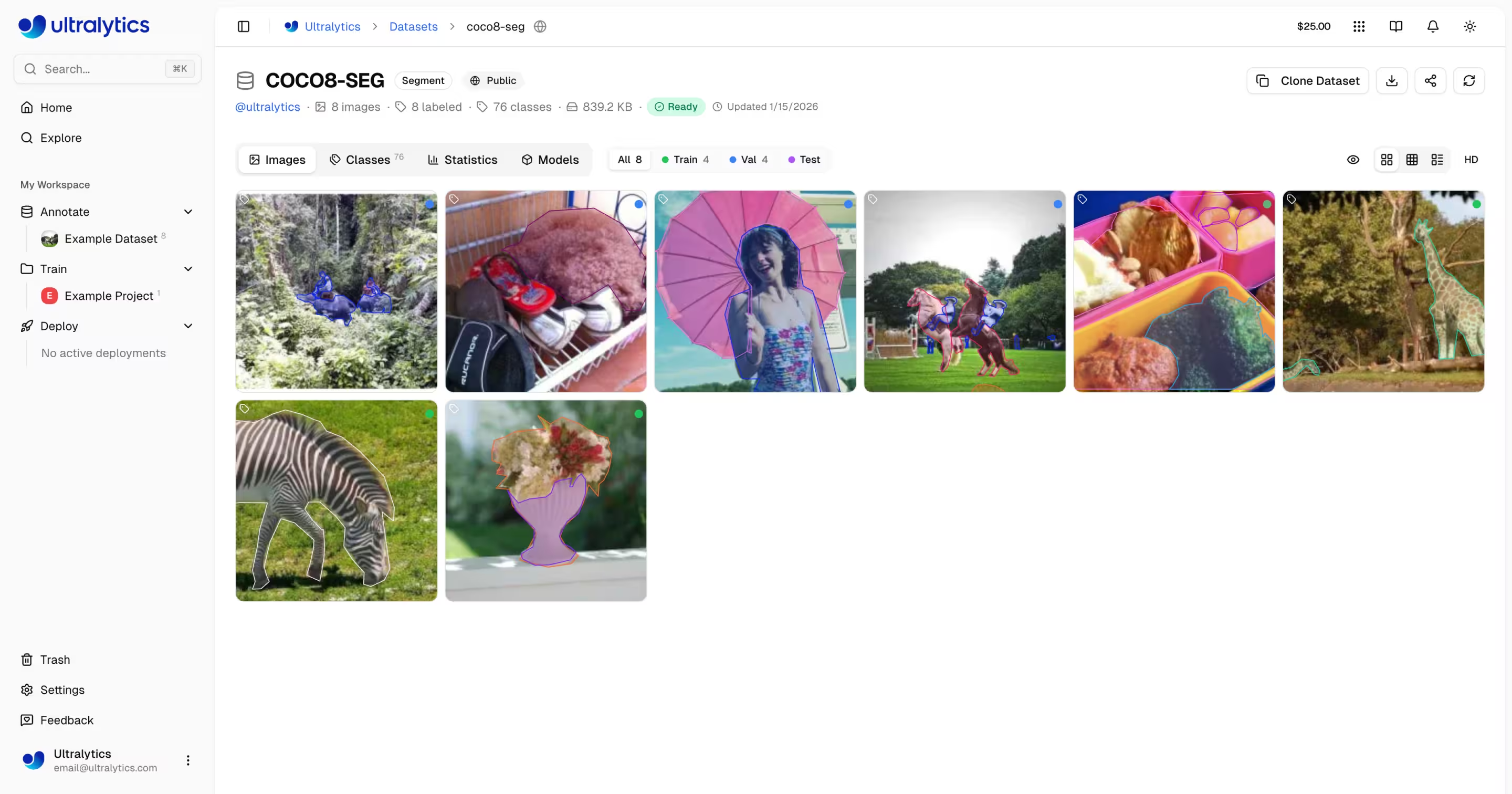
[Ultralytics Platform](https://platform.ultralytics.com) is a comprehensive end-to-end computer vision platform that streamlines the entire ML workflow from data preparation to model deployment. Built for teams and individuals who need production-ready [computer vision](https://www.ultralytics.com/glossary/computer-vision-cv) solutions without the infrastructure complexity.
|
|
|
|
|
|
|
|
## What is Ultralytics Platform?
|
|
|
|
Ultralytics Platform is designed to replace fragmented ML tooling with a unified solution. It combines the capabilities of:
|
|
|
|
- **Roboflow** - Data management and annotation
|
|
- **Weights & Biases** - Experiment tracking
|
|
- **SageMaker** - Cloud training
|
|
- **HuggingFace** - Model deployment
|
|
- **Arize** - Monitoring
|
|
|
|
All in one platform with native support for [YOLO26](../models/yolo26.md) and [YOLO11](../models/yolo11.md) models.
|
|
|
|
## Workflow: Upload → Annotate → Train → Export → Deploy
|
|
|
|
The Platform provides an end-to-end workflow:
|
|
|
|
```mermaid
|
|
graph LR
|
|
subgraph Data["📁 Data"]
|
|
A[Upload] --> B[Annotate]
|
|
B --> C[Analyze]
|
|
end
|
|
subgraph Train["🚀 Train"]
|
|
D[Configure] --> E[Train on GPU]
|
|
E --> F[View Metrics]
|
|
end
|
|
subgraph Deploy["🌐 Deploy"]
|
|
G[Export] --> H[Deploy Endpoint]
|
|
H --> I[Monitor]
|
|
end
|
|
Data --> Train --> Deploy
|
|
```
|
|
|
|
| Stage | Features |
|
|
| ------------ | ---------------------------------------------------------------------------------------------------------------------------------------------- |
|
|
| **Upload** | Images (50MB), videos (1GB), ZIP archives (10GB) with automatic processing |
|
|
| **Annotate** | Manual tools, SAM smart annotation, YOLO auto-labeling for all 5 task types (see [supported tasks](data/index.md#supported-tasks)) |
|
|
| **Train** | Cloud GPUs (22 options from RTX 2000 Ada to B200), real-time metrics, project organization |
|
|
| **Export** | [17 deployment formats](../modes/export.md) (ONNX, TensorRT, CoreML, TFLite, etc.; see [supported formats](train/models.md#supported-formats)) |
|
|
| **Deploy** | 43 global regions with dedicated endpoints, auto-scaling, monitoring |
|
|
|
|
**What you can do:**
|
|
|
|
- **Upload** images, videos, and ZIP archives to create training datasets
|
|
- **Visualize** annotations with interactive overlays for all 5 YOLO task types (see [supported tasks](data/index.md#supported-tasks))
|
|
- **Train** models on 22 cloud GPU types with real-time metrics
|
|
- **Export** to [17 deployment formats](../modes/export.md) (ONNX, TensorRT, CoreML, TFLite, etc.)
|
|
- **Deploy** to 43 global regions with one-click dedicated endpoints
|
|
- **Monitor** training progress, deployment health, and usage metrics
|
|
- **Collaborate** by making projects and datasets public for the community
|
|
|
|
## Multi-Region Infrastructure
|
|
|
|
Your data stays in your region. Ultralytics Platform operates infrastructure in three global regions:
|
|
|
|
| Region | Label | Location | Best For |
|
|
| ------ | ---------------------------- | ----------------------- | --------------------------------------- |
|
|
| **US** | Americas | Iowa, USA | Americas users, fastest for Americas |
|
|
| **EU** | Europe, Middle East & Africa | Belgium, Europe | European users, GDPR compliance |
|
|
| **AP** | Asia Pacific | Hong Kong, Asia-Pacific | Asia-Pacific users, lowest APAC latency |
|
|
|
|
You select your region during onboarding, and all your data, models, and deployments remain in that region.
|
|
|
|
!!! warning "Region is Permanent"
|
|
|
|
Your data region cannot be changed after account creation. During onboarding, the platform measures latency to each region and recommends the closest one. Choose carefully.
|
|
|
|
## Key Features
|
|
|
|
### Data Preparation
|
|
|
|
- **Dataset Management**: Upload images, videos, or ZIP archives with automatic processing
|
|
- **Annotation Editor**: Manual annotation for all 5 YOLO task types (detect, segment, pose, OBB, classify; see [supported tasks](data/index.md#supported-tasks))
|
|
- **SAM Smart Annotation**: Click-based intelligent annotation using [Segment Anything Model](../models/sam.md)
|
|
- **Auto-Annotation**: Use trained models to pre-label new data
|
|
- **Statistics**: Class distribution, location heatmaps, and dimension analysis
|
|
|
|
```mermaid
|
|
graph LR
|
|
A[Upload ZIP/Images/Video] --> B[Auto-Process]
|
|
B --> C[Browse & Filter]
|
|
C --> D{Annotate}
|
|
D --> E[Manual Tools]
|
|
D --> F[SAM Smart]
|
|
D --> G[YOLO Auto-Label]
|
|
E --> H[Train-Ready Dataset]
|
|
F --> H
|
|
G --> H
|
|
```
|
|
|
|
!!! tip "Supported Task Types"
|
|
|
|
The annotation editor supports all 5 YOLO task types: **[detect](../datasets/detect/index.md)** (bounding boxes), **[segment](../datasets/segment/index.md)** (polygons), **[pose](../datasets/pose/index.md)** (keypoints), **[OBB](../datasets/obb/index.md)** (oriented boxes), and **[classify](../datasets/classify/index.md)** (image-level labels). Each task type has dedicated drawing tools and keyboard shortcuts.
|
|
|
|
### Model Training
|
|
|
|
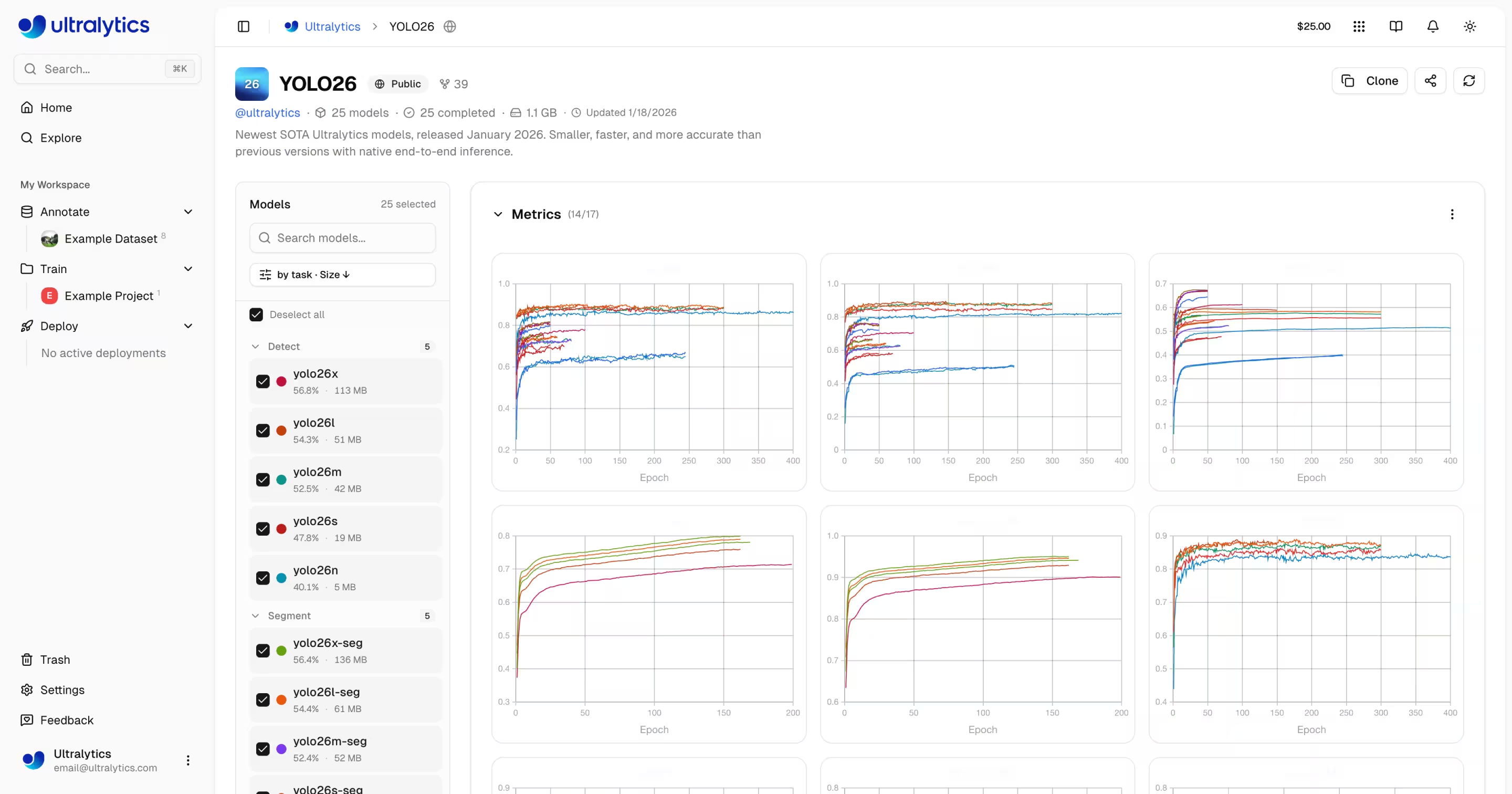
- **Cloud Training**: Train on 22 cloud GPU types with real-time metrics
|
|
- **Remote Training**: Train anywhere and stream metrics to the platform (W&B-style)
|
|
- **Project Organization**: Group related models, compare experiments, track activity
|
|
- **17 Export Formats**: ONNX, TensorRT, CoreML, TFLite, and more (see [supported formats](train/models.md#supported-formats))
|
|
|
|
|
|
|
|
You can train models either through the web UI (cloud training) or from your own machine (remote training):
|
|
|
|
=== "Cloud Training (Web UI)"
|
|
|
|
1. Navigate to your project
|
|
2. Click `Train Model`
|
|
3. Select dataset, model, GPU, and epochs
|
|
4. Monitor real-time loss curves and metrics
|
|
|
|
=== "Remote Training (CLI)"
|
|
|
|
```bash
|
|
# Install ultralytics
|
|
pip install "ultralytics>=8.4.14"
|
|
|
|
# Set your API key
|
|
export ULTRALYTICS_API_KEY="your_api_key"
|
|
|
|
# Train and stream metrics to the platform
|
|
yolo train model=yolo26n.pt data=coco.yaml epochs=100 project=username/my-project name=exp1
|
|
```
|
|
|
|
=== "Remote Training (Python)"
|
|
|
|
```python
|
|
import os
|
|
|
|
from ultralytics import YOLO
|
|
|
|
os.environ["ULTRALYTICS_API_KEY"] = "your_api_key"
|
|
|
|
model = YOLO("yolo26n.pt")
|
|
model.train(
|
|
data="coco.yaml",
|
|
epochs=100,
|
|
project="username/my-project",
|
|
name="exp1",
|
|
)
|
|
# Metrics stream to Platform automatically
|
|
```
|
|
|
|
### Deployment
|
|
|
|
- **Inference Testing**: Test models directly in the browser with custom images
|
|
- **Dedicated Endpoints**: Deploy to 43 global regions with auto-scaling
|
|
- **Monitoring**: Real-time metrics, request logs, and performance dashboards
|
|
|
|
```mermaid
|
|
graph LR
|
|
A[Trained Model] --> B{Action}
|
|
B --> C[Browser Predict]
|
|
B --> D[Export Format]
|
|
B --> E[Deploy Endpoint]
|
|
D --> F[ONNX / TensorRT / CoreML / TFLite / ...]
|
|
E --> G[43 Global Regions]
|
|
G --> H[API Endpoint URL]
|
|
H --> I[Monitor & Scale]
|
|
```
|
|
|
|
Once deployed, call your endpoint from any language:
|
|
|
|
=== "Python"
|
|
|
|
```python
|
|
import requests
|
|
|
|
url = "https://your-endpoint-url/predict"
|
|
headers = {"Authorization": "Bearer your_api_key"}
|
|
|
|
with open("image.jpg", "rb") as f:
|
|
response = requests.post(url, headers=headers, files={"file": f})
|
|
|
|
print(response.json())
|
|
```
|
|
|
|
=== "cURL"
|
|
|
|
```bash
|
|
curl -X POST "https://your-endpoint-url/predict" \
|
|
-H "Authorization: Bearer your_api_key" \
|
|
-F "file=@image.jpg"
|
|
```
|
|
|
|
=== "JavaScript"
|
|
|
|
```javascript
|
|
const form = new FormData();
|
|
form.append("file", fileInput.files[0]);
|
|
|
|
const response = await fetch("https://your-endpoint-url/predict", {
|
|
method: "POST",
|
|
headers: { Authorization: "Bearer your_api_key" },
|
|
body: form,
|
|
});
|
|
|
|
const results = await response.json();
|
|
console.log(results);
|
|
```
|
|
|
|
### Account Management
|
|
|
|
- **Teams & Organizations**: Collaborate with team members, manage roles and invites
|
|
- **API Keys**: Secure key management for remote training and API access
|
|
- **Credits & Billing**: Pay-as-you-go training with transparent pricing
|
|
- **Activity Feed**: Track all account events and actions
|
|
- **Trash & Restore**: 30-day soft delete with item recovery
|
|
- **GDPR Compliance**: Data export and account deletion
|
|
|
|
!!! info "Plan Tiers"
|
|
|
|
| Feature | Free | Pro ($29/mo) | Enterprise |
|
|
| -------------------- | -------------- | ------------------- | -------------- |
|
|
| Signup Credit | $5 / $25* | - | Custom |
|
|
| Monthly Credit | - | $30/seat/month | Custom |
|
|
| Models | 100 | 500 | Unlimited |
|
|
| Concurrent Trainings | 3 | 10 | Unlimited |
|
|
| Deployments | 3 | 10 (warm-start) | Unlimited |
|
|
| Storage | 100 GB | 500 GB | Unlimited |
|
|
| Teams | - | Up to 5 members | Up to 50 |
|
|
| Support | Community | Priority | Dedicated |
|
|
|
|
*$5 at signup, or $25 with a verified company/work email.
|
|
|
|
## Quick Links
|
|
|
|
Get started with these resources:
|
|
|
|
- [**Quickstart**](quickstart.md): Create your first project and train a model in minutes
|
|
- [**Datasets**](data/datasets.md): Upload and manage your training data
|
|
- [**Annotation**](data/annotation.md): Label your data with manual and AI-assisted tools
|
|
- [**Projects**](train/projects.md): Organize your models and experiments
|
|
- [**Cloud Training**](train/cloud-training.md): Train on cloud GPUs
|
|
- [**Inference**](deploy/inference.md): Test your models
|
|
- [**Endpoints**](deploy/endpoints.md): Deploy models to production
|
|
- [**Monitoring**](deploy/monitoring.md): Track deployment performance
|
|
- [**API Keys**](account/api-keys.md): Manage API access
|
|
- [**Billing**](account/billing.md): Credits and payment
|
|
- [**Activity**](account/activity.md): Track account events
|
|
- [**Trash**](account/trash.md): Recover deleted items
|
|
- [**REST API**](api/index.md): API reference
|
|
|
|
## FAQ
|
|
|
|
### How do I get started with Ultralytics Platform?
|
|
|
|
To get started with [Ultralytics Platform](https://platform.ultralytics.com):
|
|
|
|
1. **Sign Up**: Create an account at [platform.ultralytics.com](https://platform.ultralytics.com)
|
|
2. **Select Region**: Choose your data region (US, EU, or AP) during onboarding
|
|
3. **Upload Dataset**: Navigate to the [Datasets](data/datasets.md) section to upload your data
|
|
4. **Train Model**: Create a project and start training on cloud GPUs
|
|
5. **Deploy**: Test your model and deploy to a dedicated endpoint
|
|
|
|
For a detailed guide, see the [Quickstart](quickstart.md) page.
|
|
|
|
### What are the benefits of Ultralytics Platform?
|
|
|
|
[Ultralytics Platform](https://platform.ultralytics.com) offers:
|
|
|
|
- **Unified Workflow**: Data, training, and deployment in one place
|
|
- **Multi-Region**: Data residency in US, EU, or AP regions
|
|
- **No-Code Training**: Train advanced YOLO models without writing code
|
|
- **Real-Time Metrics**: Stream training progress and monitor deployments
|
|
- **43 Deploy Regions**: Deploy models close to your users worldwide
|
|
- **5 Task Types**: Support for detection, segmentation, pose, OBB, and classification (see [task docs](../tasks/index.md))
|
|
- **AI-Assisted Annotation**: SAM and auto-labeling to speed up data preparation
|
|
|
|
### What GPU options are available for cloud training?
|
|
|
|
Ultralytics Platform supports multiple GPU types for cloud training:
|
|
|
|
| GPU | VRAM | Cost/Hour | Best For |
|
|
| ------------ | ------ | --------- | ----------------------- |
|
|
| RTX 2000 Ada | 16 GB | $0.24 | Small datasets, testing |
|
|
| RTX A4500 | 20 GB | $0.24 | Small-medium datasets |
|
|
| RTX A5000 | 24 GB | $0.26 | Medium datasets |
|
|
| RTX 4000 Ada | 20 GB | $0.38 | Medium datasets |
|
|
| L4 | 24 GB | $0.39 | Inference optimized |
|
|
| A40 | 48 GB | $0.40 | Larger batch sizes |
|
|
| RTX 3090 | 24 GB | $0.46 | General training |
|
|
| RTX A6000 | 48 GB | $0.49 | Large models |
|
|
| RTX 4090 | 24 GB | $0.59 | Great price/performance |
|
|
| RTX 6000 Ada | 48 GB | $0.77 | Large batch training |
|
|
| L40S | 48 GB | $0.86 | Large batch training |
|
|
| RTX 5090 | 32 GB | $0.89 | Latest generation |
|
|
| L40 | 48 GB | $0.99 | Large models |
|
|
| A100 PCIe | 80 GB | $1.39 | Production training |
|
|
| A100 SXM | 80 GB | $1.49 | Production training |
|
|
| RTX PRO 6000 | 96 GB | $1.89 | Recommended default |
|
|
| H100 PCIe | 80 GB | $2.39 | Fastest training |
|
|
| H100 SXM | 80 GB | $2.69 | Fastest training |
|
|
| H100 NVL | 94 GB | $3.07 | High-memory training |
|
|
| H200 NVL | 143 GB | $3.39 | Maximum memory |
|
|
| H200 SXM | 141 GB | $3.59 | Maximum performance |
|
|
| B200 | 180 GB | $4.99 | Largest models |
|
|
|
|
See [Cloud Training](train/cloud-training.md) for complete pricing and GPU options.
|
|
|
|
### How does remote training work?
|
|
|
|
You can train models on your own hardware and stream real-time metrics to the platform, similar to Weights & Biases.
|
|
|
|
!!! warning "Package Version Requirement"
|
|
|
|
Platform integration requires **ultralytics>=8.4.14**. Lower versions will NOT work with Platform.
|
|
|
|
```bash
|
|
pip install "ultralytics>=8.4.14"
|
|
```
|
|
|
|
=== "CLI"
|
|
|
|
```bash
|
|
# Set your API key
|
|
export ULTRALYTICS_API_KEY="your_api_key"
|
|
|
|
# Train with project/name to stream metrics
|
|
yolo train model=yolo26n.pt data=coco.yaml epochs=100 project=username/my-project name=exp1
|
|
```
|
|
|
|
=== "Python"
|
|
|
|
```python
|
|
import os
|
|
|
|
from ultralytics import YOLO
|
|
|
|
os.environ["ULTRALYTICS_API_KEY"] = "your_api_key"
|
|
|
|
model = YOLO("yolo26n.pt")
|
|
model.train(
|
|
data="coco.yaml",
|
|
epochs=100,
|
|
project="username/my-project",
|
|
name="exp1",
|
|
)
|
|
```
|
|
|
|
=== "Platform Dataset (ul:// URI)"
|
|
|
|
```bash
|
|
# Train using a Platform dataset directly
|
|
export ULTRALYTICS_API_KEY="your_api_key"
|
|
|
|
yolo train model=yolo26n.pt data=ul://username/datasets/my-dataset epochs=100 project=username/my-project name=exp1
|
|
```
|
|
|
|
See [Cloud Training](train/cloud-training.md#remote-training) for more details on remote training.
|
|
|
|
### What annotation tools are available?
|
|
|
|
The Platform includes a full-featured annotation editor supporting:
|
|
|
|
- **Manual Tools**: Bounding boxes, polygons, keypoints, oriented boxes, classification
|
|
- **SAM Smart Annotation**: Click to generate precise masks using [Segment Anything Model](../models/sam.md)
|
|
- **Keyboard Shortcuts**: Efficient workflows with hotkeys
|
|
|
|
| Shortcut | Action |
|
|
| --------- | -------------------------- |
|
|
| `V` | Select mode |
|
|
| `S` | SAM smart annotation mode |
|
|
| `A` | Auto-annotate mode |
|
|
| `1` - `9` | Select class by number |
|
|
| `Delete` | Delete selected annotation |
|
|
| `Ctrl+Z` | Undo |
|
|
| `Ctrl+Y` | Redo |
|
|
| `Escape` | Cancel current action |
|
|
|
|
See [Annotation](data/annotation.md) for the complete guide.
|
|
|
|
### What export formats are supported?
|
|
|
|
The Platform supports 17 deployment formats:
|
|
|
|
| Format | File Extension | Use Case |
|
|
| ------------- | ------------------- | ------------------------- |
|
|
| ONNX | `.onnx` | Cross-platform deployment |
|
|
| TorchScript | `.torchscript` | C++ deployment |
|
|
| OpenVINO | `_openvino_model` | Intel hardware |
|
|
| TensorRT | `.engine` | NVIDIA GPU inference |
|
|
| CoreML | `.mlpackage` | Apple devices |
|
|
| TFLite | `.tflite` | Mobile/edge devices |
|
|
| TF SavedModel | `_saved_model` | TensorFlow ecosystem |
|
|
| TF GraphDef | `.pb` | TensorFlow legacy |
|
|
| PaddlePaddle | `_paddle_model` | Baidu ecosystem |
|
|
| NCNN | `_ncnn_model` | Mobile (Android/ARM) |
|
|
| Edge TPU | `_edgetpu.tflite` | Google Coral devices |
|
|
| TF.js | `_web_model` | Browser deployment |
|
|
| MNN | `.mnn` | Alibaba mobile |
|
|
| RKNN | `_rknn_model` | Rockchip NPU |
|
|
| IMX500 | `_imx_model` | Sony IMX500 sensor |
|
|
| Axelera | `_axelera_model` | Axelera AI accelerators |
|
|
| ExecuTorch | `_executorch_model` | PyTorch mobile |
|
|
|
|
See [Models Export](train/models.md#export-model), the [Export mode guide](../modes/export.md), and the [Integrations index](../integrations/index.md) for format-specific options.
|
|
|
|
## Troubleshooting
|
|
|
|
### Dataset Issues
|
|
|
|
| Problem | Solution |
|
|
| ---------------------- | --------------------------------------------------------------------------------------------------------------------------------------------------------- |
|
|
| Dataset won't process | Check file format is supported (JPEG, PNG, WebP, etc.). Max file size: images 50MB, videos 1GB, ZIP 10GB |
|
|
| Missing annotations | Verify labels are in [YOLO format](../datasets/detect/index.md#ultralytics-yolo-format) with `.txt` files matching image filenames |
|
|
| "Train split required" | Add `train/` folder to your dataset structure, or create splits in [dataset settings](data/datasets.md#filter-by-split) |
|
|
| Class names undefined | Add a `data.yaml` file with `names:` list (see [YOLO format](../datasets/detect/index.md#ultralytics-yolo-format)), or define classes in dataset settings |
|
|
|
|
### Training Issues
|
|
|
|
| Problem | Solution |
|
|
| -------------------- | ----------------------------------------------------------------------------------- |
|
|
| Training won't start | Check credit balance in Settings > Billing. Positive balance required |
|
|
| Out of memory error | Reduce batch size, use smaller model (n/s), or select GPU with more VRAM |
|
|
| Poor metrics | Check dataset quality, increase epochs, try data augmentation, verify class balance |
|
|
| Training slow | Select faster GPU, reduce image size, check dataset isn't bottlenecked |
|
|
|
|
### Deployment Issues
|
|
|
|
| Problem | Solution |
|
|
| ----------------------- | --------------------------------------------------------------------------------------------------------------------------- |
|
|
| Endpoint not responding | Check endpoint status (Ready vs Stopped). Cold start may take 5-15 seconds |
|
|
| 401 Unauthorized | Verify API key is correct and has required scopes |
|
|
| Slow inference | Check model size, consider [TensorRT export](train/models.md#supported-formats), select closer region |
|
|
| Export failed | Some formats require specific model architectures. Try [ONNX](train/models.md#supported-formats) for broadest compatibility |
|
|
|
|
### Common Questions
|
|
|
|
??? question "Can I change my username after signup?"
|
|
|
|
No, usernames are permanent and cannot be changed. Choose carefully during signup.
|
|
|
|
??? question "Can I change my data region?"
|
|
|
|
No, data region is selected during signup and cannot be changed. To switch regions, create a new account and re-upload your data.
|
|
|
|
??? question "How do I get more credits?"
|
|
|
|
Go to Settings > Billing > Add Credits. Purchase credits from $5 to $1000. Purchased credits never expire.
|
|
|
|
??? question "What happens if training fails?"
|
|
|
|
You're only charged for completed compute time. Checkpoints are saved, and you can resume training.
|
|
|
|
??? question "Can I download my trained model?"
|
|
|
|
Yes, click the download icon on any model page to download the `.pt` file or exported formats.
|
|
|
|
??? question "How do I share my work publicly?"
|
|
|
|
Edit your project or dataset settings and toggle visibility to "Public". Public content appears on the Explore page.
|
|
|
|
??? question "What are the file size limits?"
|
|
|
|
Images: 50MB, Videos: 1GB, ZIP archives: 10GB. For larger files, split into multiple uploads.
|
|
|
|
??? question "How long are deleted items kept in Trash?"
|
|
|
|
30 days. After that, items are permanently deleted and cannot be recovered.
|
|
|
|
??? question "Can I use Platform models commercially?"
|
|
|
|
Free and Pro plans use AGPL license. For commercial use without AGPL requirements, contact sales@ultralytics.com for Enterprise licensing.
|