
417 lines
15 KiB
Markdown
Executable File
417 lines
15 KiB
Markdown
Executable File
---
|
|
comments: true
|
|
description: Deploy YOLO models to dedicated endpoints in 43 global regions with auto-scaling and monitoring on Ultralytics Platform.
|
|
keywords: Ultralytics Platform, deployment, endpoints, YOLO, production, scaling, global regions
|
|
---
|
|
|
|
# Dedicated Endpoints
|
|
|
|
[Ultralytics Platform](https://platform.ultralytics.com) enables deployment of YOLO models to dedicated endpoints in 43 global regions. Each endpoint is a single-tenant service with auto-scaling, a unique endpoint URL, and independent monitoring.
|
|
|
|
|
|
|
|
## Create Endpoint
|
|
|
|
### From the Deploy Tab
|
|
|
|
Deploy a model from its `Deploy` tab:
|
|
|
|
1. Navigate to your model
|
|
2. Click the **Deploy** tab
|
|
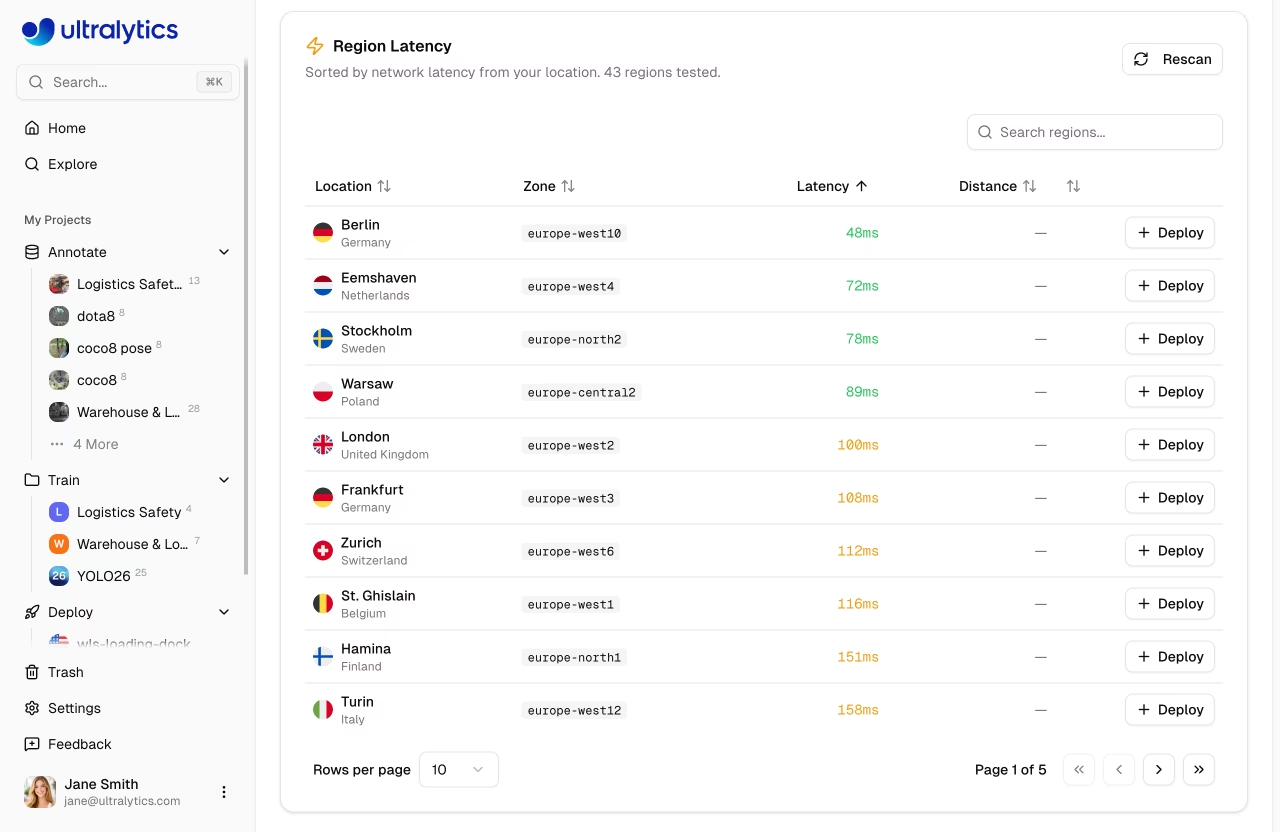
3. Select a region from the region table (sorted by latency from your location)
|
|
4. Click **Deploy** on the region row
|
|
|
|
The deployment name is auto-generated from the model name and region city (e.g., `yolo11n-iowa`).
|
|
|
|
### From the Deployments Page
|
|
|
|
Create a deployment from the global `Deploy` page in the sidebar:
|
|
|
|
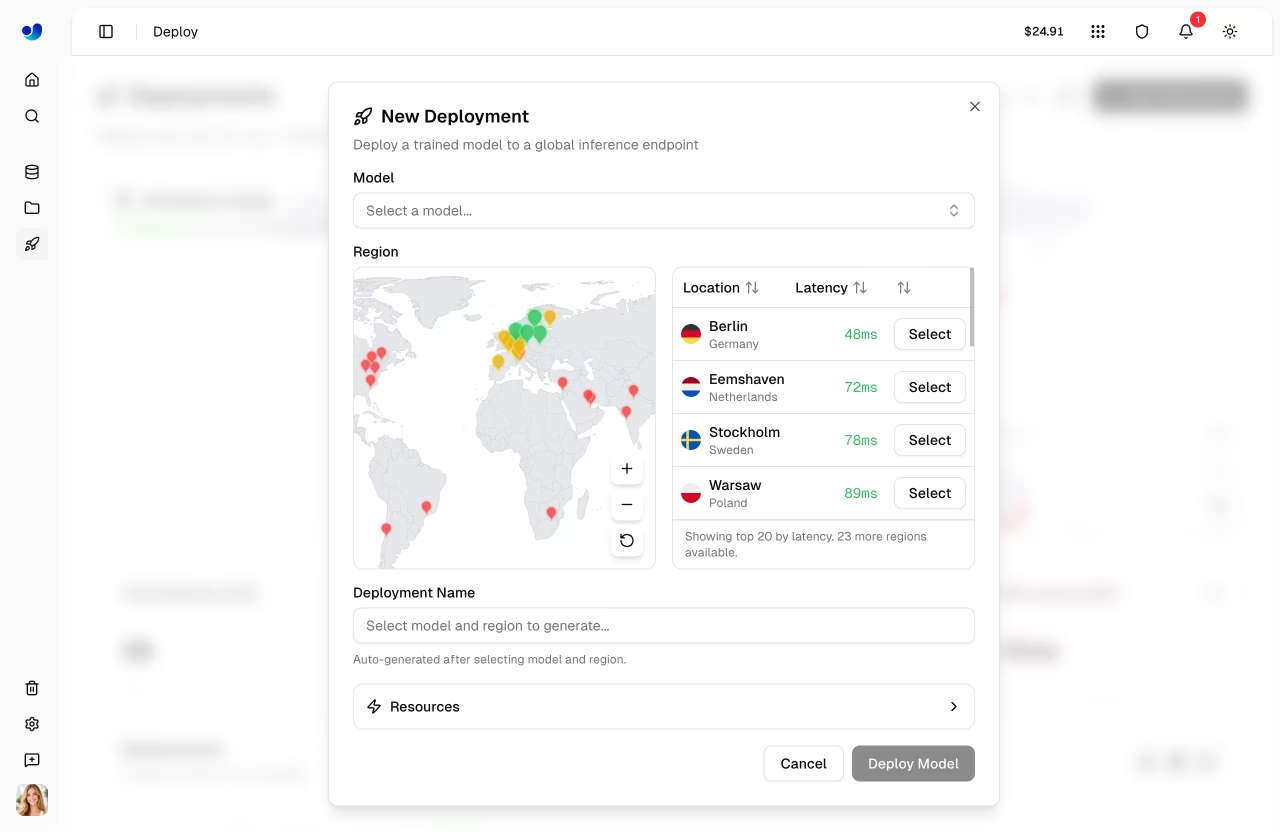
1. Click **New Deployment**
|
|
2. Select a model from the model selector
|
|
3. Select a region from the map or table
|
|
4. Optionally customize the deployment name and resources
|
|
5. Click **Deploy Model**
|
|
|
|
|
|
|
|
### Deployment Lifecycle
|
|
|
|
```mermaid
|
|
stateDiagram-v2
|
|
[*] --> Creating: Deploy
|
|
Creating --> Deploying: Container starting
|
|
Deploying --> Ready: Health check passed
|
|
Ready --> Stopping: Stop
|
|
Stopping --> Stopped: Stopped
|
|
Stopped --> Ready: Start
|
|
Ready --> [*]: Delete
|
|
Stopped --> [*]: Delete
|
|
Creating --> Failed: Error
|
|
Deploying --> Failed: Error
|
|
Failed --> [*]: Delete
|
|
```
|
|
|
|
### Region Selection
|
|
|
|
Choose from 43 regions worldwide. The interactive region map and table show:
|
|
|
|
- **Region pins**: Color-coded by latency (green < 100ms, yellow < 200ms, red > 200ms)
|
|
- **Deployed regions**: Highlighted with a "Deployed" badge
|
|
- **Deploying regions**: Animated pulse indicator
|
|
- **Bidirectional highlighting**: Hover on the map highlights the table row, and vice versa
|
|
|
|
|
|
|
|
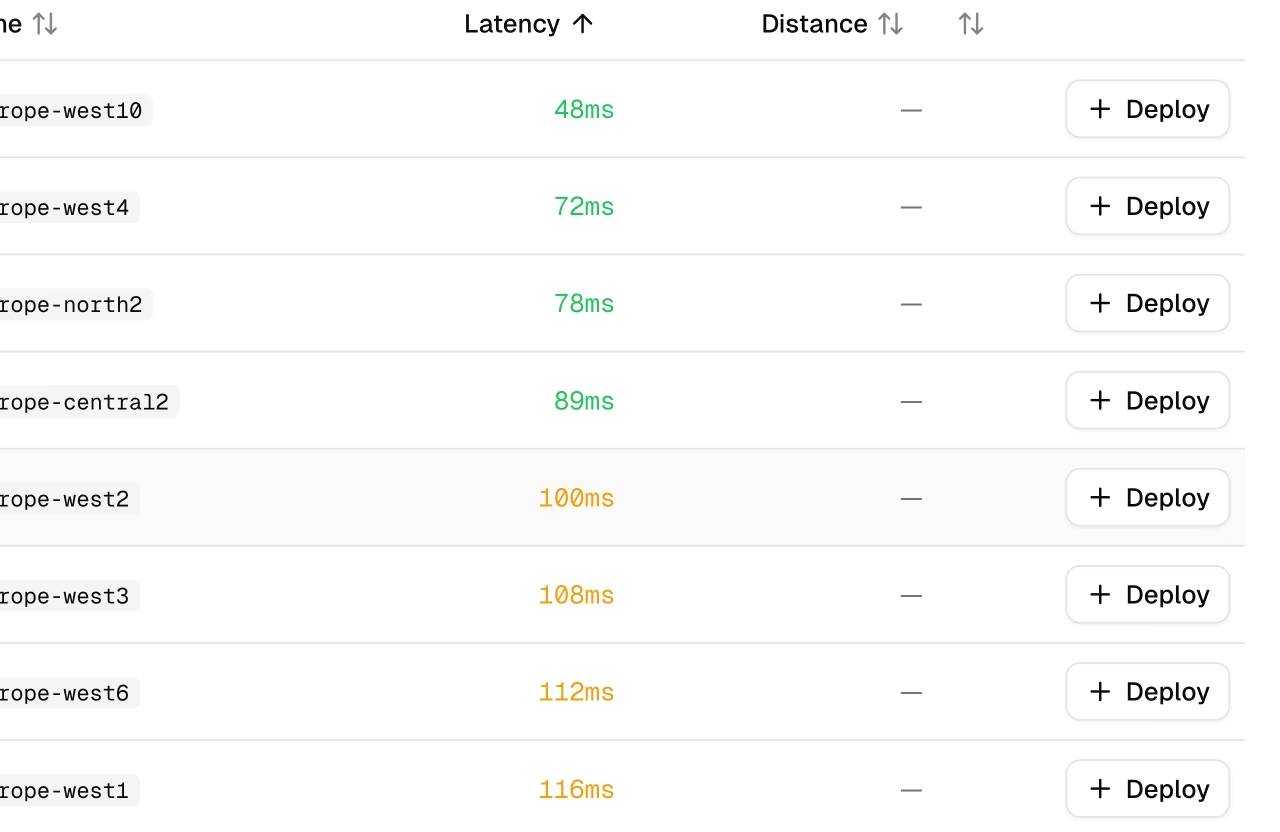
The region table on the model `Deploy` tab includes:
|
|
|
|
| Column | Description |
|
|
| ------------ | ---------------------------------------- |
|
|
| **Location** | City and country with flag icon |
|
|
| **Zone** | Region identifier |
|
|
| **Latency** | Measured ping time (median of 3 pings) |
|
|
| **Distance** | Distance from your location in km |
|
|
| **Actions** | Deploy button or "Deployed" status badge |
|
|
|
|
!!! note "New Deployment Dialog"
|
|
|
|
The `New Deployment` dialog (from the global `Deploy` page) shows a simpler region table with only Location, Latency, and Select columns.
|
|
|
|
!!! tip "Choose Wisely"
|
|
|
|
Select the region closest to your users for lowest latency. Use the **Rescan** button to re-measure latency from your current location.
|
|
|
|
## Available Regions
|
|
|
|
=== "Americas (14)"
|
|
|
|
| Zone | Location |
|
|
| ----------------------- | ---------------------- |
|
|
| us-central1 | Iowa, USA |
|
|
| us-east1 | South Carolina, USA |
|
|
| us-east4 | Northern Virginia, USA |
|
|
| us-east5 | Columbus, USA |
|
|
| us-south1 | Dallas, USA |
|
|
| us-west1 | Oregon, USA |
|
|
| us-west2 | Los Angeles, USA |
|
|
| us-west3 | Salt Lake City, USA |
|
|
| us-west4 | Las Vegas, USA |
|
|
| northamerica-northeast1 | Montreal, Canada |
|
|
| northamerica-northeast2 | Toronto, Canada |
|
|
| northamerica-south1 | Queretaro, Mexico |
|
|
| southamerica-east1 | Sao Paulo, Brazil |
|
|
| southamerica-west1 | Santiago, Chile |
|
|
|
|
=== "Europe (13)"
|
|
|
|
| Zone | Location |
|
|
| ----------------- | ---------------------- |
|
|
| europe-west1 | St. Ghislain, Belgium |
|
|
| europe-west2 | London, UK |
|
|
| europe-west3 | Frankfurt, Germany |
|
|
| europe-west4 | Eemshaven, Netherlands |
|
|
| europe-west6 | Zurich, Switzerland |
|
|
| europe-west8 | Milan, Italy |
|
|
| europe-west9 | Paris, France |
|
|
| europe-west10 | Berlin, Germany |
|
|
| europe-west12 | Turin, Italy |
|
|
| europe-north1 | Hamina, Finland |
|
|
| europe-north2 | Stockholm, Sweden |
|
|
| europe-central2 | Warsaw, Poland |
|
|
| europe-southwest1 | Madrid, Spain |
|
|
|
|
=== "Asia-Pacific (12)"
|
|
|
|
| Zone | Location |
|
|
| -------------------- | ---------------------- |
|
|
| asia-east1 | Changhua, Taiwan |
|
|
| asia-east2 | Kowloon, Hong Kong |
|
|
| asia-northeast1 | Tokyo, Japan |
|
|
| asia-northeast2 | Osaka, Japan |
|
|
| asia-northeast3 | Seoul, South Korea |
|
|
| asia-south1 | Mumbai, India |
|
|
| asia-south2 | Delhi, India |
|
|
| asia-southeast1 | Jurong West, Singapore |
|
|
| asia-southeast2 | Jakarta, Indonesia |
|
|
| asia-southeast3 | Bangkok, Thailand |
|
|
| australia-southeast1 | Sydney, Australia |
|
|
| australia-southeast2 | Melbourne, Australia |
|
|
|
|
=== "Middle East & Africa (4)"
|
|
|
|
| Zone | Location |
|
|
| ------------- | -------------------------- |
|
|
| africa-south1 | Johannesburg, South Africa |
|
|
| me-central1 | Doha, Qatar |
|
|
| me-central2 | Dammam, Saudi Arabia |
|
|
| me-west1 | Tel Aviv, Israel |
|
|
|
|
## Endpoint Configuration
|
|
|
|
### New Deployment Dialog
|
|
|
|
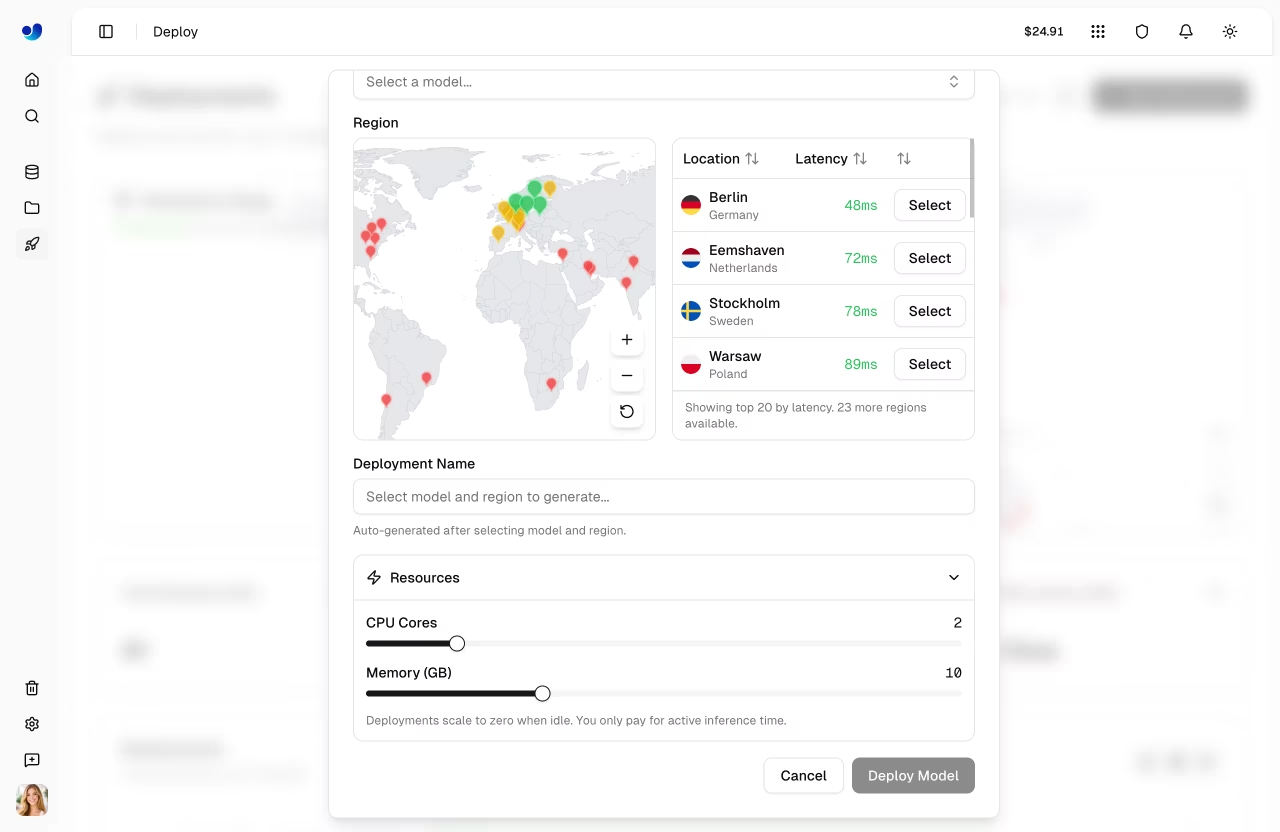
The `New Deployment` dialog provides:
|
|
|
|
| Setting | Description | Default |
|
|
| ------------------- | ---------------------------- | ------- |
|
|
| **Model** | Select from completed models | - |
|
|
| **Region** | Deployment region | - |
|
|
| **Deployment Name** | Auto-generated, editable | - |
|
|
| **CPU Cores** | CPU allocation (1-8) | 1 |
|
|
| **Memory (GB)** | Memory allocation (1-32 GB) | 2 |
|
|
|
|
|
|
|
|
Resource settings are available under the collapsible **Resources** section. Deployments use scale-to-zero by default (min instances = 0, max instances = 1) — you only pay for active inference time.
|
|
|
|
!!! note "Auto-Generated Names"
|
|
|
|
The deployment name is automatically generated from the model name and region city (e.g., `yolo11n-iowa`). If you deploy the same model to the same region again, a numeric suffix is added (e.g., `yolo11n-iowa-2`).
|
|
|
|
### Deploy Tab (Quick Deploy)
|
|
|
|
When deploying from the model's `Deploy` tab, endpoints are created with default resources (1 CPU, 2 GB memory) with scale-to-zero enabled. The deployment name is auto-generated.
|
|
|
|
## Manage Endpoints
|
|
|
|
### View Modes
|
|
|
|
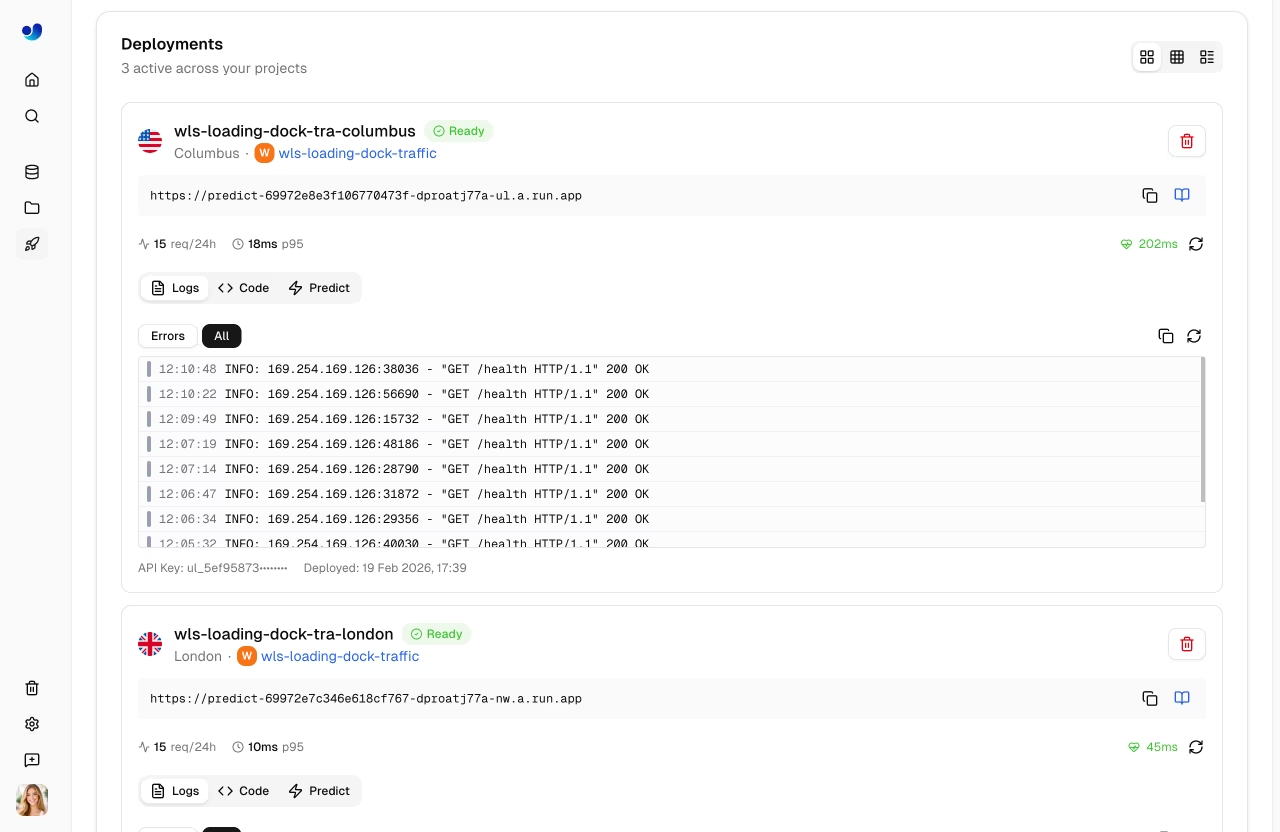
The deployments list supports three view modes:
|
|
|
|
| Mode | Description |
|
|
| ----------- | --------------------------------------------------------- |
|
|
| **Cards** | Full detail cards with logs, code examples, predict panel |
|
|
| **Compact** | Grid of smaller cards with key metrics |
|
|
| **Table** | DataTable with sortable columns and search |
|
|
|
|
|
|
|
|
### Deployment Card (Cards View)
|
|
|
|
Each deployment card in the cards view shows:
|
|
|
|
- **Header**: Name, region flag, status badge, start/stop/delete buttons
|
|
- **Endpoint URL**: Copyable URL with link to API docs
|
|
- **Metrics**: Request count (24h), P95 latency, error rate
|
|
- **Health check**: Live health indicator with latency and manual refresh
|
|
- **Tabs**: `Logs`, `Code`, and `Predict`
|
|
|
|
The `Logs` tab shows recent log entries with severity filtering (All / Errors). The `Code` tab shows ready-to-use code examples in Python, JavaScript, and cURL with your actual endpoint URL and API key. The `Predict` tab provides an inline predict panel for testing directly on the deployment.
|
|
|
|
### Deployment Statuses
|
|
|
|
| Status | Description |
|
|
| ------------- | --------------------------------------- |
|
|
| **Creating** | Deployment is being set up |
|
|
| **Deploying** | Container is starting |
|
|
| **Ready** | Endpoint is live and accepting requests |
|
|
| **Stopping** | Endpoint is shutting down |
|
|
| **Stopped** | Endpoint is paused (no billing) |
|
|
| **Failed** | Deployment failed (see error message) |
|
|
|
|
### Endpoint URL
|
|
|
|
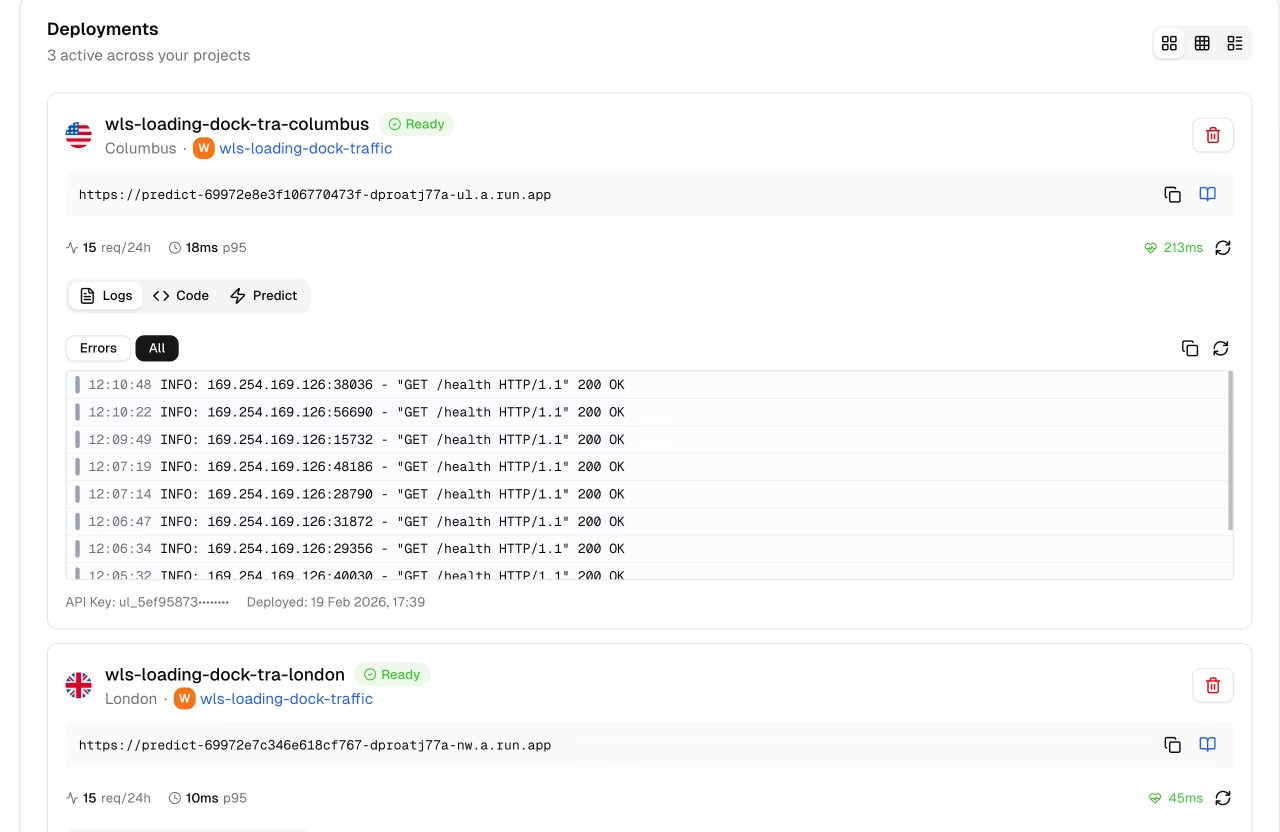
Each endpoint has a unique URL, for example:
|
|
|
|
```
|
|
https://predict-abc123.run.app
|
|
```
|
|
|
|
|
|
|
|
Click the copy button to copy the URL. Click the docs icon to view the auto-generated API documentation for the endpoint.
|
|
|
|
## Lifecycle Management
|
|
|
|
Control your endpoint state:
|
|
|
|
```mermaid
|
|
graph LR
|
|
R[Ready] -->|Stop| S[Stopped]
|
|
S -->|Start| R
|
|
R -->|Delete| D[Deleted]
|
|
S -->|Delete| D
|
|
|
|
style R fill:#4CAF50,color:#fff
|
|
style S fill:#9E9E9E,color:#fff
|
|
style D fill:#F44336,color:#fff
|
|
```
|
|
|
|
| Action | Description |
|
|
| ---------- | ------------------------------- |
|
|
| **Start** | Resume a stopped endpoint |
|
|
| **Stop** | Pause the endpoint (no billing) |
|
|
| **Delete** | Permanently remove endpoint |
|
|
|
|
### Stop Endpoint
|
|
|
|
Stop an endpoint to pause billing:
|
|
|
|
1. Click the pause icon on the deployment card
|
|
2. Endpoint status changes to "Stopping" then "Stopped"
|
|
|
|
Stopped endpoints:
|
|
|
|
- Don't accept requests
|
|
- Don't incur charges
|
|
- Can be restarted anytime
|
|
|
|
### Delete Endpoint
|
|
|
|
Permanently remove an endpoint:
|
|
|
|
1. Click the delete (trash) icon on the deployment card
|
|
2. Confirm deletion in the dialog
|
|
|
|
!!! warning "Permanent Action"
|
|
|
|
Deletion is immediate and permanent. You can always create a new endpoint.
|
|
|
|
## Using Endpoints
|
|
|
|
### Authentication
|
|
|
|
Each deployment is created with an API key from your account. Include it in requests:
|
|
|
|
```bash
|
|
Authorization: Bearer YOUR_API_KEY
|
|
```
|
|
|
|
The API key prefix is displayed on the deployment card footer for identification. Generate keys from [API Keys](../account/api-keys.md).
|
|
|
|
### No Rate Limits
|
|
|
|
Dedicated endpoints are **not subject to the Platform API rate limits**. Requests go directly to your dedicated service, so throughput is limited only by your endpoint's CPU, memory, and scaling configuration. This is a key advantage over [shared inference](inference.md), which is rate-limited to 20 requests/min per API key.
|
|
|
|
### Request Example
|
|
|
|
=== "Python"
|
|
|
|
```python
|
|
import requests
|
|
|
|
# Deployment endpoint
|
|
url = "https://predict-abc123.run.app/predict"
|
|
|
|
# Headers with your deployment API key
|
|
headers = {"Authorization": "Bearer YOUR_API_KEY"}
|
|
|
|
# Inference parameters
|
|
data = {"conf": 0.25, "iou": 0.7, "imgsz": 640}
|
|
|
|
# Send image for inference
|
|
with open("image.jpg", "rb") as f:
|
|
response = requests.post(url, headers=headers, data=data, files={"file": f})
|
|
|
|
print(response.json())
|
|
```
|
|
|
|
=== "JavaScript"
|
|
|
|
```javascript
|
|
// Build form data with image and parameters
|
|
const formData = new FormData();
|
|
formData.append("file", fileInput.files[0]);
|
|
formData.append("conf", "0.25");
|
|
formData.append("iou", "0.7");
|
|
formData.append("imgsz", "640");
|
|
|
|
// Send image for inference
|
|
const response = await fetch(
|
|
"https://predict-abc123.run.app/predict",
|
|
{
|
|
method: "POST",
|
|
headers: { Authorization: "Bearer YOUR_API_KEY" },
|
|
body: formData,
|
|
}
|
|
);
|
|
|
|
const result = await response.json();
|
|
console.log(result);
|
|
```
|
|
|
|
=== "cURL"
|
|
|
|
```bash
|
|
curl -X POST \
|
|
"https://predict-abc123.run.app/predict" \
|
|
-H "Authorization: Bearer YOUR_API_KEY" \
|
|
-F "file=@image.jpg" \
|
|
-F "conf=0.25" \
|
|
-F "iou=0.7" \
|
|
-F "imgsz=640"
|
|
```
|
|
|
|
### Request Parameters
|
|
|
|
| Parameter | Type | Default | Description |
|
|
| ----------- | ------ | ------- | ----------------------------- |
|
|
| `file` | file | - | Image file (required) |
|
|
| `conf` | float | 0.25 | Minimum confidence threshold |
|
|
| `iou` | float | 0.7 | NMS IoU threshold |
|
|
| `imgsz` | int | 640 | Input image size |
|
|
| `normalize` | string | - | Return normalized coordinates |
|
|
|
|
### Response Format
|
|
|
|
Same as [shared inference](inference.md#response) with task-specific fields.
|
|
|
|
## Pricing
|
|
|
|
Dedicated endpoints bill based on:
|
|
|
|
| Component | Rate |
|
|
| ------------ | -------------------- |
|
|
| **CPU** | Per vCPU-second |
|
|
| **Memory** | Per GB-second |
|
|
| **Requests** | Per million requests |
|
|
|
|
!!! tip "Cost Optimization"
|
|
|
|
- Use scale-to-zero for development endpoints
|
|
- Set appropriate max instances
|
|
- Monitor usage in the [Monitoring](monitoring.md) dashboard
|
|
- Review costs in [Settings > Billing](../account/billing.md)
|
|
|
|
## FAQ
|
|
|
|
### How many endpoints can I create?
|
|
|
|
Endpoint limits depend on plan:
|
|
|
|
- **Free**: Up to 3 deployments
|
|
- **Pro**: Up to 10 deployments
|
|
- **Enterprise**: Unlimited deployments
|
|
|
|
Each model can still be deployed to multiple regions within your plan quota.
|
|
|
|
### Can I change the region after deployment?
|
|
|
|
No, regions are fixed. To change regions:
|
|
|
|
1. Delete the existing endpoint
|
|
2. Create a new endpoint in the desired region
|
|
|
|
### How do I handle multi-region deployment?
|
|
|
|
For global coverage:
|
|
|
|
1. Deploy to multiple regions
|
|
2. Use a load balancer or DNS routing
|
|
3. Route users to the nearest endpoint
|
|
|
|
### What's the cold start time?
|
|
|
|
Cold start time depends on model size and whether the container is already cached in the region. Typical ranges:
|
|
|
|
| Scenario | Cold Start |
|
|
| ------------------- | -------------- |
|
|
| Cached container | ~5-15 seconds |
|
|
| First deploy/region | ~15-45 seconds |
|
|
|
|
The health check uses a 55-second timeout to accommodate worst-case cold starts.
|
|
|
|
### Can I use custom domains?
|
|
|
|
Custom domains are coming soon. Currently, endpoints use platform-generated URLs.
|