
166 lines
6.8 KiB
Markdown
Executable File
166 lines
6.8 KiB
Markdown
Executable File
---
|
|
comments: true
|
|
description: Learn about data management in Ultralytics Platform including dataset upload, annotation tools, and statistics visualization for YOLO model training.
|
|
keywords: Ultralytics Platform, data management, datasets, annotation, YOLO, computer vision, data preparation, labeling
|
|
---
|
|
|
|
# Data Preparation
|
|
|
|
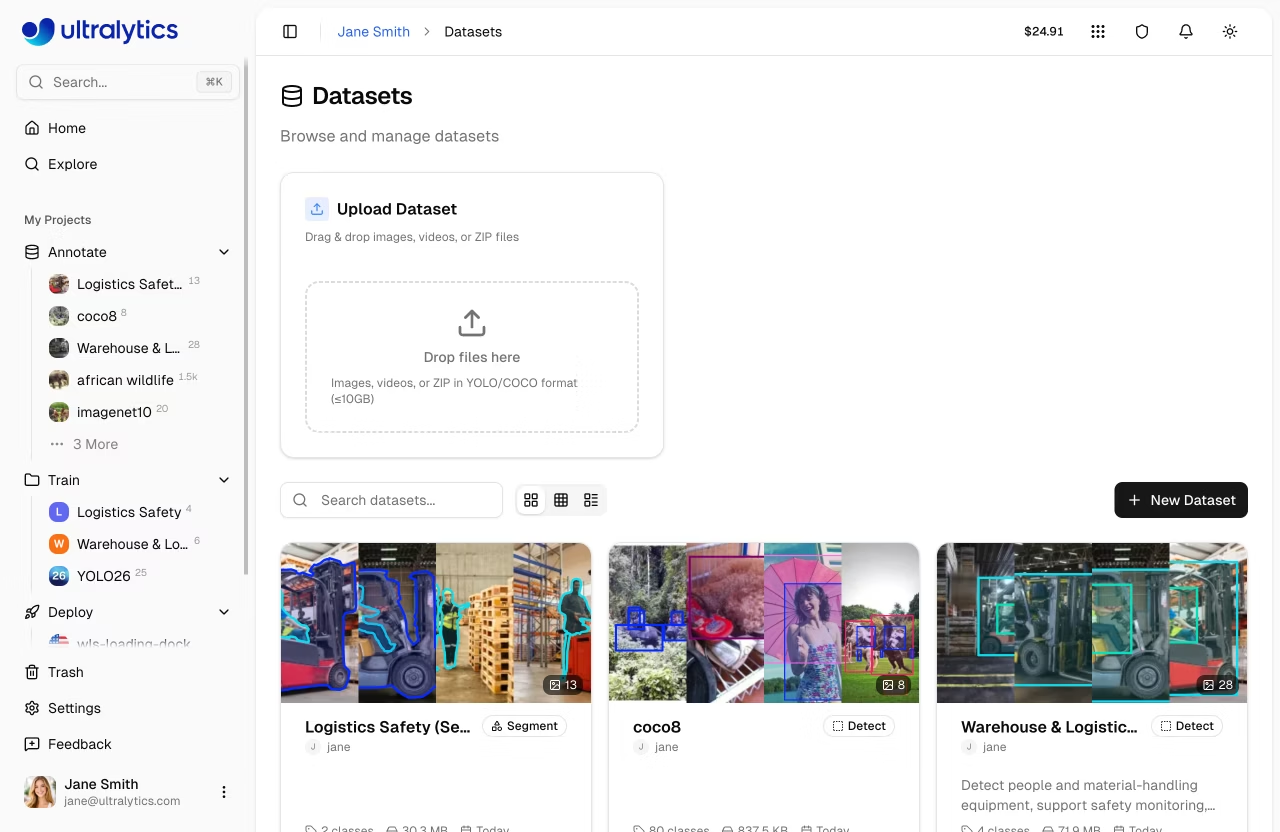
Data preparation is the foundation of successful [computer vision](https://www.ultralytics.com/glossary/computer-vision-cv) models. [Ultralytics Platform](https://platform.ultralytics.com) provides comprehensive tools for managing your training data, from upload through annotation to analysis.
|
|
|
|
## Overview
|
|
|
|
The Data section of Ultralytics Platform helps you:
|
|
|
|
- **Upload** images, videos, and archives (ZIP, TAR, GZ)
|
|
- **Annotate** with manual drawing tools and SAM-powered smart labeling
|
|
- **Analyze** your data with statistics and visualizations
|
|
- **Export** in [NDJSON format](../../datasets/detect/index.md#ultralytics-ndjson-format) for local training
|
|
|
|
|
|
|
|
## Workflow
|
|
|
|
```mermaid
|
|
graph LR
|
|
A[Upload] --> B[Annotate]
|
|
B --> C[Analyze]
|
|
C --> D[Train]
|
|
|
|
style A fill:#4CAF50,color:#fff
|
|
style B fill:#2196F3,color:#fff
|
|
style C fill:#FF9800,color:#fff
|
|
style D fill:#9C27B0,color:#fff
|
|
```
|
|
|
|
| Stage | Description |
|
|
| ------------ | ----------------------------------------------------------------------------------------------------- |
|
|
| **Upload** | Import images, videos, or archives with automatic processing |
|
|
| **Annotate** | Label data with bounding boxes, polygons, keypoints, or classifications |
|
|
| **Analyze** | View class distributions, spatial heatmaps, and dimension statistics |
|
|
| **Export** | Download in [NDJSON format](../../datasets/detect/index.md#ultralytics-ndjson-format) for offline use |
|
|
|
|
## Supported Tasks
|
|
|
|
Ultralytics Platform supports all 5 YOLO task types:
|
|
|
|
| Task | Description | Annotation Tool |
|
|
| ------------------------------------------------ | ------------------------------------------- | ----------------- |
|
|
| **[Detect](../../datasets/detect/index.md)** | Object detection with bounding boxes | Rectangle tool |
|
|
| **[Segment](../../datasets/segment/index.md)** | Instance segmentation with pixel masks | Polygon tool |
|
|
| **[Pose](../../datasets/pose/index.md)** | Keypoint estimation (17-point COCO format) | Keypoint tool |
|
|
| **[OBB](../../datasets/obb/index.md)** | Oriented bounding boxes for rotated objects | Oriented box tool |
|
|
| **[Classify](../../datasets/classify/index.md)** | Image-level classification | Class selector |
|
|
|
|
!!! info "Task Type Selection"
|
|
|
|
The task type is set when creating a dataset and determines which annotation tools are available. You can change it later from the dataset settings, but incompatible annotations won't be displayed after switching.
|
|
|
|
## Key Features
|
|
|
|
### Smart Storage
|
|
|
|
Ultralytics Platform uses Content-Addressable Storage (CAS) for efficient data management:
|
|
|
|
- **Deduplication**: Identical images stored only once via XXH3-128 hashing
|
|
- **Integrity**: Hash-based addressing ensures data integrity
|
|
- **Efficiency**: Optimized storage and fast processing
|
|
|
|
### Dataset URIs
|
|
|
|
Reference datasets using the `ul://` URI format (see [Using Platform Datasets](../api/index.md#using-platform-datasets)):
|
|
|
|
```bash
|
|
yolo train data=ul://username/datasets/my-dataset
|
|
```
|
|
|
|
This allows training on the platform's datasets from any machine with your [API key](../account/api-keys.md) configured.
|
|
|
|
!!! example "Use Platform Data from Python"
|
|
|
|
```python
|
|
from ultralytics import YOLO
|
|
|
|
model = YOLO("yolo26n.pt")
|
|
model.train(data="ul://username/datasets/my-dataset", epochs=100)
|
|
```
|
|
|
|
### Dataset Tabs
|
|
|
|
Every dataset page provides five tabs:
|
|
|
|
| Tab | Description |
|
|
| ----------- | ---------------------------------------------------------------------------- |
|
|
| **Images** | Browse images in grid, compact, or table view with annotation overlays |
|
|
| **Classes** | View and edit class names, colors, and label counts per class |
|
|
| **Charts** | Automatic statistics: split distribution, class counts, heatmaps |
|
|
| **Models** | [Models](../train/models.md) trained on this dataset with metrics and status |
|
|
| **Errors** | Images that failed processing with error details and fix guidance |
|
|
|
|
### Statistics and Visualization
|
|
|
|
The `Charts` tab provides automatic analysis including:
|
|
|
|
- **Split Distribution**: Donut chart of train/val/test image counts
|
|
- **Top Classes**: Donut chart of most frequent annotation classes
|
|
- **Image Widths**: Histogram of image width distribution
|
|
- **Image Heights**: Histogram of image height distribution
|
|
- **Points per Instance**: Polygon vertex or keypoint count distribution (segment/pose datasets)
|
|
- **Annotation Locations**: 2D heatmap of bounding box center positions
|
|
- **Image Dimensions**: 2D heatmap of width vs height with aspect ratio guide lines
|
|
|
|
## Quick Links
|
|
|
|
- [**Datasets**](datasets.md): Upload and manage your training data
|
|
- [**Annotation**](annotation.md): Label data with manual and AI-assisted tools
|
|
|
|
## FAQ
|
|
|
|
### What file formats are supported for upload?
|
|
|
|
Ultralytics Platform supports:
|
|
|
|
**Images:** JPEG, PNG, WebP, BMP, TIFF, HEIC, AVIF, JP2, DNG, MPO (max 50MB each)
|
|
|
|
**Videos:** MP4, WebM, MOV, AVI, MKV, M4V (max 1GB, frames extracted at 1 FPS, max 100 frames)
|
|
|
|
**Archives:** ZIP, TAR, TAR.GZ, TGZ, GZ (max 10GB) containing images with optional [YOLO-format labels](../../datasets/detect/index.md#ultralytics-yolo-format)
|
|
|
|
### What is the maximum dataset size?
|
|
|
|
Storage limits depend on your plan:
|
|
|
|
| Plan | Storage Limit |
|
|
| ---------- | ------------- |
|
|
| Free | 100 GB |
|
|
| Pro | 500 GB |
|
|
| Enterprise | Custom |
|
|
|
|
Individual file limits: Images 50MB, Videos 1GB, Archives 10GB
|
|
|
|
### Can I use my Platform datasets for local training?
|
|
|
|
Yes! Use the dataset URI format to train locally:
|
|
|
|
=== "CLI"
|
|
|
|
```bash
|
|
export ULTRALYTICS_API_KEY="your_key"
|
|
yolo train model=yolo26n.pt data=ul://username/datasets/my-dataset epochs=100
|
|
```
|
|
|
|
=== "Python"
|
|
|
|
```python
|
|
import os
|
|
|
|
os.environ["ULTRALYTICS_API_KEY"] = "your_key"
|
|
|
|
from ultralytics import YOLO
|
|
|
|
model = YOLO("yolo26n.pt")
|
|
model.train(data="ul://username/datasets/my-dataset", epochs=100)
|
|
```
|
|
|
|
Or export your dataset in [NDJSON format](../../datasets/detect/index.md#ultralytics-ndjson-format) for fully offline training.
|