
10 KiB
Executable File
comments, description, keywords
| comments | description | keywords |
|---|---|---|
| true | Manage credits, payments, and subscriptions on Ultralytics Platform with transparent pricing for cloud training and deployments. | Ultralytics Platform, billing, credits, pricing, subscription, payments, training costs |
Billing
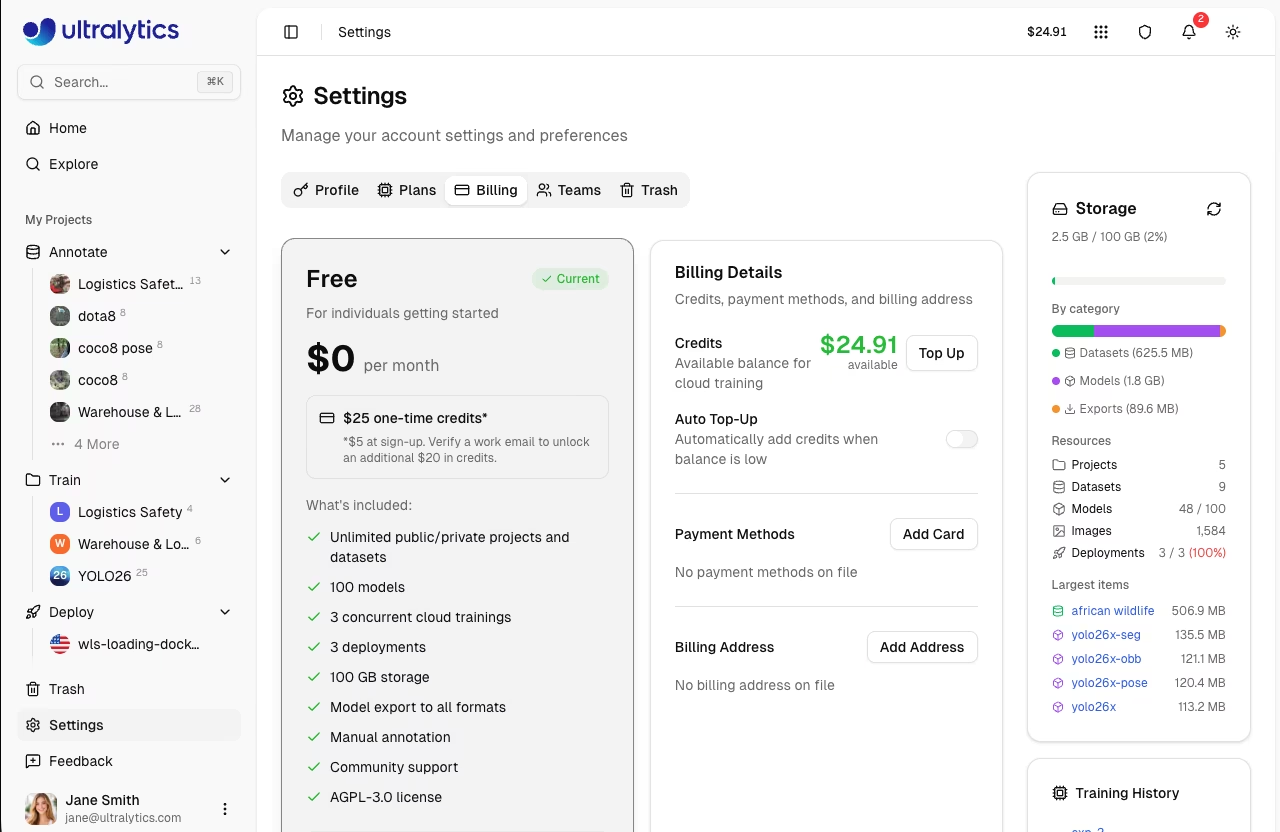
Ultralytics Platform uses a credit-based billing system for cloud training and dedicated endpoints. Add credits, track usage, and manage your subscription from Settings > Billing.
Plans
Choose the plan that fits your needs. Compare plans in Settings > Plans:
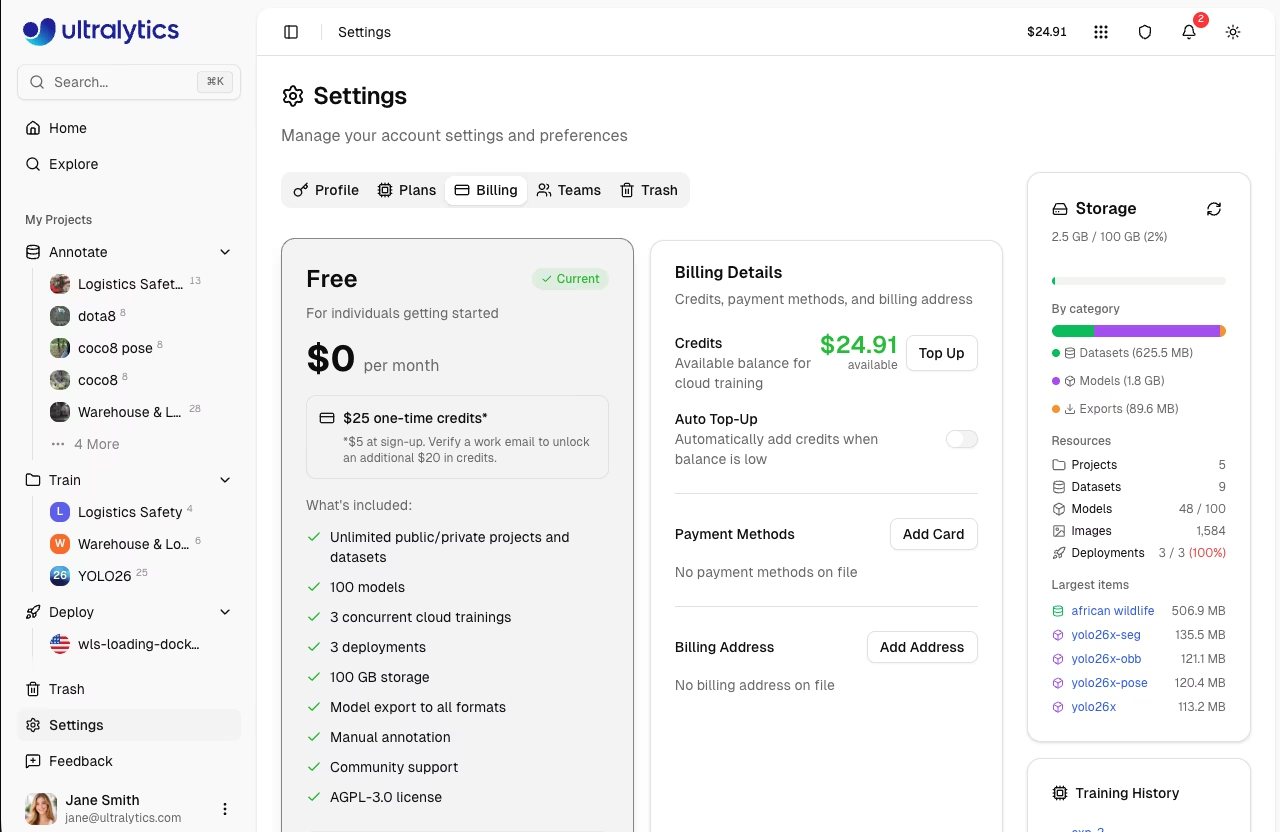
| Feature | Free | Pro ($29/mo) | Enterprise |
|---|---|---|---|
| Signup Credit | $5 / $25* | - | Custom |
| Monthly Credit | - | $30/seat/month | Custom |
| Models | 100 | 500 | Unlimited |
| Concurrent Trainings | 3 | 10 | Unlimited |
| Storage | 100 GB | 500 GB | Unlimited |
| Deployments | 3 | 10 (warm-start) | Unlimited |
| Teams | - | Up to 5 members | Up to 50 |
| Best GPUs (H200, B200) | - | Yes | Yes |
| SSO / SAML | - | - | Yes |
| Enterprise License | - | - | Yes |
| License | AGPL-3.0 | AGPL-3.0 | Enterprise |
*Free plan: $5 at signup, or $25 if you verify a company/work email address.
Free Plan
Get started at no cost:
- $5 signup credit ($25 for verified company/work emails)
- Unlimited public and private projects and datasets
- 100 models
- 3 concurrent cloud trainings
- 3 deployments
- 100 GB storage
- Model export to all formats
- Manual annotation
- Community support
!!! tip "Company Email Bonus"
Sign up with a company email address (not gmail.com, outlook.com, etc.) to receive $25 in signup credits instead of $5.
Pro Plan
For professionals and small teams ($29/month or $290/year):
- $30/seat/month in credits (recurring)
- 500 models
- 10 concurrent cloud trainings
- 500 GB storage
- 10 warm-start deployments (faster cold starts)
- Team collaboration (up to 5 members)
- Access to the best GPUs (H200, B200)
- Priority support
!!! tip "Save with Yearly Billing"
Choose yearly billing ($290/year) to save 17% compared to monthly billing.
Enterprise
For organizations with advanced needs:
- $1,000/month in credits (starting allocation)
- Custom credit allocation
- Unlimited models, storage, trainings, and deployments
- Enterprise License (commercial use, non-AGPL)
- SSO / SAML authentication
- RBAC with 4 roles (Owner, Admin, Editor, Viewer)
- Custom roles with granular permissions
- On-premise deployment options
- Compliance (ISO/SOC)
- SLA guarantees
- Enterprise support
Contact sales@ultralytics.com for Enterprise pricing.
Credits
Credits are the currency for Platform compute services.
Credit Balance
View your balance in Settings > Billing:
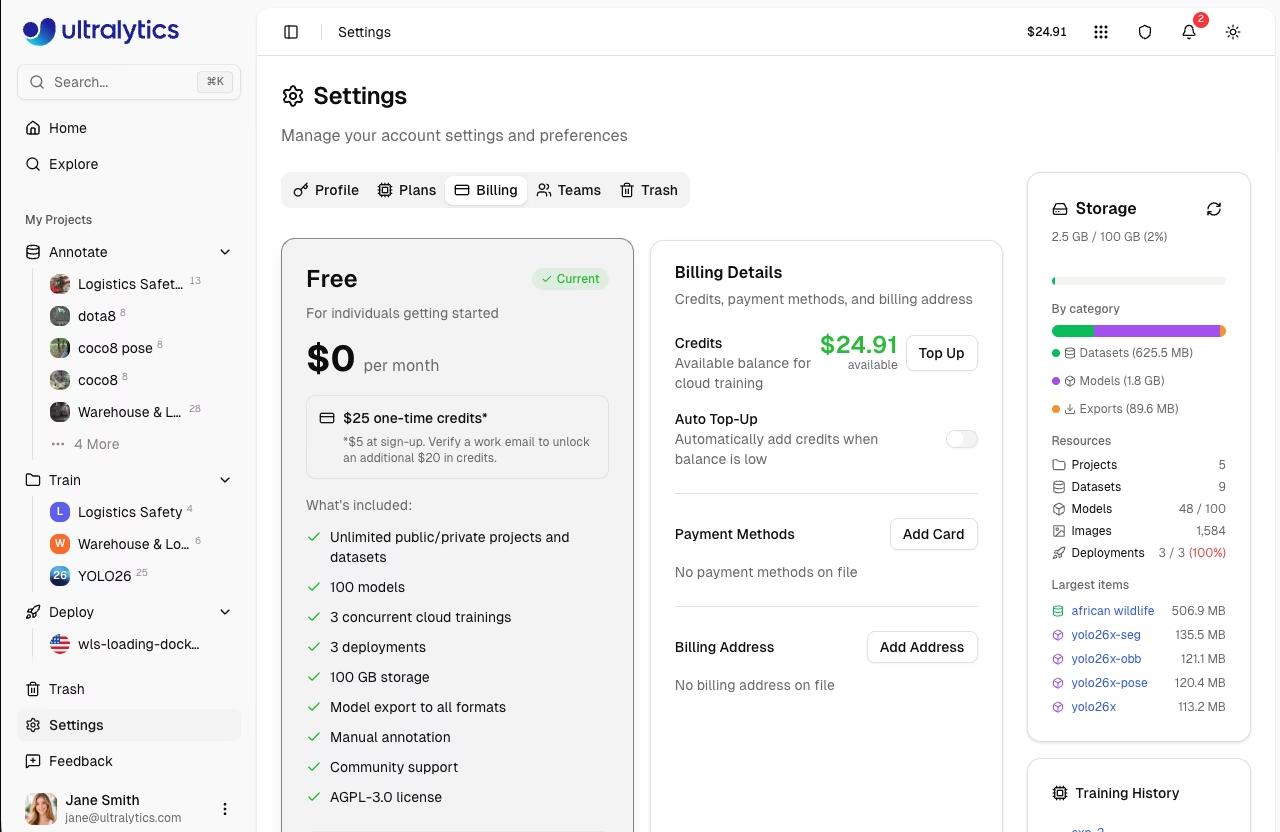
| Balance Type | Description |
|---|---|
| Total Balance | Available credits for cloud training |
| Promotional Credits | Credits from signup or monthly grants |
Credit Uses
Credits are consumed by:
| Service | Rate |
|---|---|
| Cloud Training | GPU rate x hours |
Add Credits
Top up your balance:
- Go to Settings > Billing
- Click Top Up
- Select or enter amount ($5 - $1,000)
- Complete payment
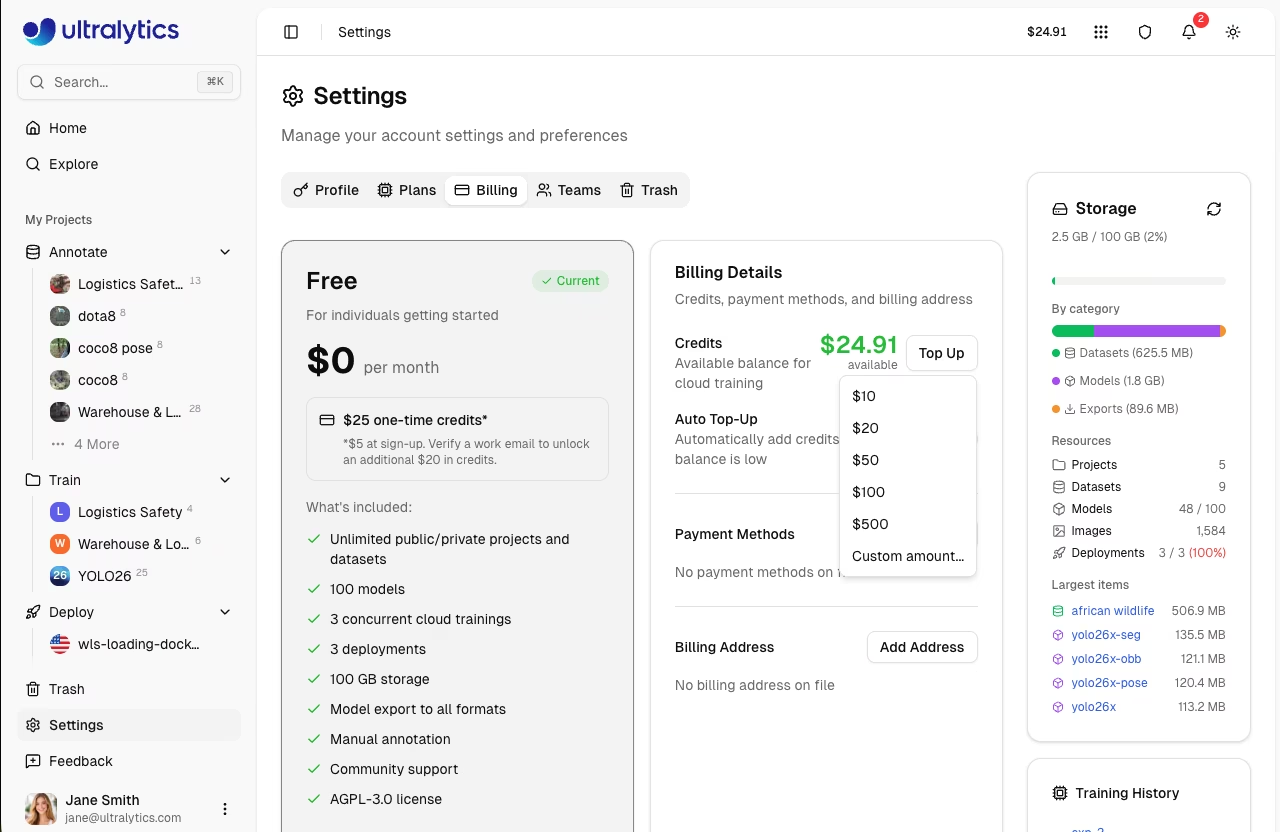
Top-Up Presets
| Amount |
|---|
| $10 |
| $20 |
| $50 |
| $100 |
| $500 |
Custom amounts between $5 and $1,000 are also supported.
Auto Top-Up
Enable automatic credit purchases when your balance drops below a threshold:
- Go to Settings > Billing
- Toggle Auto Top-Up on
- Set Threshold (balance level that triggers a top-up)
- Set Amount (credits to purchase when triggered)
- Click Save
Default settings: threshold $20, amount $100.
!!! tip "Uninterrupted Training"
Enable auto top-up to ensure training jobs are never interrupted by insufficient credits.
Payment Methods
Manage payment methods in Settings > Billing:
- Add Card: Click Add Card to add a credit or debit card
- Set Default: Set a default payment method for top-ups and subscriptions
- Remove: Remove payment methods you no longer need
Billing Address
Set a billing address for invoices:
- Go to Settings > Billing
- Click Add Address (or Edit if already set)
- Enter your billing details (name, address, country)
- Click Save
Training Cost Flow
Cloud training estimates cost before start and charges for actual GPU time used.
flowchart LR
    A[Start Training] --> B[Estimate Cost]
    B --> C[Run Training]
    C --> D[Charge Actual Usage]
How It Works
- Estimate: Platform calculates estimated cost based on model size, dataset size, epochs, and GPU
- Authorize Start: Your available balance is checked before training starts
- Train: Job runs on the selected GPU
- Charge: On completion (or cancellation), billing uses actual runtime
!!! success "Consumer Protection"
You pay for actual compute time used, including partial runs that are cancelled.
Training Costs
Cloud training costs depend on GPU selection:
| GPU | VRAM | Rate/Hour |
|---|---|---|
| RTX 2000 Ada | 16 GB | $0.24 |
| RTX A4500 | 20 GB | $0.24 |
| RTX A5000 | 24 GB | $0.26 |
| RTX 4000 Ada | 20 GB | $0.38 |
| L4 | 24 GB | $0.39 |
| A40 | 48 GB | $0.40 |
| RTX 3090 | 24 GB | $0.46 |
| RTX A6000 | 48 GB | $0.49 |
| RTX 4090 | 24 GB | $0.59 |
| RTX 6000 Ada | 48 GB | $0.77 |
| L40S | 48 GB | $0.86 |
| RTX 5090 | 32 GB | $0.89 |
| L40 | 48 GB | $0.99 |
| A100 PCIe | 80 GB | $1.39 |
| A100 SXM | 80 GB | $1.49 |
| RTX PRO 6000 | 96 GB | $1.89 |
| H100 PCIe | 80 GB | $2.39 |
| H100 SXM | 80 GB | $2.69 |
| H100 NVL | 94 GB | $3.07 |
| H200 NVL | 143 GB | $3.39 |
| H200 SXM | 141 GB | $3.59 |
| B200 | 180 GB | $4.99 |
See Cloud Training for complete GPU options and pricing.
Cost Calculation
Total Cost = GPU Rate x Training Time (hours)
Example: Training for 2.5 hours on RTX PRO 6000
$1.89 x 2.5 = $4.73
Upgrade to Pro
Upgrade for more features and monthly credits:
- Go to Settings > Plans
- Click Upgrade to Pro
- Choose billing cycle (Monthly or Yearly)
- Complete checkout
Pro Benefits
After upgrading:
- $30/seat/month credit added immediately and each month
- Storage increased to 500 GB
- 500 models
- 10 concurrent cloud trainings
- 10 warm-start deployments
- Team collaboration (up to 5 members)
- Access to best GPUs
- Priority support
Cancel Pro
Cancel anytime from the billing portal:
- Go to Settings > Billing
- Click Manage Subscription
- Select Cancel
- Confirm cancellation
!!! note "Cancellation Timing"
Pro features remain active until the end of your billing period. Monthly credits stop at cancellation.
Transaction History
View all transactions in Settings > Billing:
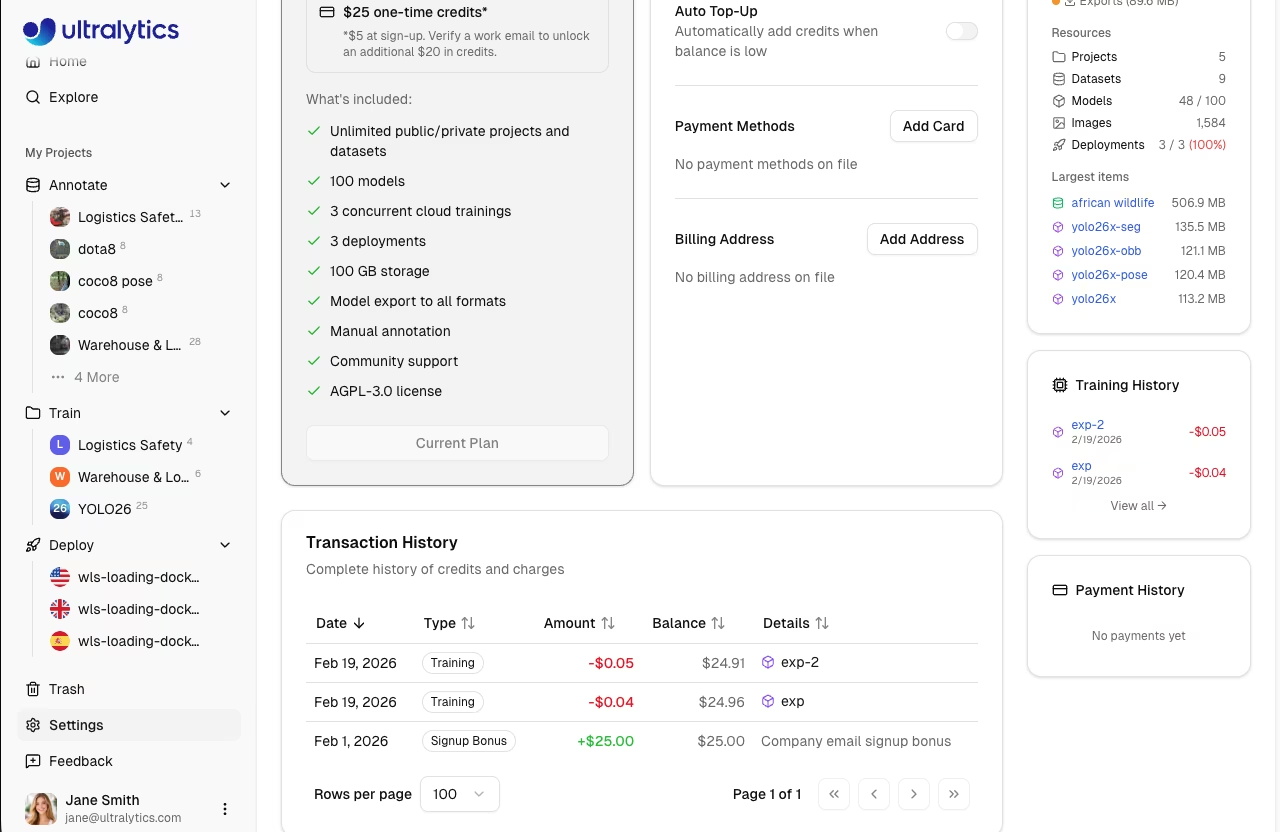
| Column | Description |
|---|---|
| Date | Transaction date |
| Type | Signup Bonus, Credit Purchase, Monthly Grant, Training, Refund, Adjustment, Auto Top-Up, Auto Top-Up Failed |
| Amount | Transaction value (green for credits, red for charges) |
| Balance | Resulting balance after transaction |
| Details | Additional context (model link, receipt, period) |
FAQ
What happens when I run out of credits?
- Active training: Cannot start new training jobs
- Deployments: Continue running
- New training: Requires credits to start
Add credits or enable auto top-up to continue training.
Are unused credits refundable?
- Purchased credits: No refunds
- Signup/monthly credits: No refunds (use it or lose it)
Can I transfer credits?
Credits are not transferable between accounts.
How do I get an invoice?
Transaction receipts are available in the transaction history. Click the receipt icon next to any purchase transaction.
What if training fails?
You're only charged for completed compute time. Failed jobs don't charge for unused time.
Is there a free trial?
The Free plan includes $5 signup credit ($25 with a company email) -- essentially a free trial. No credit card required to start.