
197 lines
7.4 KiB
Markdown
Executable File
197 lines
7.4 KiB
Markdown
Executable File
---
|
|
comments: true
|
|
description: Track all account activity and events on Ultralytics Platform with the activity feed, including training, uploads, and system events.
|
|
keywords: Ultralytics Platform, activity feed, audit log, notifications, event tracking, activity history
|
|
---
|
|
|
|
# Activity Feed
|
|
|
|
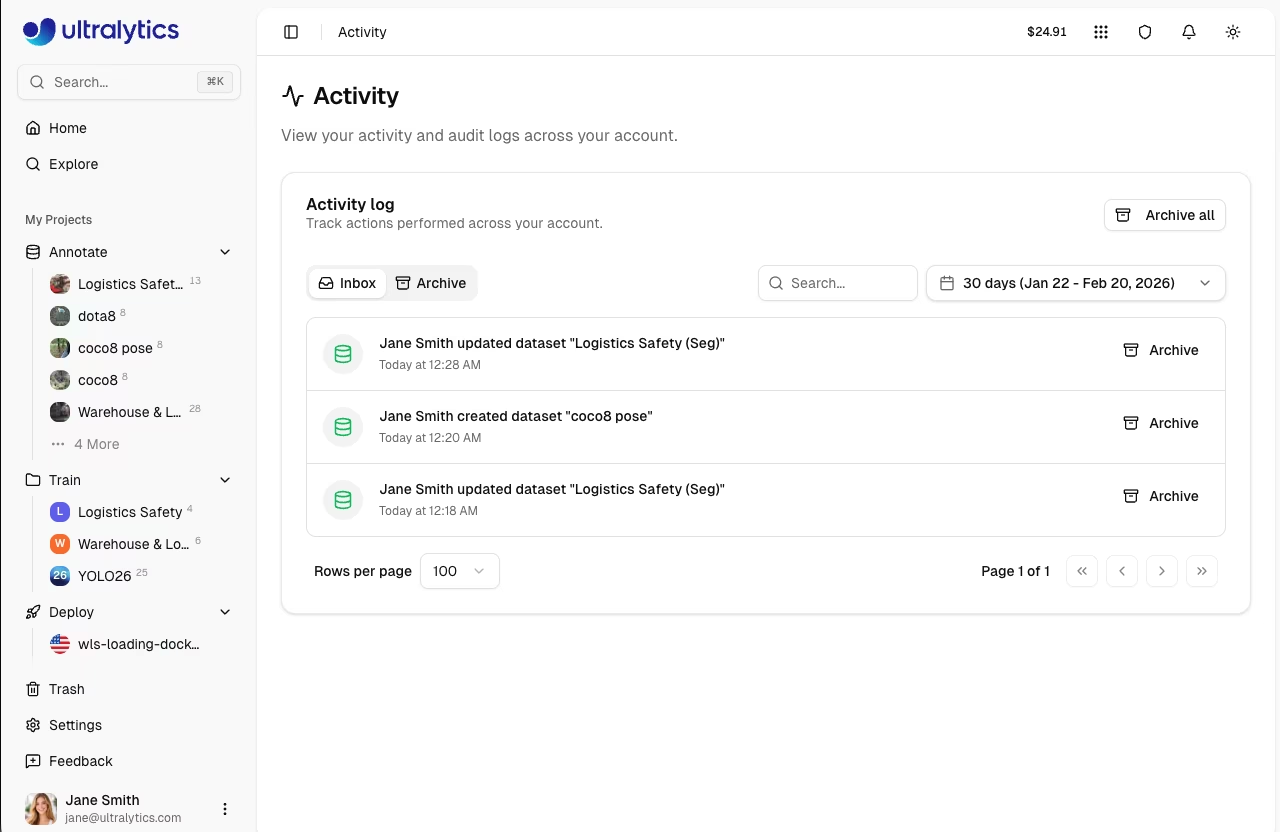
[Ultralytics Platform](https://platform.ultralytics.com) provides a comprehensive activity feed that tracks all events and actions across your account. Monitor training progress and system events in one centralized location.
|
|
|
|
|
|
|
|
## Overview
|
|
|
|
The Activity Feed serves as your central hub for:
|
|
|
|
- **Training updates**: Job started, completed, failed, or cancelled
|
|
- **Data changes**: Datasets created, modified, or deleted
|
|
- **Model events**: Model creation, exports, and deployments
|
|
- **Project events**: Project creation, updates, and deletion
|
|
- **API key events**: Key creation and revocation
|
|
- **Settings changes**: Profile and account updates
|
|
- **System alerts**: Onboarding and account notifications
|
|
|
|
## Accessing Activity
|
|
|
|
Navigate to the Activity Feed:
|
|
|
|
1. Click **Activity** in the sidebar
|
|
2. Or navigate directly to `/activity`
|
|
|
|

|
|
|
|
## Activity Types
|
|
|
|
The Platform tracks the following resource types and actions:
|
|
|
|
| Resource Type | Description | Icon Color |
|
|
| -------------- | ------------------------------------------- | ------------------- |
|
|
| **project** | [Project](../train/projects.md) events | Blue |
|
|
| **dataset** | [Dataset](../data/datasets.md) events | Green |
|
|
| **model** | [Model](../train/models.md) events | Purple |
|
|
| **training** | Training job events | Blue/Green/Red/Gray |
|
|
| **settings** | Account settings changes | Gray |
|
|
| **api_key** | [API key](api-keys.md) creation/revocation | Amber |
|
|
| **export** | Model export events | Amber |
|
|
| **deployment** | [Deployment](../deploy/endpoints.md) events | Blue |
|
|
| **onboarding** | Onboarding completion | Green |
|
|
|
|
### Action Types
|
|
|
|
Each event includes one of the following action types:
|
|
|
|
| Action | Description |
|
|
| ------------- | -------------------------------------------- |
|
|
| **created** | Resource was created |
|
|
| **updated** | Resource was modified |
|
|
| **deleted** | Resource was permanently deleted |
|
|
| **trashed** | Resource was moved to trash |
|
|
| **restored** | Resource was restored from trash |
|
|
| **started** | Training or export job was started |
|
|
| **completed** | Training or export job finished successfully |
|
|
| **failed** | Training or export job failed |
|
|
| **cancelled** | Training or export job was cancelled |
|
|
| **uploaded** | Data was uploaded (images, model weights) |
|
|
| **shared** | Resource visibility changed to public |
|
|
| **unshared** | Resource visibility changed to private |
|
|
| **exported** | Model was exported to a deployment format |
|
|
| **cloned** | Resource was cloned to another location |
|
|
|
|
## Inbox and Archive
|
|
|
|
Organize your activity with two tabs:
|
|
|
|
### Inbox
|
|
|
|
The Inbox shows recent activity:
|
|
|
|
- New events appear here automatically
|
|
- Unseen events are highlighted with a colored background
|
|
- Events are automatically marked as seen when you view the page
|
|
- Click **Archive** on individual events to move them out of Inbox
|
|
|
|
### Archive
|
|
|
|
Move events to Archive to keep your Inbox clean:
|
|
|
|
- Click **Archive** on individual events
|
|
- Click **Archive all** to archive all Inbox events at once
|
|
- Access archived events via the `Archive` tab
|
|
- Click **Restore** on archived events to move them back to Inbox
|
|
|
|
## Search and Filtering
|
|
|
|
Find specific events quickly:
|
|
|
|
### Search
|
|
|
|
Use the search bar to find events by resource name or event description.
|
|
|
|
### Date Range
|
|
|
|
Filter by time period using the date range picker:
|
|
|
|
- Select a start and end date
|
|
- No default date filter (shows all events)
|
|
- Custom date ranges supported
|
|
|
|

|
|
|
|
## Event Details
|
|
|
|
Each event displays:
|
|
|
|
| Field | Description |
|
|
| --------------- | -------------------------------------------------- |
|
|
| **Icon** | Resource type indicator |
|
|
| **Description** | What happened (e.g., "Created project my-project") |
|
|
| **Timestamp** | Relative time (e.g., "2 hours ago") |
|
|
| **Metadata** | Additional context when available |
|
|
|
|
## Undo Support
|
|
|
|
Some actions support undo directly from the Activity feed:
|
|
|
|
- **Settings changes**: Click **Undo** next to a settings update event to revert the change
|
|
- Undo is available for a short time window after the action
|
|
|
|
## Pagination
|
|
|
|
The Activity feed supports pagination:
|
|
|
|
- Default page size: 20 events
|
|
- Navigate between pages using the pagination controls
|
|
- Page size is configurable via URL query parameter
|
|
|
|
## API Access
|
|
|
|
Access activity programmatically via the [REST API](../api/index.md#activity-api):
|
|
|
|
=== "List Activity"
|
|
|
|
```bash
|
|
curl -H "Authorization: Bearer YOUR_API_KEY" \
|
|
https://platform.ultralytics.com/api/activity
|
|
```
|
|
|
|
=== "Filter and Search"
|
|
|
|
```bash
|
|
curl -H "Authorization: Bearer YOUR_API_KEY" \
|
|
"https://platform.ultralytics.com/api/activity?archived=false&search=model&page=1&limit=20"
|
|
```
|
|
|
|
=== "Mark Seen"
|
|
|
|
```bash
|
|
curl -X POST -H "Authorization: Bearer YOUR_API_KEY" \
|
|
-H "Content-Type: application/json" \
|
|
-d '{"all": true}' \
|
|
https://platform.ultralytics.com/api/activity/mark-seen
|
|
```
|
|
|
|
=== "Archive"
|
|
|
|
```bash
|
|
# Archive specific events
|
|
curl -X POST -H "Authorization: Bearer YOUR_API_KEY" \
|
|
-H "Content-Type: application/json" \
|
|
-d '{"eventIds": ["event_id_here"], "archive": true}' \
|
|
https://platform.ultralytics.com/api/activity/archive
|
|
|
|
# Archive all events
|
|
curl -X POST -H "Authorization: Bearer YOUR_API_KEY" \
|
|
-H "Content-Type: application/json" \
|
|
-d '{"all": true, "archive": true}' \
|
|
https://platform.ultralytics.com/api/activity/archive
|
|
```
|
|
|
|
## FAQ
|
|
|
|
### How long is activity history retained?
|
|
|
|
Activity history is retained indefinitely for your account. Archived events are also kept permanently.
|
|
|
|
### Can I export my activity history?
|
|
|
|
Yes, use the GDPR data export feature in [`Settings > Profile`](settings.md#gdpr-compliance) to download all account data including activity history.
|
|
|
|
### What happens to activity when I delete a resource?
|
|
|
|
The activity event remains in your history with a note that the resource was deleted. You can still see what happened even after deletion.
|
|
|
|
### Does activity work with team workspaces?
|
|
|
|
Yes, the Activity feed shows events for the currently active workspace. Switch workspaces in the sidebar to see activity for different workspaces.
|