
191 lines
7.1 KiB
Markdown
Executable File
191 lines
7.1 KiB
Markdown
Executable File
---
|
|
comments: true
|
|
description: Learn how to recover deleted projects, datasets, and models from Trash on Ultralytics Platform with the 30-day soft delete policy.
|
|
keywords: Ultralytics Platform, trash, restore, soft delete, recover, deleted items, data recovery
|
|
---
|
|
|
|
# Trash and Restore
|
|
|
|
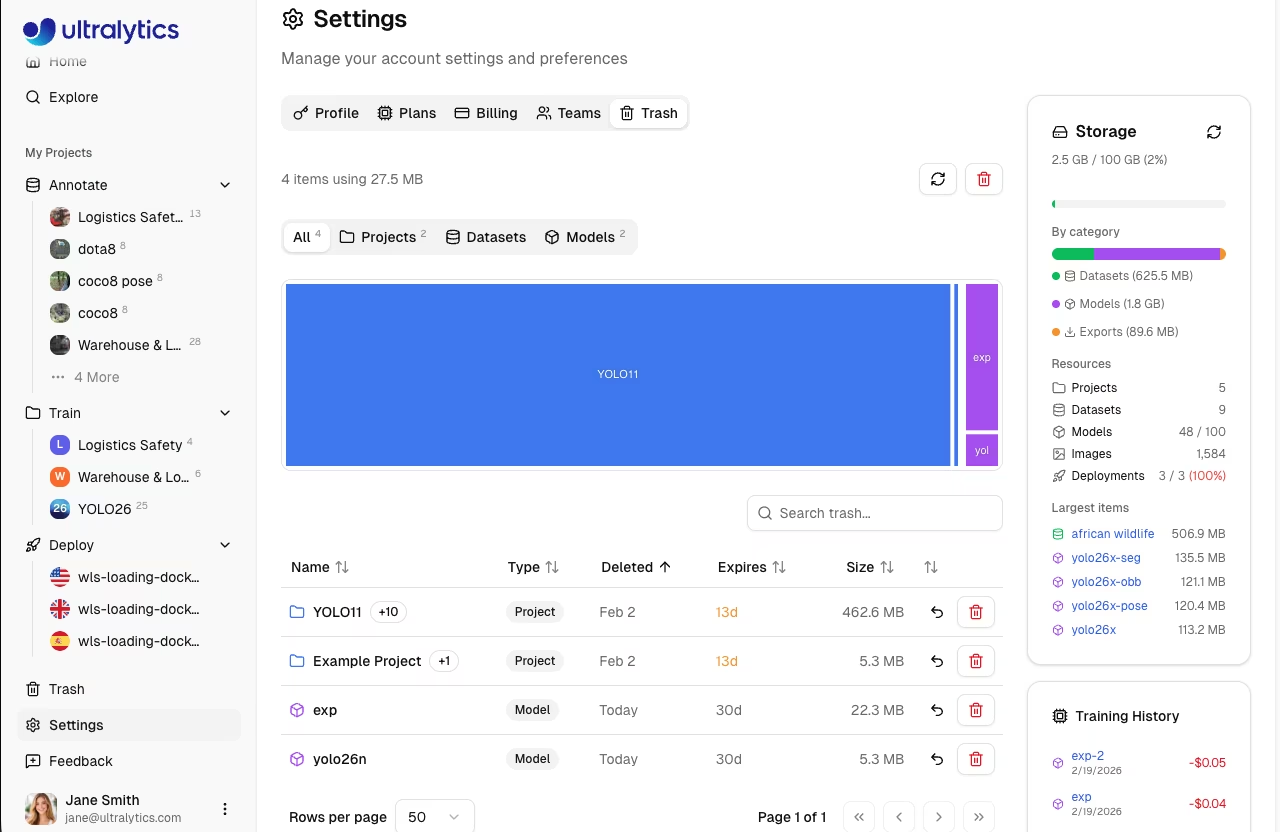
[Ultralytics Platform](https://platform.ultralytics.com) implements a 30-day soft delete policy, allowing you to recover accidentally deleted projects, datasets, and models. Deleted items are moved to Trash where they can be restored before permanent deletion.
|
|
|
|
|
|
|
|
## Soft Delete Policy
|
|
|
|
When you delete a resource on the platform:
|
|
|
|
1. **Immediate**: Item moves to Trash (not permanently deleted)
|
|
2. **30 Days**: Item remains recoverable in Trash
|
|
3. **After 30 Days**: Item is permanently deleted automatically
|
|
|
|
!!! success "Recovery Window"
|
|
|
|
You have 30 days to restore any deleted item. After this period, the item and all associated data are permanently removed and cannot be recovered.
|
|
|
|
## Accessing Trash
|
|
|
|
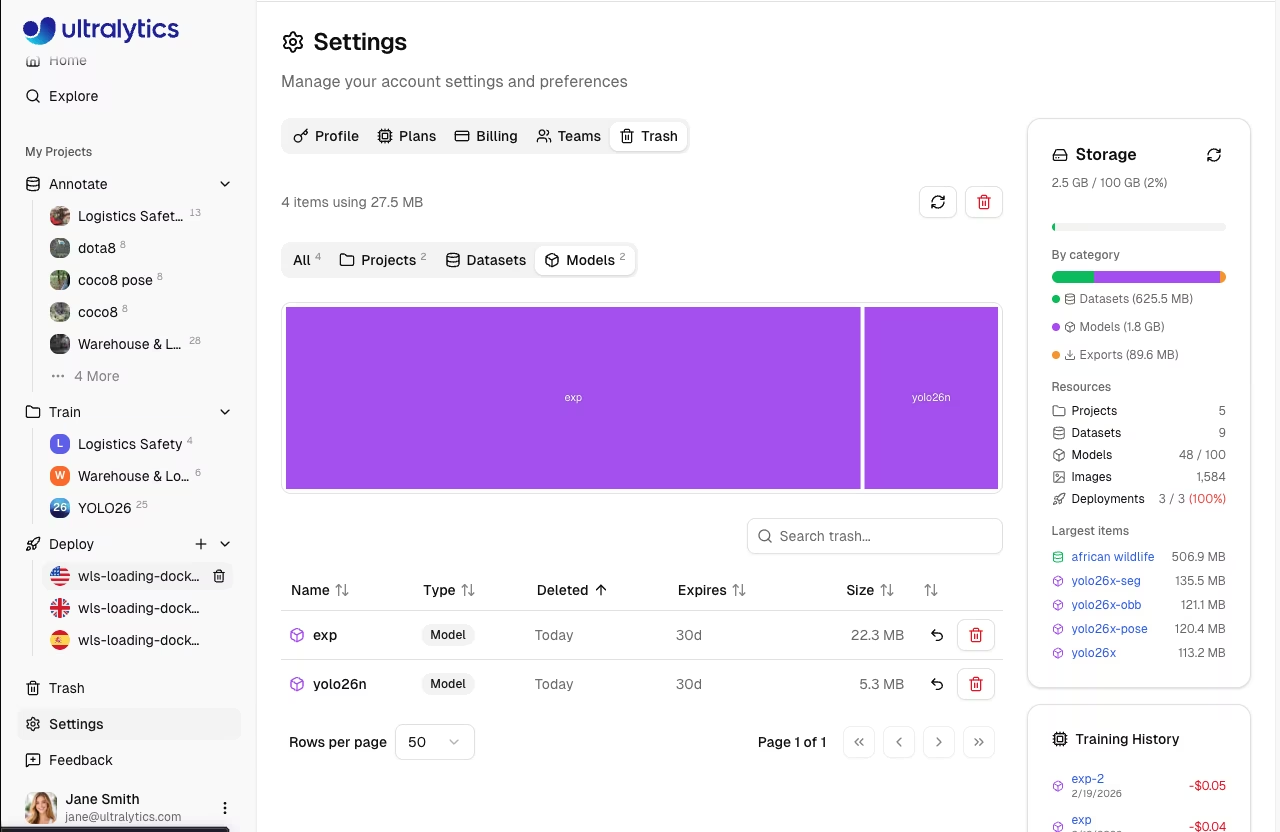
Navigate to your Trash:
|
|
|
|
1. Go to **Settings** and click the **Trash** tab
|
|
2. Or navigate directly to `/trash` (redirects to `Settings > Trash`)
|
|
|
|
|
|
|
|
## Trash Contents
|
|
|
|
The Trash shows all soft-deleted resources with filter options:
|
|
|
|
| Filter | Shows |
|
|
| ------------ | ----------------- |
|
|
| **All** | All trashed items |
|
|
| **Projects** | Trashed projects |
|
|
| **Datasets** | Trashed datasets |
|
|
| **Models** | Trashed models |
|
|
|
|
### Viewing Trash Items
|
|
|
|
Each item in Trash displays:
|
|
|
|
| Field | Description |
|
|
| ------------------ | ---------------------------------------- |
|
|
| **Name** | Original resource name |
|
|
| **Type** | Project, Dataset, or Model (color-coded) |
|
|
| **Deleted** | Date and time of deletion |
|
|
| **Days Remaining** | Time until permanent deletion |
|
|
| **Size** | Storage used by the item |
|
|
| **Cascaded Items** | Number of child items included |
|
|
| **Parent Project** | Parent project (for models) |
|
|
|
|
### Cascade Behavior
|
|
|
|
When deleting a parent resource, child resources are also moved to Trash:
|
|
|
|
| Resource Type | What's Included When Deleted |
|
|
| ------------------------------------ | ------------------------------------------ |
|
|
| [**Projects**](../train/projects.md) | Project + all models inside |
|
|
| [**Datasets**](../data/datasets.md) | Dataset + all images and annotations |
|
|
| [**Models**](../train/models.md) | Model weights + training history + exports |
|
|
|
|
### Storage Treemap
|
|
|
|
The Trash tab includes a storage visualization (treemap) showing the relative size of trashed items, color-coded by type:
|
|
|
|
- **Blue**: Projects
|
|
- **Green**: Datasets
|
|
- **Purple**: Models
|
|
|
|
## Restoring Items
|
|
|
|
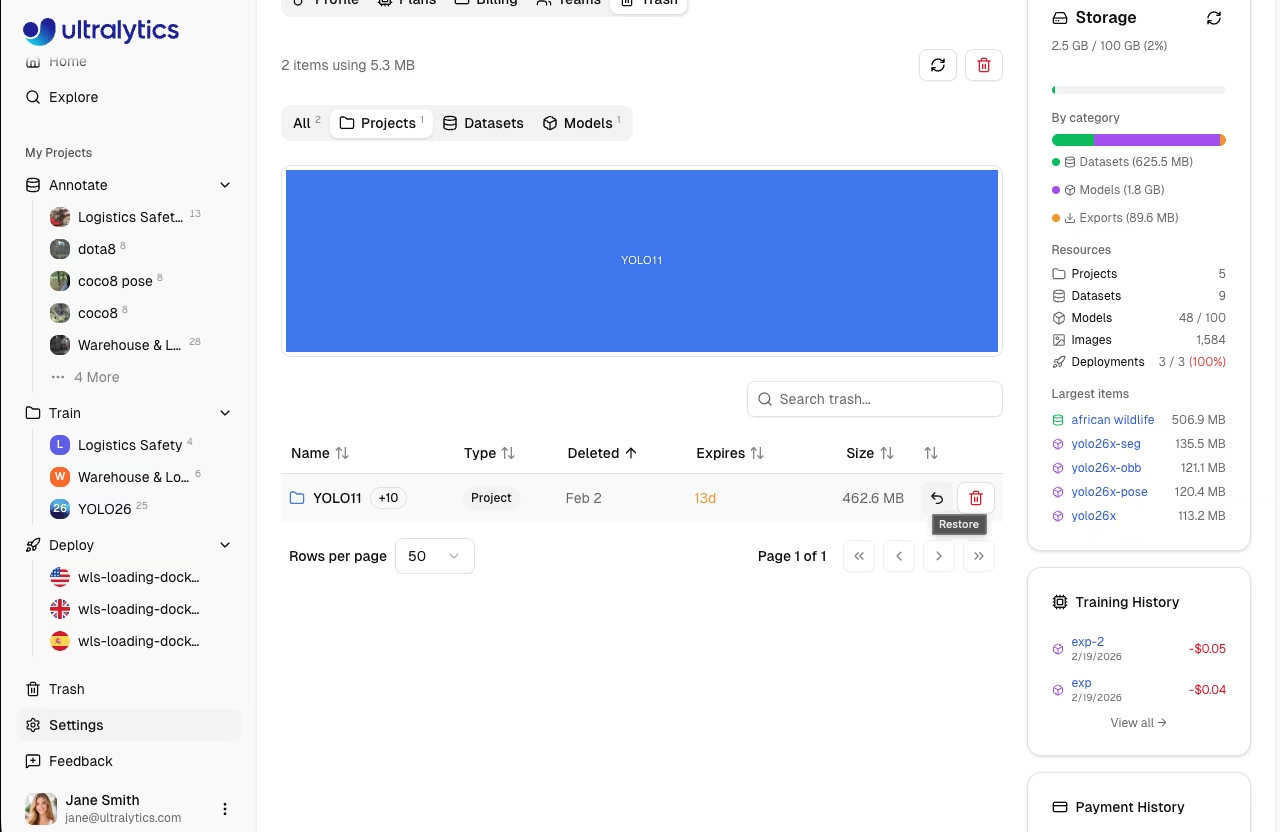
Recover a deleted item:
|
|
|
|
1. Navigate to **Settings > Trash**
|
|
2. Find the item you want to restore
|
|
3. Click the **Restore** button (undo icon)
|
|
4. Confirm restoration
|
|
|
|
|
|
|
|
The item returns to its original location with all data intact.
|
|
|
|
### Restore Behavior
|
|
|
|
| Resource | Restore Behavior |
|
|
| -------- | ----------------------------------------------------------- |
|
|
| Project | Restores project and all contained models |
|
|
| Dataset | Restores dataset with all images and annotations |
|
|
| Model | Restores model to original project if the project is active |
|
|
|
|
!!! warning "Parent Project Required"
|
|
|
|
Restoring a model fails if its parent project is in Trash. You'll see the error: "Cannot restore model while its parent project is in trash. Restore the project first." Always restore the parent project before restoring individual models.
|
|
|
|
## Permanent Deletion
|
|
|
|
### Automatic Deletion
|
|
|
|
Items in Trash are automatically and permanently deleted after 30 days. A daily cleanup job runs at 3:00 AM UTC to remove expired items.
|
|
|
|
### Empty Trash
|
|
|
|
Permanently delete all items immediately:
|
|
|
|
1. Navigate to **Settings > Trash**
|
|
2. Click **Empty Trash**
|
|
3. Confirm the action
|
|
|
|
!!! warning "Irreversible Action"
|
|
|
|
Emptying Trash permanently deletes all items immediately. This action cannot be undone and all data will be lost.
|
|
|
|
### Delete Single Item Permanently
|
|
|
|
To permanently delete one item without waiting:
|
|
|
|
1. Find the item in Trash
|
|
2. Click the **Delete** button
|
|
3. Confirm deletion
|
|
|
|
## Storage and Trash
|
|
|
|
Items in Trash still count toward your storage quota:
|
|
|
|
| Scenario | Storage Impact |
|
|
| -------------------- | ------------------------------ |
|
|
| Delete item | Storage remains allocated |
|
|
| Restore item | No change (was still counting) |
|
|
| Permanent deletion | Storage freed |
|
|
| 30-day auto-deletion | Storage freed automatically |
|
|
|
|
!!! tip "Free Up Storage"
|
|
|
|
If you're running low on storage, empty Trash or permanently delete specific items to immediately reclaim space. Check your storage usage in [Settings](settings.md#storage-usage) and see [Billing](billing.md#plans) for plan storage limits.
|
|
|
|
## API Access
|
|
|
|
Access trash programmatically via the [REST API](../api/index.md#trash-api):
|
|
|
|
=== "List Trash"
|
|
|
|
```bash
|
|
curl -H "Authorization: Bearer YOUR_API_KEY" \
|
|
https://platform.ultralytics.com/api/trash
|
|
```
|
|
|
|
=== "Restore Item"
|
|
|
|
```bash
|
|
curl -X POST -H "Authorization: Bearer YOUR_API_KEY" \
|
|
-H "Content-Type: application/json" \
|
|
-d '{"id": "item_abc123", "type": "dataset"}' \
|
|
https://platform.ultralytics.com/api/trash
|
|
```
|
|
|
|
=== "Empty Trash"
|
|
|
|
```bash
|
|
curl -X DELETE -H "Authorization: Bearer YOUR_API_KEY" \
|
|
https://platform.ultralytics.com/api/trash/empty
|
|
```
|
|
|
|
## FAQ
|
|
|
|
### Can I restore an item after 30 days?
|
|
|
|
No. After 30 days, items are permanently deleted and cannot be recovered. Make sure to restore important items before the expiration date shown in Trash.
|
|
|
|
### What happens when I delete a project with models?
|
|
|
|
Both the project and all models inside it move to Trash together. Restoring the project restores all its models. You can also restore individual models separately.
|
|
|
|
### Do items in Trash count toward storage?
|
|
|
|
Yes, items in Trash continue to use storage quota. To free up space, permanently delete items or empty Trash.
|
|
|
|
### Can I recover a model if its project was permanently deleted?
|
|
|
|
No. If a project is permanently deleted, all models that were inside it are also permanently deleted. Always restore items before the 30-day window expires.
|
|
|
|
### How do I know when an item will be permanently deleted?
|
|
|
|
Each item in Trash shows a "Days Remaining" counter indicating how many days until automatic permanent deletion occurs.
|