
313 lines
10 KiB
Markdown
Executable File
313 lines
10 KiB
Markdown
Executable File
---
|
|
comments: true
|
|
description: Manage credits, payments, and subscriptions on Ultralytics Platform with transparent pricing for cloud training and deployments.
|
|
keywords: Ultralytics Platform, billing, credits, pricing, subscription, payments, training costs
|
|
---
|
|
|
|
# Billing
|
|
|
|
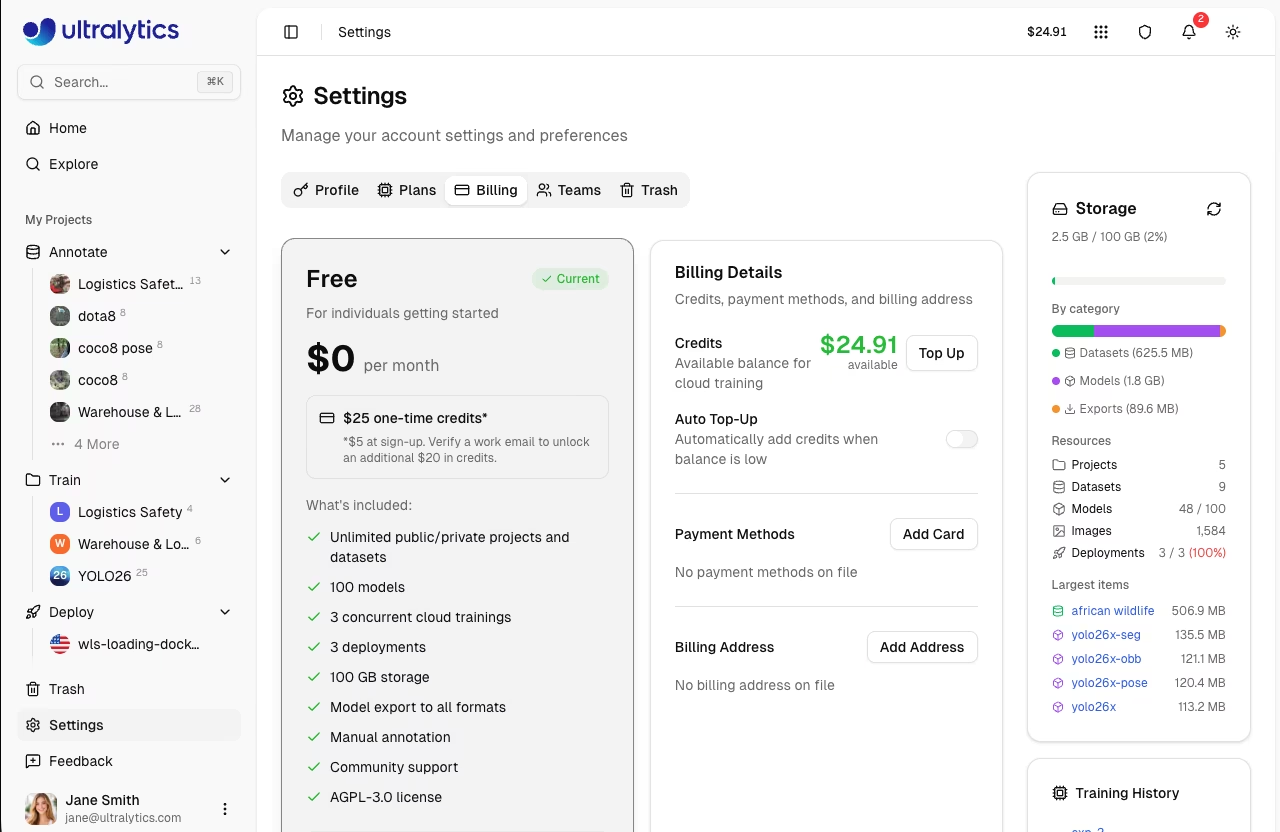
[Ultralytics Platform](https://platform.ultralytics.com) uses a credit-based billing system for cloud training and dedicated endpoints. Add credits, track usage, and manage your subscription from `Settings > Billing`.
|
|
|
|
|
|
|
|
## Plans
|
|
|
|
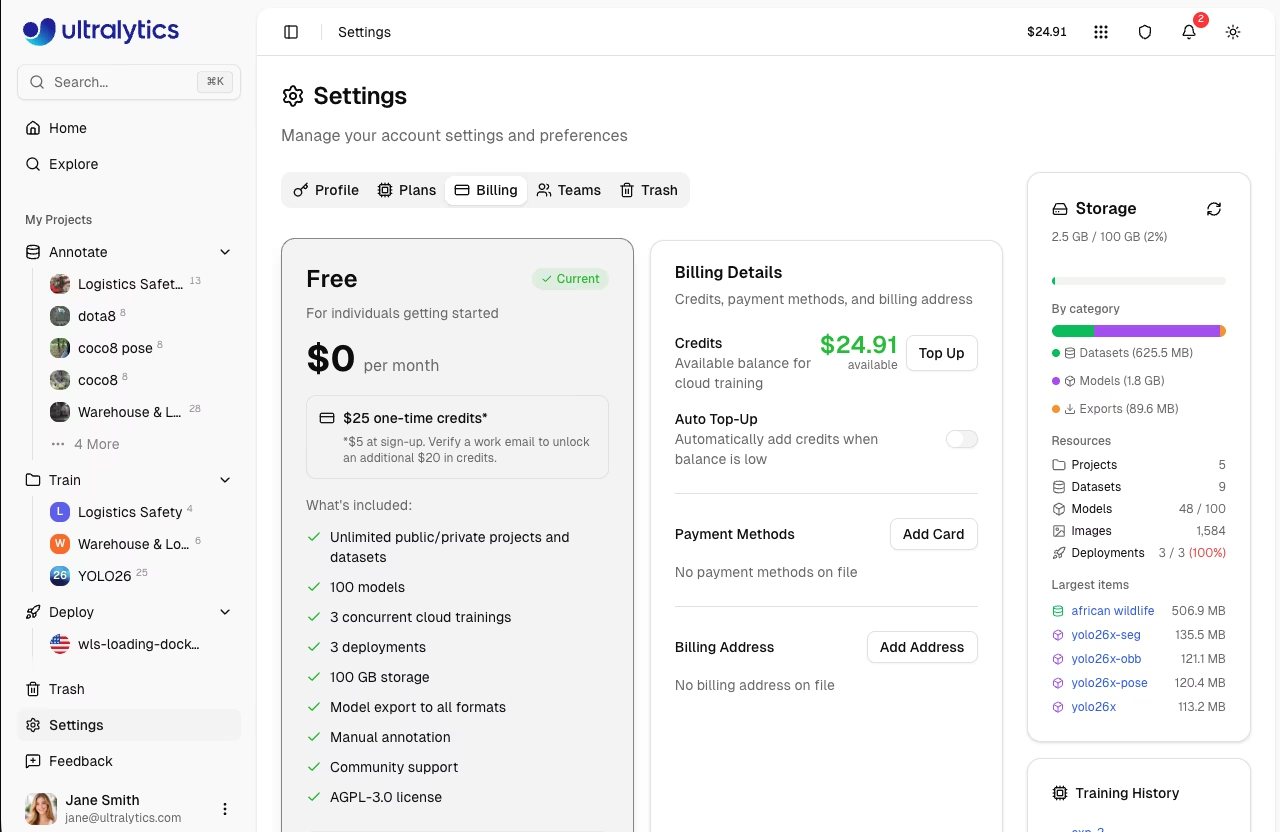
Choose the plan that fits your needs. Compare plans in `Settings > Plans`:
|
|
|
|
|
|
|
|
| Feature | Free | Pro ($29/mo) | Enterprise |
|
|
| -------------------------- | ---------- | --------------- | ---------- |
|
|
| **Signup Credit** | $5 / $25\* | - | Custom |
|
|
| **Monthly Credit** | - | $30/seat/month | Custom |
|
|
| **Models** | 100 | 500 | Unlimited |
|
|
| **Concurrent Trainings** | 3 | 10 | Unlimited |
|
|
| **Storage** | 100 GB | 500 GB | Unlimited |
|
|
| **Deployments** | 3 | 10 (warm-start) | Unlimited |
|
|
| **Teams** | - | Up to 5 members | Up to 50 |
|
|
| **Best GPUs (H200, B200)** | - | Yes | Yes |
|
|
| **SSO / SAML** | - | - | Yes |
|
|
| **Enterprise License** | - | - | Yes |
|
|
| **License** | AGPL-3.0 | AGPL-3.0 | Enterprise |
|
|
|
|
\*Free plan: $5 at signup, or $25 if you verify a company/work email address.
|
|
|
|
### Free Plan
|
|
|
|
Get started at no cost:
|
|
|
|
- $5 signup credit ($25 for verified company/work emails)
|
|
- Unlimited public and private projects and datasets
|
|
- 100 models
|
|
- 3 concurrent cloud trainings
|
|
- 3 deployments
|
|
- 100 GB storage
|
|
- Model export to all formats
|
|
- Manual annotation
|
|
- Community support
|
|
|
|
!!! tip "Company Email Bonus"
|
|
|
|
Sign up with a company email address (not gmail.com, outlook.com, etc.) to receive $25 in signup credits instead of $5.
|
|
|
|
### Pro Plan
|
|
|
|
For professionals and small teams ($29/month or $290/year):
|
|
|
|
- $30/seat/month in credits (recurring)
|
|
- 500 models
|
|
- 10 concurrent cloud trainings
|
|
- 500 GB storage
|
|
- 10 warm-start deployments (faster cold starts)
|
|
- Team collaboration (up to 5 members)
|
|
- Access to the best GPUs (H200, B200)
|
|
- Priority support
|
|
|
|
!!! tip "Save with Yearly Billing"
|
|
|
|
Choose yearly billing ($290/year) to save 17% compared to monthly billing.
|
|
|
|
### Enterprise
|
|
|
|
For organizations with advanced needs:
|
|
|
|
- $1,000/month in credits (starting allocation)
|
|
- Custom credit allocation
|
|
- Unlimited models, storage, trainings, and deployments
|
|
- Enterprise License (commercial use, non-AGPL)
|
|
- SSO / SAML authentication
|
|
- RBAC with 4 roles (Owner, Admin, Editor, Viewer)
|
|
- Custom roles with granular permissions
|
|
- On-premise deployment options
|
|
- Compliance (ISO/SOC)
|
|
- SLA guarantees
|
|
- Enterprise support
|
|
|
|
Contact [sales@ultralytics.com](mailto:sales@ultralytics.com) for Enterprise pricing.
|
|
|
|
## Credits
|
|
|
|
Credits are the currency for Platform compute services.
|
|
|
|
### Credit Balance
|
|
|
|
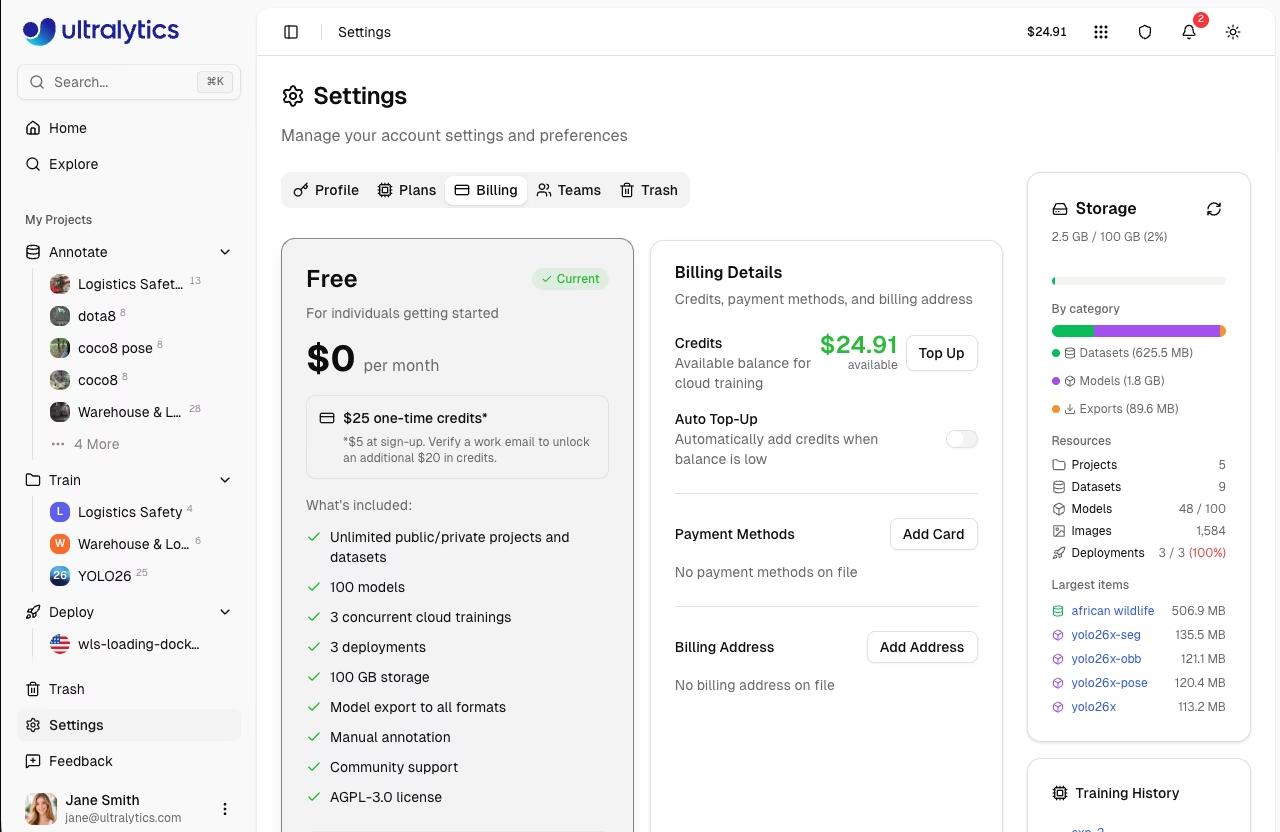
View your balance in `Settings > Billing`:
|
|
|
|
|
|
|
|
| Balance Type | Description |
|
|
| ----------------------- | ------------------------------------- |
|
|
| **Total Balance** | Available credits for cloud training |
|
|
| **Promotional Credits** | Credits from signup or monthly grants |
|
|
|
|
### Credit Uses
|
|
|
|
Credits are consumed by:
|
|
|
|
| Service | Rate |
|
|
| ------------------ | ---------------- |
|
|
| **Cloud Training** | GPU rate x hours |
|
|
|
|
## Add Credits
|
|
|
|
Top up your balance:
|
|
|
|
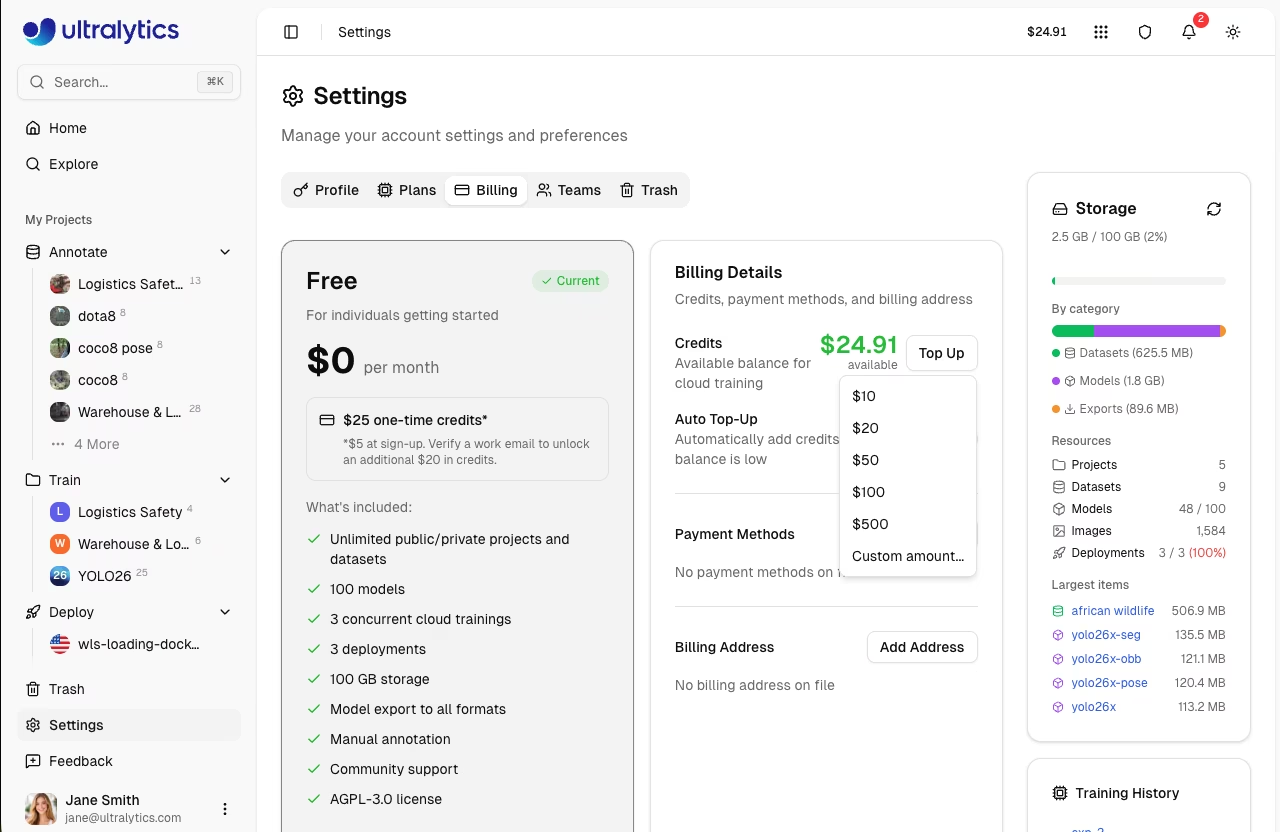
1. Go to **Settings > Billing**
|
|
2. Click **Top Up**
|
|
3. Select or enter amount ($5 - $1,000)
|
|
4. Complete payment
|
|
|
|
|
|
|
|
### Top-Up Presets
|
|
|
|
| Amount |
|
|
| ------ |
|
|
| $10 |
|
|
| $20 |
|
|
| $50 |
|
|
| $100 |
|
|
| $500 |
|
|
|
|
Custom amounts between $5 and $1,000 are also supported.
|
|
|
|
### Auto Top-Up
|
|
|
|
Enable automatic credit purchases when your balance drops below a threshold:
|
|
|
|
1. Go to **Settings > Billing**
|
|
2. Toggle **Auto Top-Up** on
|
|
3. Set **Threshold** (balance level that triggers a top-up)
|
|
4. Set **Amount** (credits to purchase when triggered)
|
|
5. Click **Save**
|
|
|
|
Default settings: threshold $20, amount $100.
|
|
|
|
!!! tip "Uninterrupted Training"
|
|
|
|
Enable auto top-up to ensure training jobs are never interrupted by insufficient credits.
|
|
|
|
### Payment Methods
|
|
|
|
Manage payment methods in `Settings > Billing`:
|
|
|
|
- **Add Card**: Click **Add Card** to add a credit or debit card
|
|
- **Set Default**: Set a default payment method for top-ups and subscriptions
|
|
- **Remove**: Remove payment methods you no longer need
|
|
|
|
### Billing Address
|
|
|
|
Set a billing address for invoices:
|
|
|
|
1. Go to **Settings > Billing**
|
|
2. Click **Add Address** (or **Edit** if already set)
|
|
3. Enter your billing details (name, address, country)
|
|
4. Click **Save**
|
|
|
|
## Training Cost Flow
|
|
|
|
Cloud training estimates cost before start and charges for actual GPU time used.
|
|
|
|
```mermaid
|
|
flowchart LR
|
|
A[Start Training] --> B[Estimate Cost]
|
|
B --> C[Run Training]
|
|
C --> D[Charge Actual Usage]
|
|
```
|
|
|
|
### How It Works
|
|
|
|
1. **Estimate**: Platform calculates estimated cost based on model size, dataset size, epochs, and GPU
|
|
2. **Authorize Start**: Your available balance is checked before training starts
|
|
3. **Train**: Job runs on the selected GPU
|
|
4. **Charge**: On completion (or cancellation), billing uses actual runtime
|
|
|
|
!!! success "Consumer Protection"
|
|
|
|
You pay for actual compute time used, including partial runs that are cancelled.
|
|
|
|
## Training Costs
|
|
|
|
Cloud training costs depend on GPU selection:
|
|
|
|
| GPU | VRAM | Rate/Hour |
|
|
| ------------ | ------ | --------- |
|
|
| RTX 2000 Ada | 16 GB | $0.24 |
|
|
| RTX A4500 | 20 GB | $0.24 |
|
|
| RTX A5000 | 24 GB | $0.26 |
|
|
| RTX 4000 Ada | 20 GB | $0.38 |
|
|
| L4 | 24 GB | $0.39 |
|
|
| A40 | 48 GB | $0.40 |
|
|
| RTX 3090 | 24 GB | $0.46 |
|
|
| RTX A6000 | 48 GB | $0.49 |
|
|
| RTX 4090 | 24 GB | $0.59 |
|
|
| RTX 6000 Ada | 48 GB | $0.77 |
|
|
| L40S | 48 GB | $0.86 |
|
|
| RTX 5090 | 32 GB | $0.89 |
|
|
| L40 | 48 GB | $0.99 |
|
|
| A100 PCIe | 80 GB | $1.39 |
|
|
| A100 SXM | 80 GB | $1.49 |
|
|
| RTX PRO 6000 | 96 GB | $1.89 |
|
|
| H100 PCIe | 80 GB | $2.39 |
|
|
| H100 SXM | 80 GB | $2.69 |
|
|
| H100 NVL | 94 GB | $3.07 |
|
|
| H200 NVL | 143 GB | $3.39 |
|
|
| H200 SXM | 141 GB | $3.59 |
|
|
| B200 | 180 GB | $4.99 |
|
|
|
|
See [Cloud Training](../train/cloud-training.md) for complete GPU options and pricing.
|
|
|
|
### Cost Calculation
|
|
|
|
```
|
|
Total Cost = GPU Rate x Training Time (hours)
|
|
```
|
|
|
|
Example: Training for 2.5 hours on RTX PRO 6000
|
|
|
|
```
|
|
$1.89 x 2.5 = $4.73
|
|
```
|
|
|
|
## Upgrade to Pro
|
|
|
|
Upgrade for more features and monthly credits:
|
|
|
|
1. Go to **Settings > Plans**
|
|
2. Click **Upgrade to Pro**
|
|
3. Choose billing cycle (Monthly or Yearly)
|
|
4. Complete checkout
|
|
|
|
<!-- Screenshot: settings-plans-tab-upgrade-to-pro-dialog.avif -->
|
|
|
|
### Pro Benefits
|
|
|
|
After upgrading:
|
|
|
|
- $30/seat/month credit added immediately and each month
|
|
- Storage increased to 500 GB
|
|
- 500 models
|
|
- 10 concurrent cloud trainings
|
|
- 10 warm-start deployments
|
|
- Team collaboration (up to 5 members)
|
|
- Access to best GPUs
|
|
- Priority support
|
|
|
|
### Cancel Pro
|
|
|
|
Cancel anytime from the billing portal:
|
|
|
|
1. Go to **Settings > Billing**
|
|
2. Click **Manage Subscription**
|
|
3. Select **Cancel**
|
|
4. Confirm cancellation
|
|
|
|
!!! note "Cancellation Timing"
|
|
|
|
Pro features remain active until the end of your billing period. Monthly credits stop at cancellation.
|
|
|
|
## Transaction History
|
|
|
|
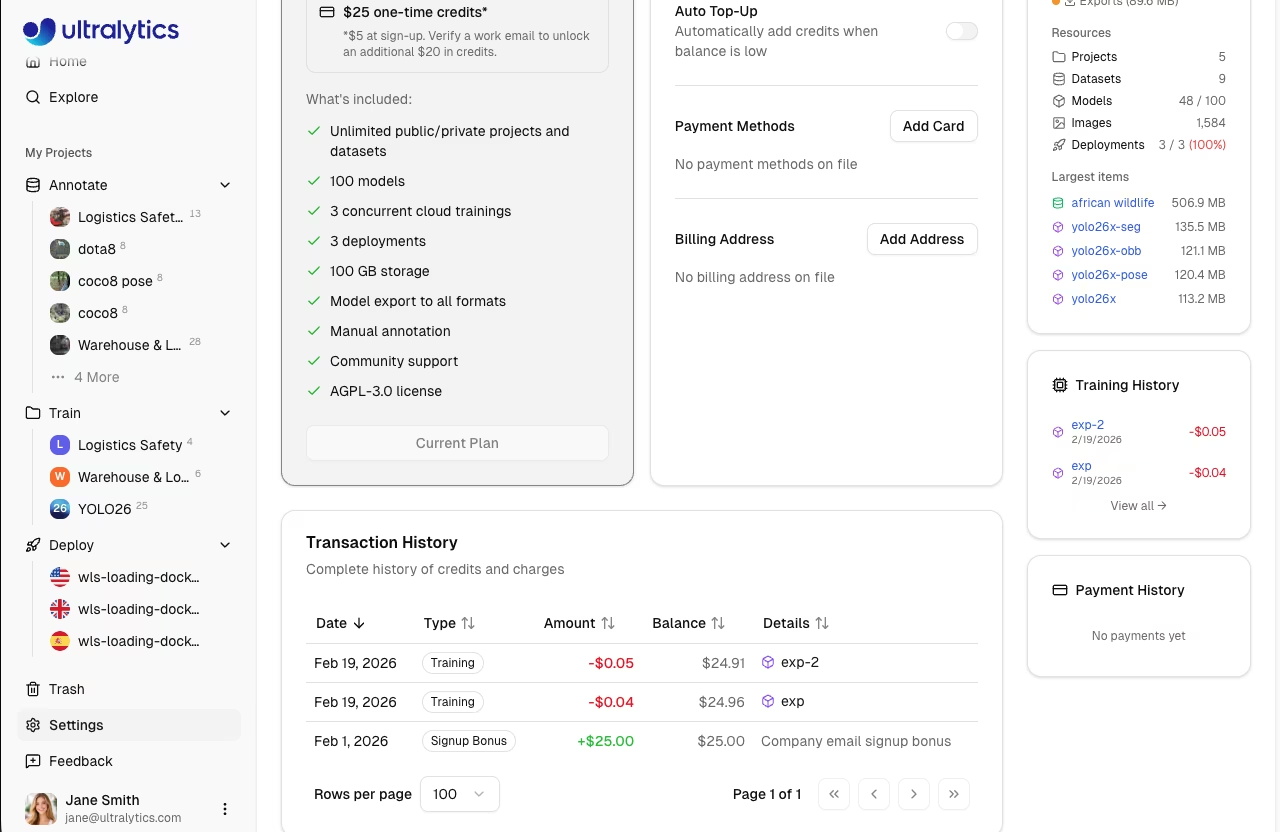
View all transactions in `Settings > Billing`:
|
|
|
|
|
|
|
|
| Column | Description |
|
|
| ----------- | ----------------------------------------------------------------------------------------------------------- |
|
|
| **Date** | Transaction date |
|
|
| **Type** | Signup Bonus, Credit Purchase, Monthly Grant, Training, Refund, Adjustment, Auto Top-Up, Auto Top-Up Failed |
|
|
| **Amount** | Transaction value (green for credits, red for charges) |
|
|
| **Balance** | Resulting balance after transaction |
|
|
| **Details** | Additional context (model link, receipt, period) |
|
|
|
|
## FAQ
|
|
|
|
### What happens when I run out of credits?
|
|
|
|
- **Active training**: Cannot start new training jobs
|
|
- **Deployments**: Continue running
|
|
- **New training**: Requires credits to start
|
|
|
|
Add credits or enable auto top-up to continue training.
|
|
|
|
### Are unused credits refundable?
|
|
|
|
- **Purchased credits**: No refunds
|
|
- **Signup/monthly credits**: No refunds (use it or lose it)
|
|
|
|
### Can I transfer credits?
|
|
|
|
Credits are not transferable between accounts.
|
|
|
|
### How do I get an invoice?
|
|
|
|
Transaction receipts are available in the transaction history. Click the receipt icon next to any purchase transaction.
|
|
|
|
### What if training fails?
|
|
|
|
You're only charged for completed compute time. Failed jobs don't charge for unused time.
|
|
|
|
### Is there a free trial?
|
|
|
|
The Free plan includes $5 signup credit ($25 with a company email) -- essentially a free trial. No credit card required to start.
|