 Chengfang Lu
e72bc061c5
Chengfang Lu
e72bc061c5
Major changes:
- New frontend (platform/web/): Vite + React 18 + TypeScript + Tailwind
- 4-module navigation: 数据送标 / 模型管理 / 车队管理 / 系统管理
- Data catalog with charts (DMS/ADAS/Lane 3-tab view)
- Quality review workflow (标注质检): Good/Fine/Bad scoring with auto-advance
- Audit enhancements: batch operations, rejection categories, Feishu notifications
- Operation audit log (操作日志)
- World model simulation studio (仿真工坊)
- Dataset version management with snapshots and diff
- ADAS 7-class dataset integration (138K images organized + compressed)
- User management with Feishu integration and pagination
- CRUD/search/filter on all pages, card layout redesign
- PIL-optimized image overlay rendering
- Auto-snapshot on build, in_review workflow stage
- Removed embedded algorithm code (now in workspace)
8.5 KiB
comments, description, keywords
| comments | description | keywords |
|---|---|---|
| true | Learn how to use Ultralytics YOLO26 for precise object counting in specified regions, enhancing efficiency across various applications. | object counting, regions, YOLO26, computer vision, Ultralytics, efficiency, accuracy, automation, real-time, applications, surveillance, monitoring |
Object Counting in Different Regions using Ultralytics YOLO 🚀
What is Object Counting in Regions?
Object counting in regions with Ultralytics YOLO26 involves precisely determining the number of objects within specified areas using advanced computer vision. This approach is valuable for optimizing processes, enhancing security, and improving efficiency in various applications.
Watch: Object Counting in Different Regions using Ultralytics YOLO26 | Ultralytics Solutions 🚀
Advantages of Object Counting in Regions
- Precision and Accuracy: Object counting in regions with advanced computer vision ensures precise and accurate counts, minimizing errors often associated with manual counting.
- Efficiency Improvement: Automated object counting enhances operational efficiency, providing real-time results and streamlining processes across different applications.
- Versatility and Application: The versatility of object counting in regions makes it applicable across various domains, from manufacturing and surveillance to traffic monitoring, contributing to its widespread utility and effectiveness.
Real World Applications
| Retail | Market Streets |
|---|---|
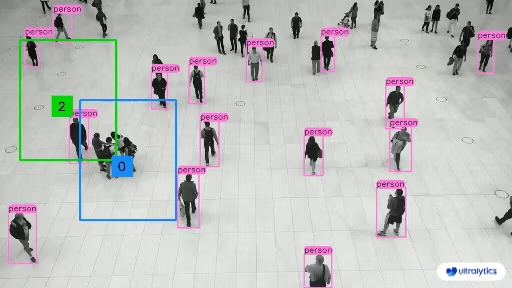 |
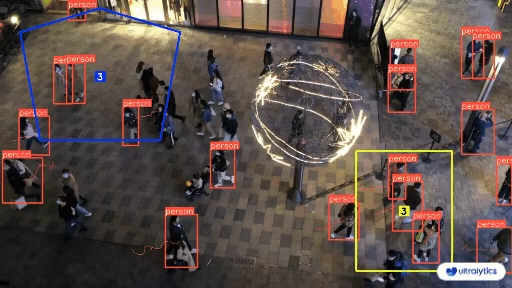 |
| People Counting in Different Region using Ultralytics YOLO26 | Crowd Counting in Different Region using Ultralytics YOLO26 |
Usage Examples
!!! example "Region counting using Ultralytics YOLO"
=== "Python"

     ```python
     import cv2

     from ultralytics import solutions

     cap = cv2.VideoCapture("path/to/video.mp4")
     assert cap.isOpened(), "Error reading video file"

     # Pass region as list
     # region_points = [(20, 400), (1080, 400), (1080, 360), (20, 360)]

     # Pass region as dictionary
     region_points = {
         "region-01": [(50, 50), (250, 50), (250, 250), (50, 250)],
         "region-02": [(640, 640), (780, 640), (780, 720), (640, 720)],
     }

     # Video writer
     w, h, fps = (int(cap.get(x)) for x in (cv2.CAP_PROP_FRAME_WIDTH, cv2.CAP_PROP_FRAME_HEIGHT, cv2.CAP_PROP_FPS))
     video_writer = cv2.VideoWriter("region_counting.avi", cv2.VideoWriter_fourcc(*"mp4v"), fps, (w, h))

     # Initialize region counter object
     regioncounter = solutions.RegionCounter(
         show=True,  # display the frame
         region=region_points,  # pass region points
         model="yolo26n.pt",  # model for counting in regions, e.g., yolo26s.pt
     )

     # Process video
     while cap.isOpened():
         success, im0 = cap.read()

         if not success:
             print("Video frame is empty or processing is complete.")
             break

         results = regioncounter(im0)

         # print(results)  # access the output

         video_writer.write(results.plot_im)

     cap.release()
     video_writer.release()
     cv2.destroyAllWindows()  # destroy all opened windows
     ```
!!! tip "Ultralytics Example Code"
The Ultralytics region counting module is available in our [examples section](https://github.com/ultralytics/ultralytics/blob/main/examples/YOLOv8-Region-Counter/yolov8_region_counter.py). You can explore this example for code customization and modify it to suit your specific use case.
RegionCounter Arguments
Here's a table with the RegionCounter arguments:
{% from "macros/solutions-args.md" import param_table %} {{ param_table(["model", "region"]) }}
The RegionCounter solution enables the use of object tracking parameters:
{% from "macros/track-args.md" import param_table %} {{ param_table(["tracker", "conf", "iou", "classes", "verbose", "device"]) }}
Additionally, the following visualization settings are supported:
{% from "macros/visualization-args.md" import param_table %} {{ param_table(["show", "line_width", "show_conf", "show_labels"]) }}
FAQ
What is object counting in specified regions using Ultralytics YOLO26?
Object counting in specified regions with Ultralytics YOLO26 involves detecting and tallying the number of objects within defined areas using advanced computer vision. This precise method enhances efficiency and accuracy across various applications like manufacturing, surveillance, and traffic monitoring.
How do I run the region based object counting script with Ultralytics YOLO26?
Follow these steps to run object counting in Ultralytics YOLO26:
-
Clone the Ultralytics repository and navigate to the directory:
git clone https://github.com/ultralytics/ultralytics cd ultralytics/examples/YOLOv8-Region-Counter -
Execute the region counting script:
python yolov8_region_counter.py --source "path/to/video.mp4" --save-img
For more options, visit the Usage Examples section.
Why should I use Ultralytics YOLO26 for object counting in regions?
Using Ultralytics YOLO26 for object counting in regions offers several advantages:
- Real-time Processing: YOLO26's architecture enables fast inference, making it ideal for applications requiring immediate counting results.
- Flexible Region Definition: The solution allows you to define multiple custom regions as polygons, rectangles, or lines to suit your specific monitoring needs.
- Multi-class Support: Count different object types simultaneously within the same regions, providing comprehensive analytics.
- Integration Capabilities: Easily integrate with existing systems through the Ultralytics Python API or command-line interface.
Explore deeper benefits in the Advantages section.
What are some real-world applications of object counting in regions?
Object counting with Ultralytics YOLO26 can be applied to numerous real-world scenarios:
- Retail Analytics: Count customers in different store sections to optimize layout and staffing.
- Traffic Management: Monitor vehicle flow in specific road segments or intersections.
- Manufacturing: Track products moving through different production zones.
- Warehouse Operations: Count inventory items in designated storage areas.
- Public Safety: Monitor crowd density in specific zones during events.
Explore more examples in the Real World Applications section and the TrackZone solution for additional zone-based monitoring capabilities.